us-pc@fangor.cn
24
ENEN
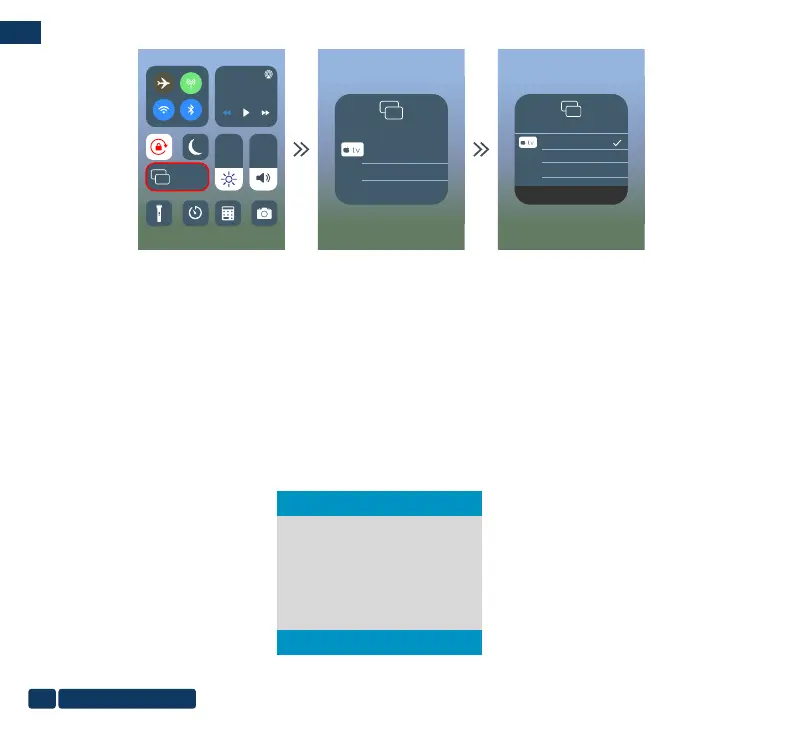
Step4: Open the Screen Mirroring , and choose the correct SSID name.
Then the connection is succeeded.
Screen
Mirroring
Screen
Mirroring
Screen Mirroring
Dualcast-2677E9A9
Screen Mirroring
Dualcast-2677E9A9
Stop Mirroring
1.2 Wireless Connection to Android Phone.
For Android device, considering there are two different operating environments :
A)With WiFi environment.
B)Without WiFi environment.
A: Android device with WiFi Environment.
Step1: Turn on the portable monitor and press the "source" button. Click to enter the “Mirascreen” on the portable monitor.
(Loading time 5-10 seconds)
Auto
Type-C
Mirascreen
HDMI


 To Next Page