6
Low Voltage Control Systems
* Please see instruction manuals for individual controls for proper wiring and set up of control systems.
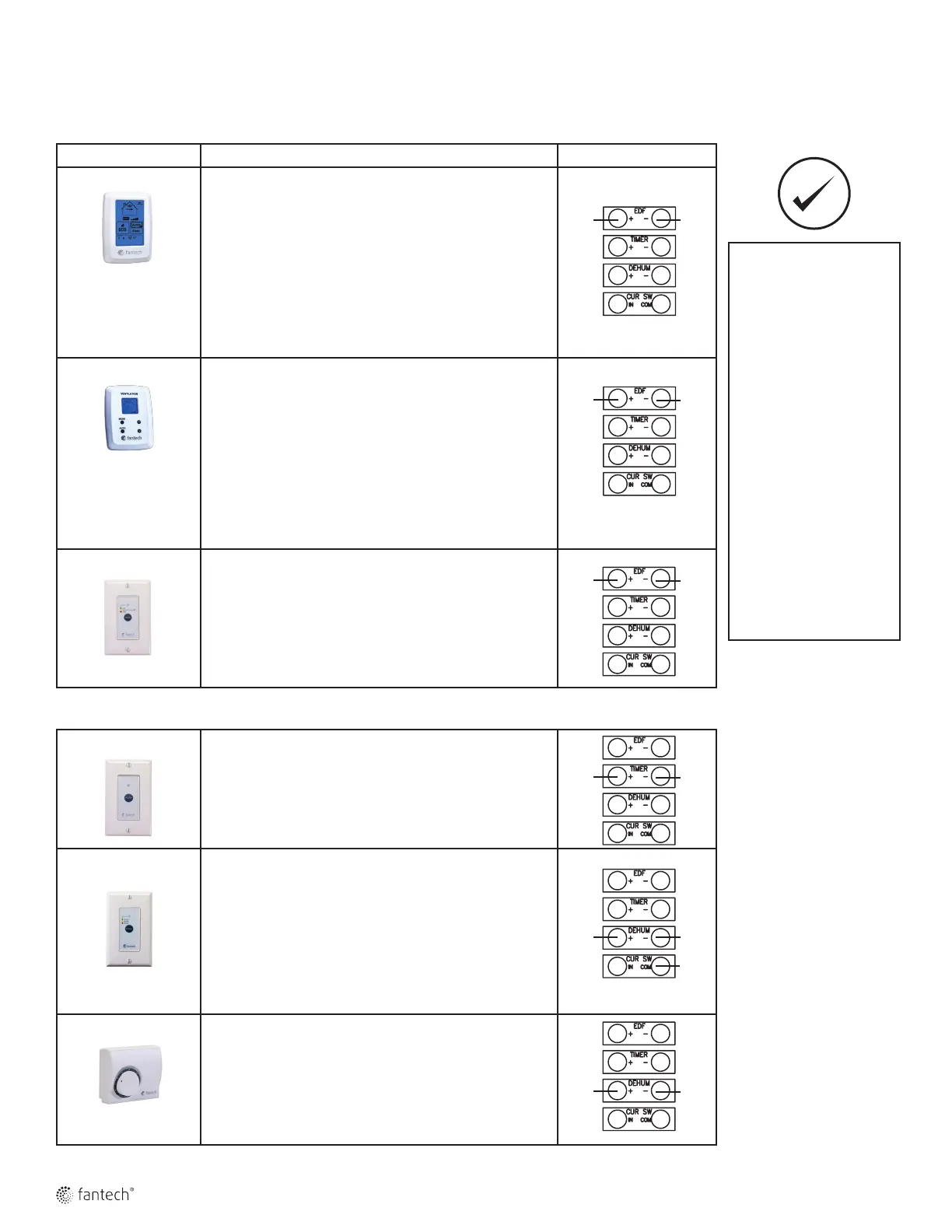
CENTRAL CONTROLS – These control options can only be used individually
CONTROLS FEATURES CONNECT TO
ECO-Touch • Our most complete, yet easy to use control system
• Sleek design with backlight touchscreen LCD
• ECO mode selects the best operating mode and speed for the
season, minimizing energy use associated with ventilation
• Set preferred indoor relative humidity range and ventilation
mode for day and night conditions
• No battery to replace, all programmed settings are retained
during power outage
• Maintenance reminder indicator
• Error code messages reduce troubleshooting time
EDF7
• MODE button provides 3 modes of operations: Ventilation ,
Recirculation and Standby
• User selected fan speed: Low, Medium, Normal and 20
minutes per hour
• AUTO setting allows the homeowner to deactivate the
dehumidistat
• When the humidity exceeds the desired setpoint, the venti-
lation system operates at Normal speed.
• Once the desired humidity level is achieved, your ventilation
system resumes to its previous mode of operation
EDF1 • Press button once for continuous LOW speed
• Press button twice and the unit will cycle 20 minutes ON/
40 minutes OFF and repeat
• Press button a third time and the system will run continu-
ously on HIGH speed
AUXILIARY CONTROL – These controls can be paired
RTS2*
• 20- minute timer with LED light
• Boosts system to high speed with the touch of a button
• Up to 5 can be used in one system
• Use in bathroom, kitchen, laundry room
RTS3
• Press button once and unit will operate in continuous mode
on HIGH speed for 20 minutes (Green).
• Press button a second time and unit will operate in continu-
ous mode on HIGH speed for 40 minutes (Yellow).
• Press button a third time and unit will operate in continuous
mode on HIGH speed for 60 minutes (Red).
• Press button a fourth time to cancel the timer (LED turns
off).
MDEH1
• Rotary dial Dehumidistat
• Multiple units can be used
• We recommend setting the relative humidity above 80%
during the summer
To avoid window condensation:
• It is not necessary to change
the humidity control every
day. Monitor the average
weekly temperature or
experiment with various
settings until you find a level
that is comfortable for you.
Adjust the control when
needed.
• A dehumidistat is ideal for
use in energy efficient
houses where indoor
humidity (during the
heating season) is higher
than outdoor levels. High
humidity is a major cause
of structure damage and
IAQ problems such as mold
and mildew.
*Maintain polarity
between control
and HRV
(+ → + ; - → -)
EDF EDF
EDF EDF
EDF EDF
+T -T
D D
D D
COM



 To Next Page