Need help?
Do you have a question about the Fanvil i16S and is the answer not in the manual?
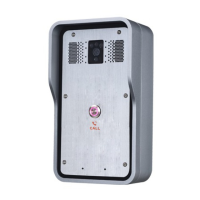
Details the physical components of the intercom panel, including camera, speaker, MIC.
Configure SIP server address, port, username, password, and SIP user parameters.
Set up short-circuit input/output, tamper alarm server, and trigger settings.
The Fanvil i16S/i16SV SIP Intercom is a robust and versatile communication device designed for quick and efficient installation, offering a range of features for access control, security, and general communication needs. This guide outlines its functions, usage, and maintenance aspects, ensuring users can effectively deploy and manage the intercom system.
The primary function of the Fanvil i16S/i16SV SIP Intercom is to facilitate two-way audio communication, and in the case of the i16SV model, video communication, over a SIP (Session Initiation Protocol) network. This allows for seamless integration with existing IP telephony systems, making it suitable for various environments such as offices, residential buildings, and industrial sites.
At its core, the intercom serves as an access control point. Users can initiate calls by pressing the "CALL" button, connecting to a pre-configured extension or group of extensions. This enables visitors to communicate with occupants or security personnel, requesting entry or assistance. The device supports short-circuit input detection, allowing it to connect to external sensors such as switches, infrared probes, door magnets, and vibration sensors. These inputs can trigger specific actions or alarms, enhancing the security capabilities of the system. For instance, a door magnet detecting an open door could trigger an alert to a monitoring station.
Complementing the input capabilities, the intercom also features short-circuit output control. This allows it to manage external devices like electric locks and alarms. Upon receiving a valid command or a triggered event, the intercom can activate an electric lock to grant access or trigger an alarm to signal a security breach. This integration streamlines access management and provides an automated response to various scenarios.
The i16SV model further extends its functionality with an integrated camera and IR LED, enabling video surveillance and visual verification. This is particularly useful for identifying visitors before granting access, adding an extra layer of security. The IR LED ensures clear visibility even in low-light conditions, making it effective for 24/7 monitoring.
Audio output is managed through an internal speaker, providing clear sound for communication. For environments requiring higher audio power, the device includes an external active speaker interface, allowing for the connection of external speakers for audio amplification. This ensures that announcements or conversations can be heard clearly in larger or noisier areas. Additionally, a recording output interface is available, mixing the device's audio and the far-end call sound. This feature is crucial for logging communications, which can be vital for security audits or dispute resolution.
The intercom is designed to be network-adaptive, supporting 10/100M Ethernet connections. This ensures reliable and high-speed data transmission for both audio and video streams. Power is supplied via a 12V/1A input, making it compatible with standard power sources.
The Fanvil i16S/i16SV SIP Intercom is designed for straightforward use and configuration, catering to both end-users and administrators.
For end-users, the "CALL" button is the primary interface for initiating communication. Its prominent placement ensures ease of use for visitors. The device's robust construction and clear audio output make it reliable for daily interactions.
Administrators benefit from multiple methods for device discovery and configuration. The iDoorPhone Network Scanner tool simplifies the process of finding the intercom's IP address on the network. Alternatively, a quick installation guide outlines how to use the DSS key for IP address acquisition. By long-pressing the DSS key for a few seconds and then pressing it again quickly, the intercom can report its IP address audibly, which is particularly useful during initial setup without a connected display. The DSS key also allows for switching between DHCP and static IP address modes, providing flexibility in network integration.
Once the IP address is known, the intercom can be accessed and configured via a web browser. The web-based interface provides a comprehensive suite of settings for customizing the device's behavior. This includes setting up SIP accounts, which involves configuring the SIP server address, port, user name, password, and SIP user. The ability to activate and save these settings ensures the intercom is ready to integrate with the existing communication infrastructure.
Audio settings are highly customizable. Administrators can adjust the speakerphone volume for normal calls and the microphone gain for optimal call quality. This ensures that communication is clear and audible in various environmental conditions.
The function key (DSS key) can be configured as a memory key, allowing it to dial a pre-defined number or a secondary number if the primary one is unavailable. This feature is useful for directing calls to specific departments or individuals, or for implementing call forwarding in case of no answer. The subtype can be set to speed dial, and the line can be assigned to a working line, streamlining call initiation.
Security features are integral to the intercom's design. The web interface allows for the configuration of short-circuit input and output settings, enabling precise control over connected sensors and actuators. Tamper alarm server settings can also be configured, ensuring that any unauthorized attempts to open or damage the device trigger an alert to a designated server. This proactive security measure enhances the overall safety of the premises.
Maintaining the Fanvil i16S/i16SV SIP Intercom is designed to be relatively simple, focusing on ease of access for wiring and software updates.
Physical installation involves removing the surface shell using a built-in screw tool. This provides access to the internal components and wiring terminals. The mounting template helps in accurately drilling holes for secure wall mounting. White rubber plugs are used to fix the bottom of the device to the wall, ensuring stability. After connecting the power cord and network cable, the surface shell can be screwed back into place, protecting the internal electronics from environmental factors and tampering.
The rear case of the device, once opened, reveals a row of terminal blocks. These are clearly labeled for connecting power supply, electric lock control, and other external devices. This organized layout simplifies wiring and troubleshooting. The detailed interface description in the manual provides clear guidance on connecting various components, such as Ethernet, power, short-circuit inputs and outputs, recording output, and external active speakers. This clarity helps in preventing wiring errors and ensures proper functionality.
Software maintenance is primarily handled through the web-based interface. This allows administrators to remotely access and configure the device, eliminating the need for physical interaction for most settings adjustments. Firmware updates, if available, can typically be applied through the web interface, ensuring the intercom benefits from the latest features, security patches, and performance improvements.
The ability to switch IP address acquisition modes (DHCP or static) via the DSS key provides a convenient way to reconfigure network settings without needing to access the web interface, which can be useful in scenarios where network changes occur or during initial setup.
The recording output interface allows for continuous monitoring and logging of conversations, which can be invaluable for post-incident analysis or for ensuring compliance with communication policies. This feature contributes to both security and operational accountability.
Overall, the Fanvil i16S/i16SV SIP Intercom is designed for reliable operation with user-friendly installation, configuration, and maintenance procedures, making it a practical choice for various communication and access control applications.
 General
| Connector type | RJ-45 |
|---|---|
| IP connectable | Yes |
| Outdoor units quantity | 1 |
| Connectivity technology | Wired |
| International Protection (IP) code | IP65 |
| Operating temperature (T-T) | -30 - 60 °C |
| Placement | Wall |
| Product color | Stainless steel |
| Indoor unit included | No |
 Weight and Dimensions
| Depth | 120 mm |
|---|---|
| Width | 195 mm |
| Height | 40 mm |
| Package depth | 165 mm |
| Package width | 260 mm |
| Package height | 62 mm |


 To Next Page