USE AND MAINTENANCE MANUAL - SECTION 4
ELEVAH 40 MOVE / 40 B AERIAL PLATFORM – Rev. 12_2021
ANTI-COLLISION RADAR USE
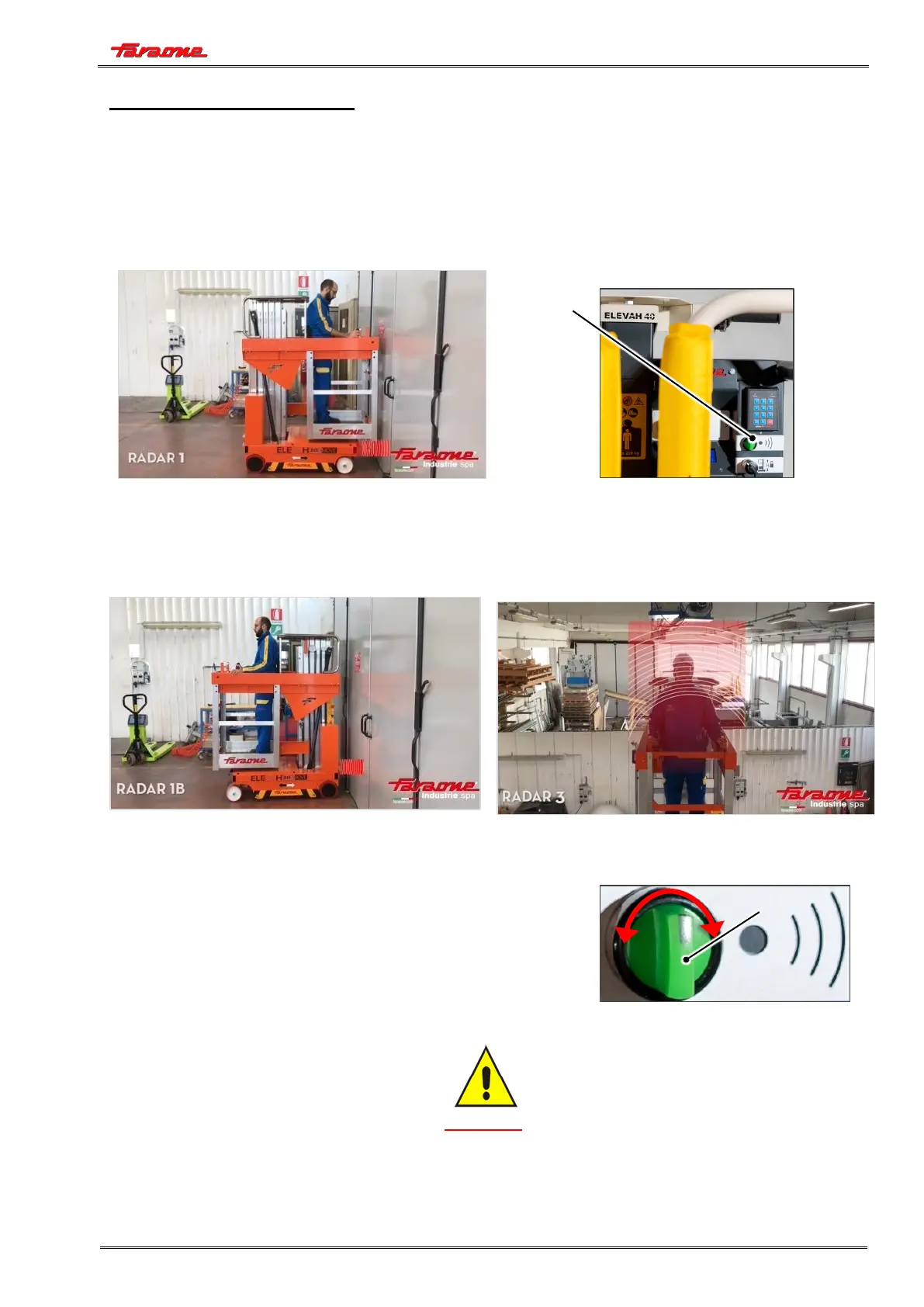
When the machine gets close to an obstacle during a movement, the radar system will lock all the
features of the machine and stop it about 10 cm away from the obstacle.
The lock of the machine features caused by the presence of an obstacle along the pathway is
signalled to the operator via the warning light integrated in the system release selector (1) in the
control console lighting up.
NOTE: The position of the release selector - warning light button shown in the picture refers to a particular
model of machine, and therefore may vary depending on the control console of the aerial platform
model where the radar system is installed.
Once the machine has been locked, proceed as follows to restore operation:
1. Disable the “Anti-collision Radar” system by turning the relevant
selector (1) to the right;
2. Move 30 cm away from the obstacle;
3. Re-enable the “Anti-collision Radar” system by turning the
relevant selector (1) to the left.
After that, normal machine operation will be restored.
CAUTION
BY KEEPING THE "ANTI-COLLISION RADAR" SYSTEM DISABLED, YOU OBTAIN A
SIGNIFICANT REDUCTION IN THE MOTION SPEED


 To Next Page