Fasep 2000 srl Rev. 1.6
Videotronic V585.2.U: User’s Manual 14 march 2022
2-6
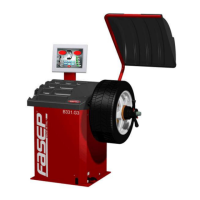
Fig. 46
4.2 How to control the calibration of wheel balancer and position weight (USER)
Switch on the wheel balancer.
Select SET UP > CALIBRATION > SET/OK >
CHECK CALIBRATION > SET/OK.
Put a wheel on the shaft and press <START>
(Fig.46).
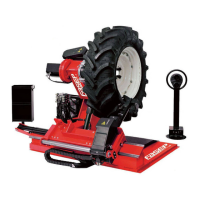
Put the calibration weight (Fig.47) and press
<SET/OK>.
Close the wheel guard or press <START>.
At the end of the spin, 160-0 will show on the
video (tolerance allowed is ±10).
Put the weight at 6h o’clock: the weight
indicators of internal side must be both green.
If not, press <6h>.
Put the weight at 6h o’clock and press <SET
OK>.
NOTE technical calibration is only available for qualified personnel.
Fig. 47
Fig. 48
Fig. 49



 To Next Page