Fasep 2000 srl Rev. 1.6
Videotronic V585.2.U: User’s Manual 14 march 2022
3-8
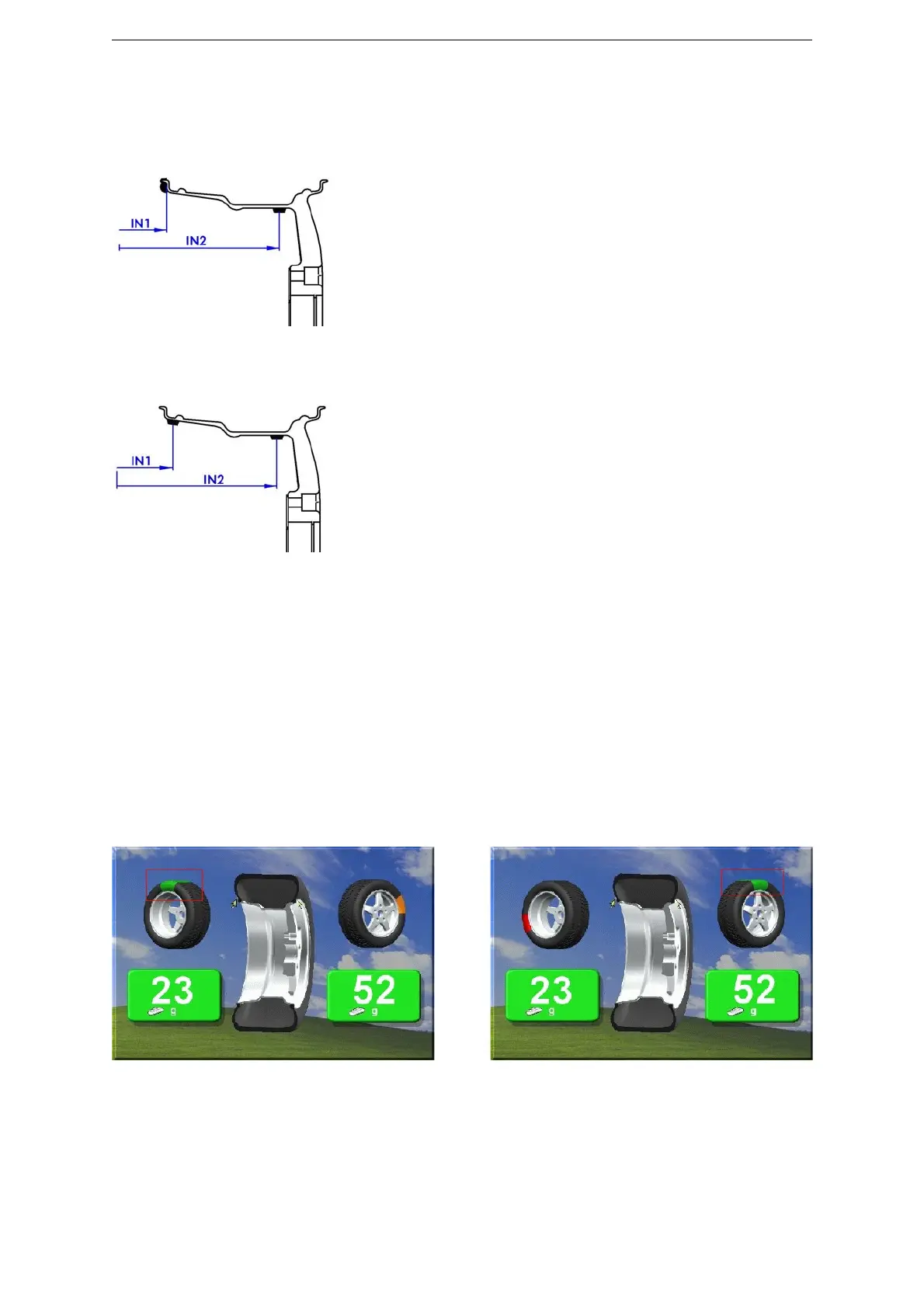
Fig. 56
Fig. 57
7.3 Input of Rim Dimensions (ALU-SE or LASER version)
! CAUTION: Laser installed on wheel balancer is of class 2, so special protection are not required. It is however
recommended to avoid the continuos view of the direct beam.
MAIN MENU > INPUT
Press ALU MODE untill the required position of weight is on the video (fig.56).
Insert the distance (IN1).
Insert the distance (IN2).
Press ALU MODE untill the required position of weight is on the video (fig.57).
Insert the distance (IN1).
Insert the distance (IN2).
7.4 Detecting and correcting umbalance
7.4.1 After setting wheel dimensions, press <START> or close the safety cover to spin the wheel and start the measurement
run.
! CAUTION: wheel start automatically when safety cover is closed.
7.4.2 At the end of the spin the wheel will brake automatically and the display will show the weight position and weight
requirement to correct the wheel’s umbalance.
7.4.3 Apply the weights (fig.58, fig.59). If umbalance shown is 0, press <FINE> to show residual umbalance.
Fig. 58
Fig. 59



 To Next Page