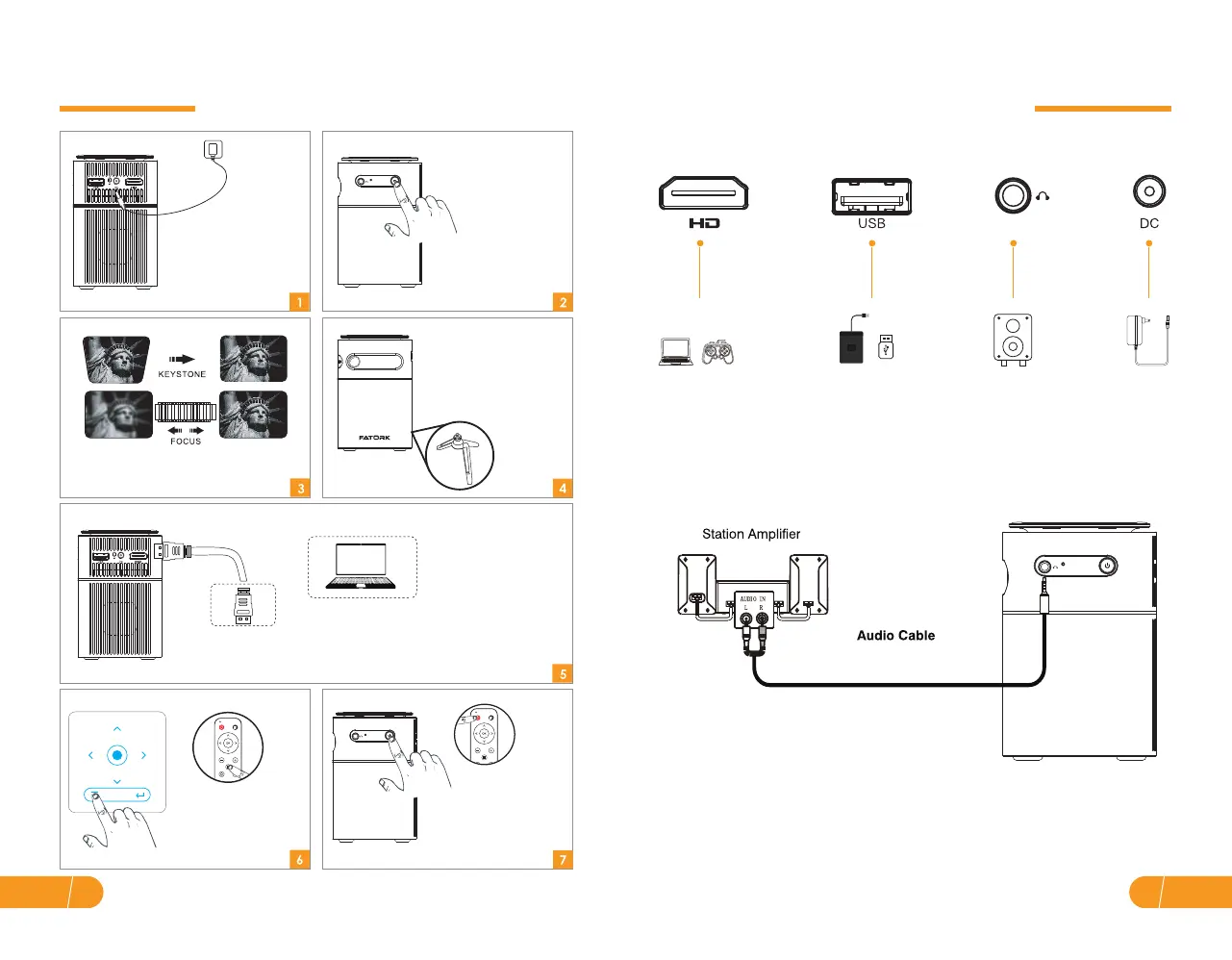
● Projector interface connection
● 3.5 mm audio connection
a. Use 3.5 mm audio to connect headphones and speaker equipment.
Connect multiple devices and applications.
Connection
HD
EN09
EN 08
Press and hold the
Power button for 2
seconds to turn off the
projector.
Getting Started
Plug the power cord to
the projector/Fully
charge the projector
and turn it on.
Press and hold the
power button for 2
seconds to turn on
the projector.
Adjust keystone and focus ring to get
the best image performance.
(Automatic keystone, vertical: ± 40°)
Connect the projector to WIFI / USB / HD
port support device.
HD Cable
Select the input source.
The mounting bracket
can be adjusted 45°
to the most suitable
angle for viewing. (Or
you can choose not
to use the bracket.)


 To Next Page