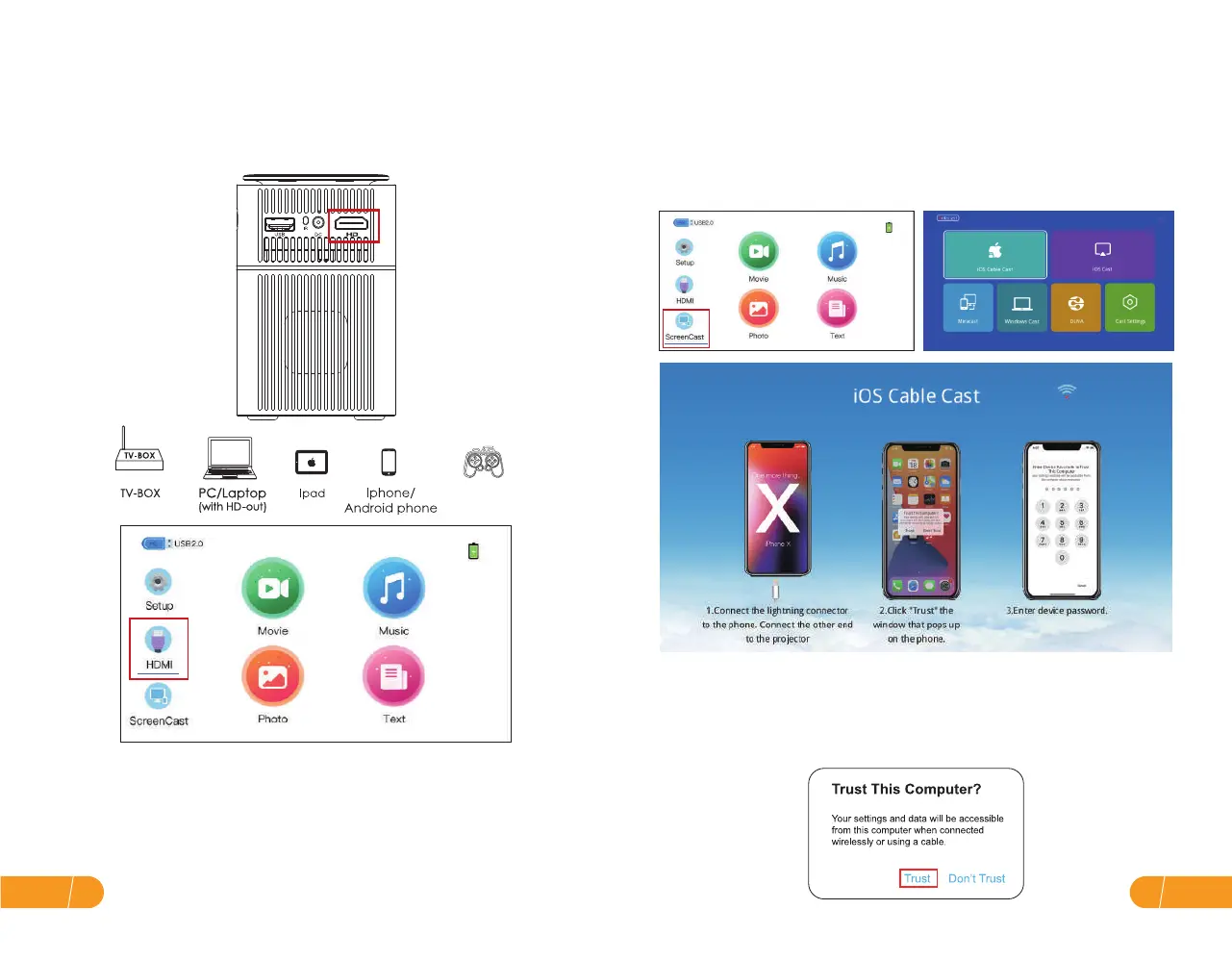
● HD connection ● Wired Screen Mirroring Connection by USB cable
Tips:
iPhone / iPad (iOS system)
a. Use the HD port to connect computers and HD-compatible devices.
Once connected, select the HD signal source.
Screen Mirroring with the original lightning cable.
Step 1. Turn on the projector, select"ScreenCast"screen mirroring as the input
source, then go to the next screen and select"iOS Cable Cast".
Step 2. Connect iPhone / iPad and the USB port of projector with the lightning
cable.
Step 3. Select "Trust" in the pop-up window of "Trust This Computer". Enter
your device password. The display of your iPhone/iPad will be projected to the
wall/screen after a few seconds.
1. Mini Display Port to HD Cable, Thunderbolt to HD Adapter are needed to be
compatible with Apple iMac, MacBook, Surface, ThinkPad.
2. Supported resolution:
576P, 480P, 720P, 1080P, 640x480, 800x600, 1024x768, 1280x1024, 1280x720,
1440x900, 1366x768, 1920x1080, 1280x800, 1440x960, 680x1050
EN13
EN 12


 To Next Page