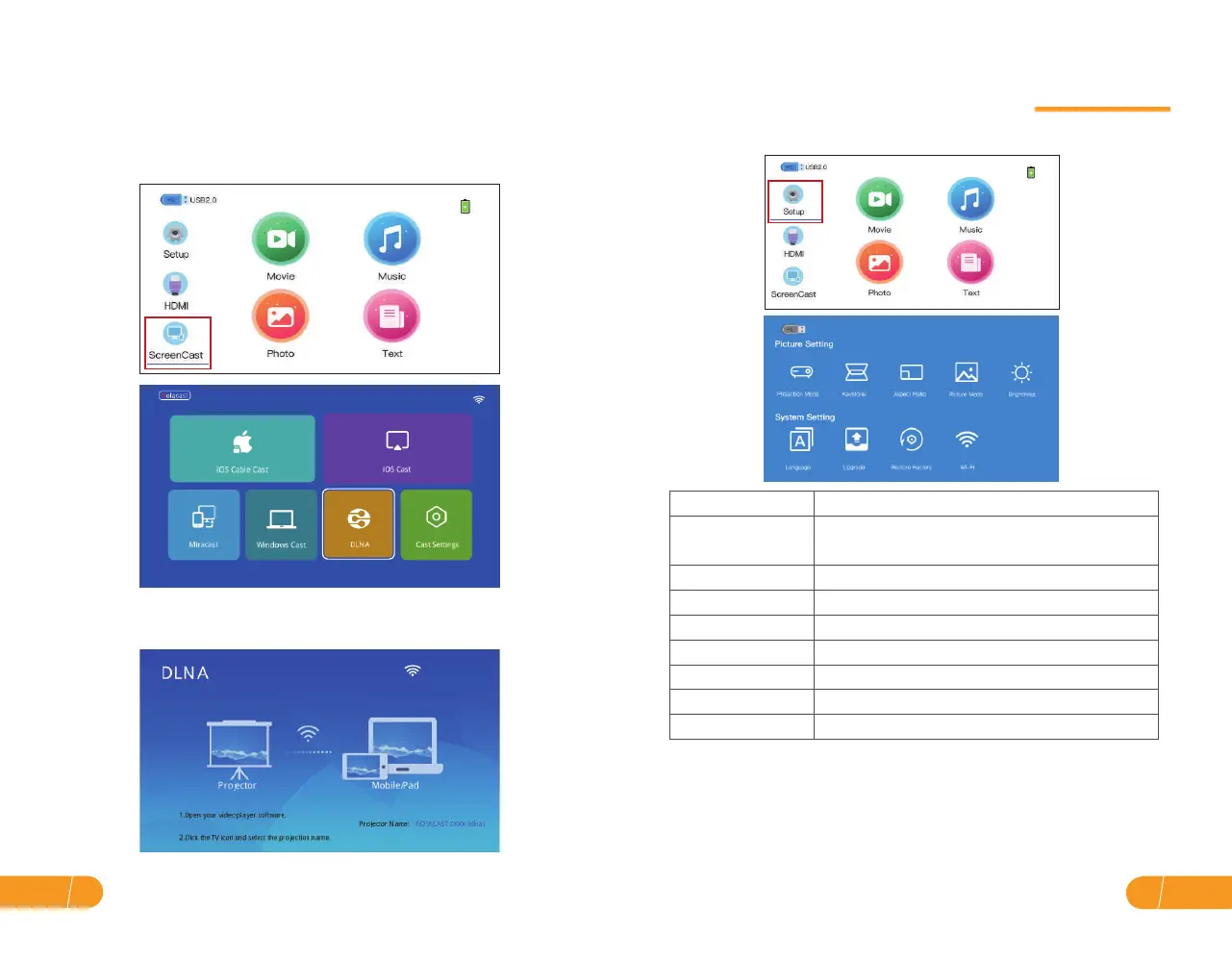
D. For DLNA:
Streaming with your WiFi (wireless connection)
Projection Settings
* About the brightness:
when plugged in, the brightness will automatically adjust to "Highlight".
After unplugging, the brightness will be automatically adjusted to "Normal".
Users can enter the interface in the setting brightness to "Highlight" or "Normal".
* Battery life:
Highlight mode: 1h50min
Normal mode: 2h30min
Step 1. Turn on the projector, select"ScreenCast"screen mirroring as the input
source, then go to the next screen and select"DLNA".
Step 2. Open the App, select the video to be played, click the TV icon function
in the App, select the projector's name, and directly on the same screen.
Menu Settings
Parameter
Projection Mode
Keystone
Aspect Ratio
Picture Mode
Brightness
Language
Upgrade
Restore Factory
Option
Auto / Manual
Auto / 4:3 / 16:9
Normal / Vivid / User / Soft
Highlight / Normal
English / Japanese / German / Spanish / France
Searching Firmware
Restore to Original Factory Settings
Front projection / Rear projection /
Ceiling projection / Rear ceiling projection
EN19
EN 18


 To Next Page