FAY-002
2-12
2.8 Connectors
2.8.1 Rear panel connectors
LAN port
Speed
LED
Activity Link
LED
ACT/LINK LED SPEED LED
Status
Description
Status
Description
OFF
Nolink
OFF
10Mbpsconnection
ORANGE
Linked
ORANGE
100Mbpsconnection
BLINKING
Dataactivity
GREEN
1 Gbps connection
21
3 4 65
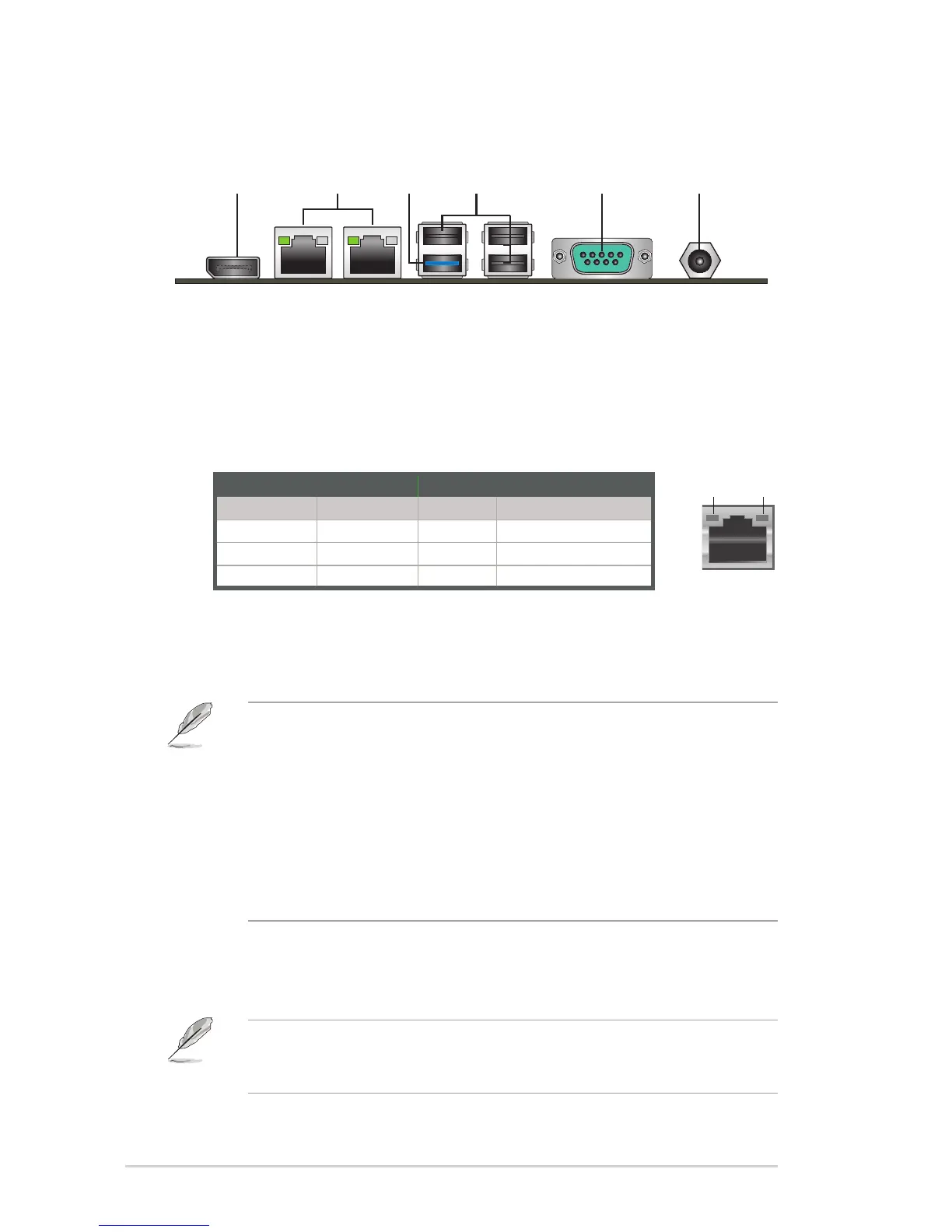
1. DisplayPort connector. ThisportconnectsadevicewithDisplayPort
connector.
2. LAN (RJ-45) ports.TheseportsallowGigabitconnectiontoaLocalArea
Network(LAN)throughanetworkhub.RefertothetablebelowfortheLAN
portLEDindications.
LAN port LED indications
3. USB 3.0 port.This9-pinUniversalSerialBus(USB)portconnectstoUSB
3.0/2.0devices.
NOTES:
• DONOTconnectakeyboard/mousetoanyUSB3.0portwheninstalling
Windows
®
operating system.
• DuetoUSB3.0controllerlimitation,USB3.0devicescanonlybeused
underWindows
®
OSenvironmentandaftertheUSB3.0driverinstallation.
• USB3.0devicescanbeusedfordatastorageonly.
• WestronglyrecommendthatyouconnectUSB3.0devicestoUSB3.0
portsforafasterandbetterperformancefromyourUSB3.0devices.
4. USB 2.0 ports.Thesethree4-pinUniversalSerialBus(USB)portsare
availableforconnectingUSB2.0/1.1devices.
NOTE:BeforeyouinstallWindows7operatingsystem,gotoBIOSSetup>
Advanced>XHCImode[Disabled],USB2.0(EHCI)support[Enabled],andset
thembackwhenyounishinstallingtheoperatingsystem.


 To Next Page