32
[Self-tuning]
1
Function:
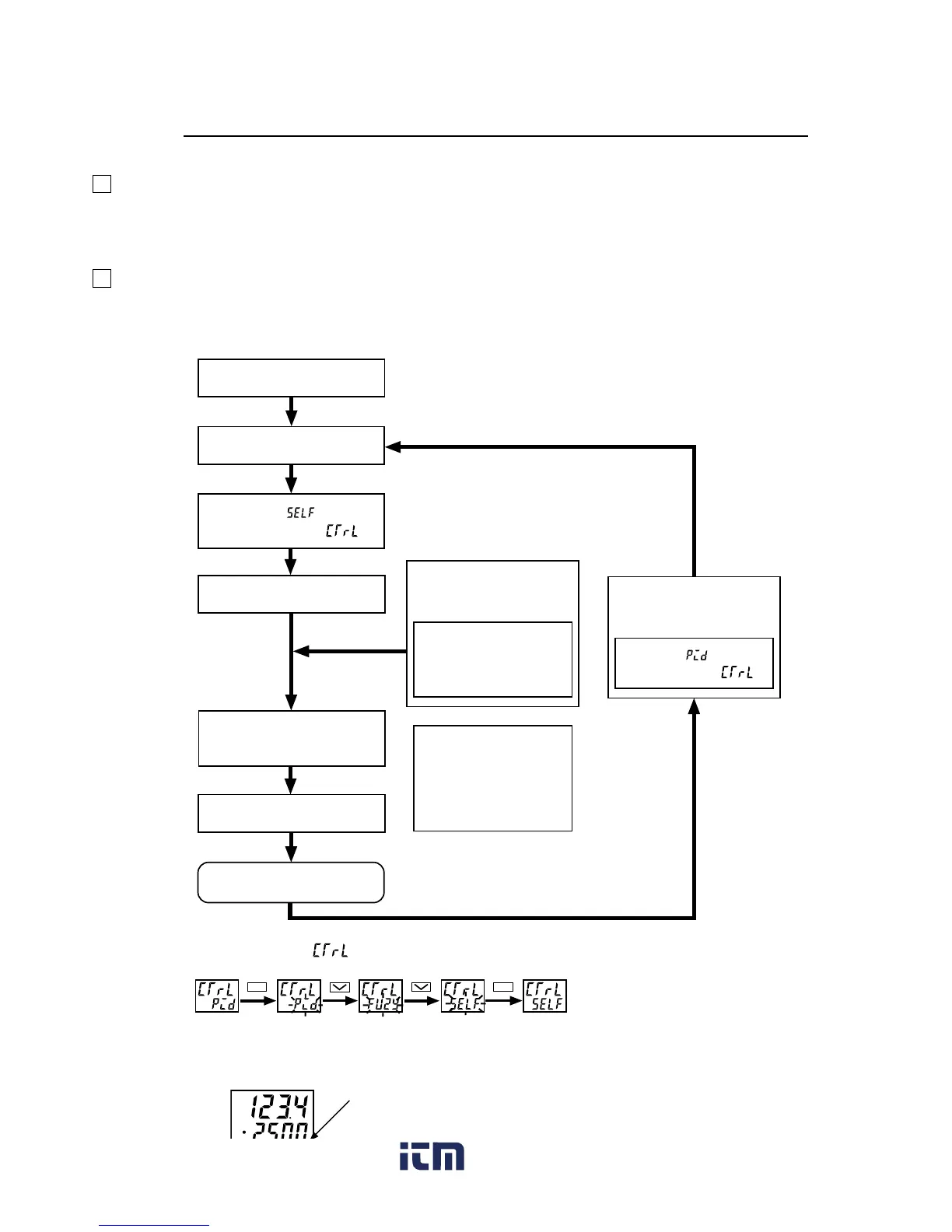
With the self-tuning function, PID parameters are automatically re-optimised depending on the actual condition of device
to be controlled and the setting temperature (SV).
2
How to execute:
Follow the procedure shown below to set and execute the self-tuning. The self-tuning starts to run at the appropriate
conditions. (See page 31)
q Power on the PXR.
w Set the SV.
e Select in the
parameter of .*
1
r Power off the PXR.
t Power on the device
to be controlled.
y Power on the PXR.
(Tuning / Control) *
2
To re-start the self-tuning:
If the device that is to be
controlled has powered
ON at this point:
Wait until the temperature
of the device that is to be
controlled falls and
stabilizes.
Select in the
parameter of .
The device to be
controlled and the PXR
should be powered ON
at the same time or in
order of the left flow-
chart.
*1: How to set the parameter of :
*2: Display during self-tuning is shown below:
PV
SV
This lamp flashes.
SEL
SEL
www. .com
information@itm.com1.800.561.8187



 To Next Page