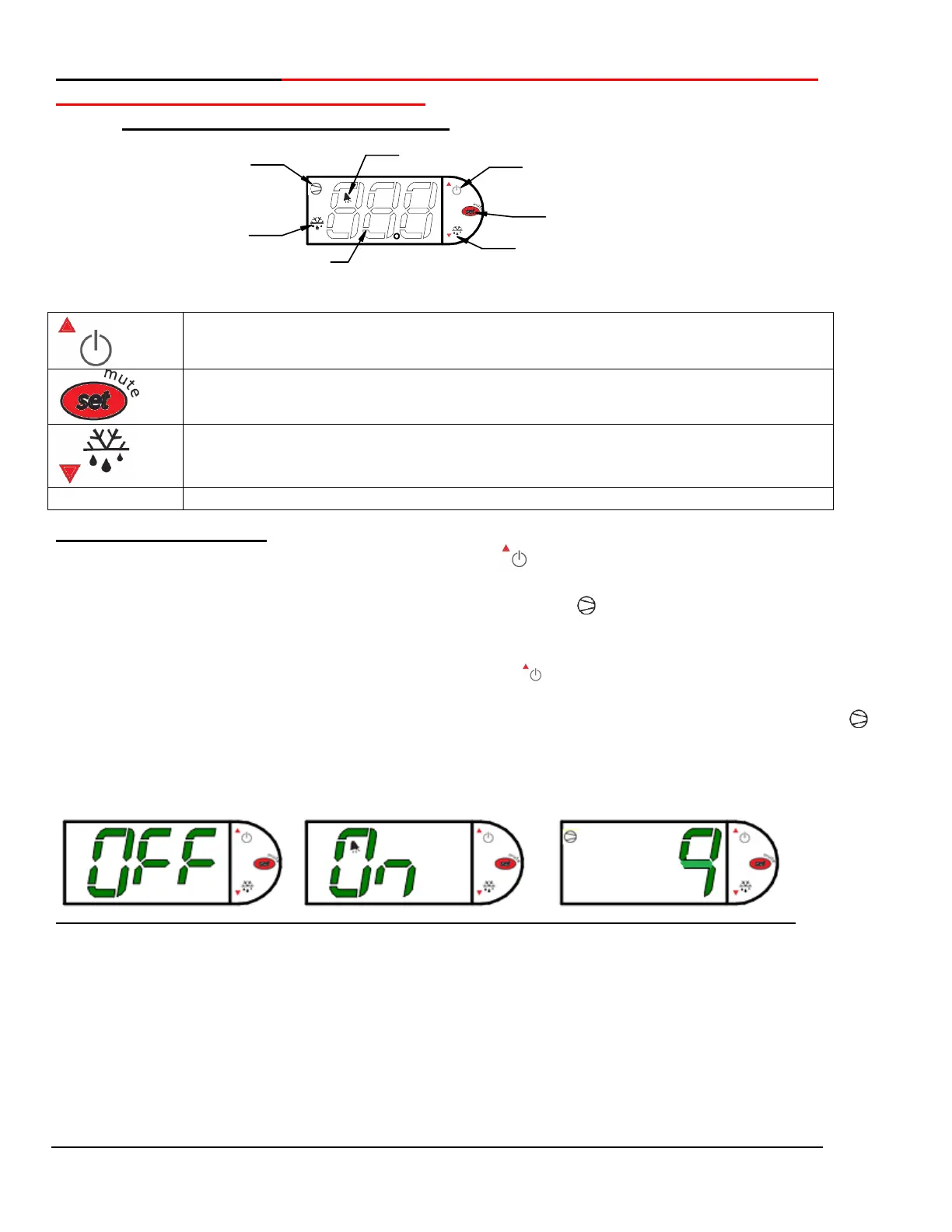
User Control CAREL THIS CONTROL REPLACES THE RANCO CONTROL
WHICH IS NO LONGER AVAILABLE
Electronic Temperature Control
Press and hold this button for three seconds to turn system on (if off) or off (if on).
Also used to adjust set point when in set point adjust mode
Press and hold this button for three seconds to initiate a manual defrost (and cancel
defrost if initiated), also adjusts set point down when in set point adjust mode
Powering on control
To turn refrigeration control power on, press and hold for approx. three seconds. The display will
read “On” while the button is depressed. When the control powers on, the display will read the current
set point (a number “1” thru “9” ). The compressor run indicator will illuminate on the display,
meaning that the compressor is running. (Note: the control may already be in the on mode when
shipped from factory).
To turn refrigeration control power to off, press and hold for approx. three seconds. The display
will read “Off” while the button is depressed. When the control powers off the display will flash back
and forth between the relative current case temperature and “Off”. The compressor run indicator
will be off on the display. When refrigeration control is in the off-mode cabinet lights and evaporator
fans will still operate, but the compressor will not turn on causing the case to gradually reach room
temperature.
Refrigerated Self-Serve Merchandiser (High Profile) Page 10


 To Next Page