FeelElec
FY6900 Series User’s Manual 17
Select Waveform
FY6900 can output Function/Arbitrary Waveform including:
l Sine
l Square
l Rectangle
l Triangle/Ramp
l Rise Sawtooth
l Fall Sawtooth
l Lorenz Pulse
l Multitone
l Noise
l Electrocardiogram (ECG)
l Trapezoidal Pulse
l Sinc Pulse
l Narrow Pulse
l Gauss White Noise
l Step Triangle
l Positive Step
l Inverse Step
l Positive Exponent
l Inverse Exponent
l Positive Falling Exponent
l Inverse Falling Exponent
l Positive Logarithm
l Inverse Logarithm
l Positive Falling Logarithm
l Inverse Falling Logarithm
l Linear FM
l AM
l FM
l Positive Half Wave
l Negative Half Wave
l Positive Half Wave
Rectification
l Negative Half Wave
Rectification
l User-defined waveform
Press WAVE to change waveform selected. Or rotate ADJ Knob under waveform
switching status to change waveform. The waveform diagram displays on the
screen. Pressing the knob can change to arbitrary waveform directly when
choosing waveform. At start-up Sine is selected by default. (Users can also
configure start-up waveform. Please check Chapter “Save and Load”.
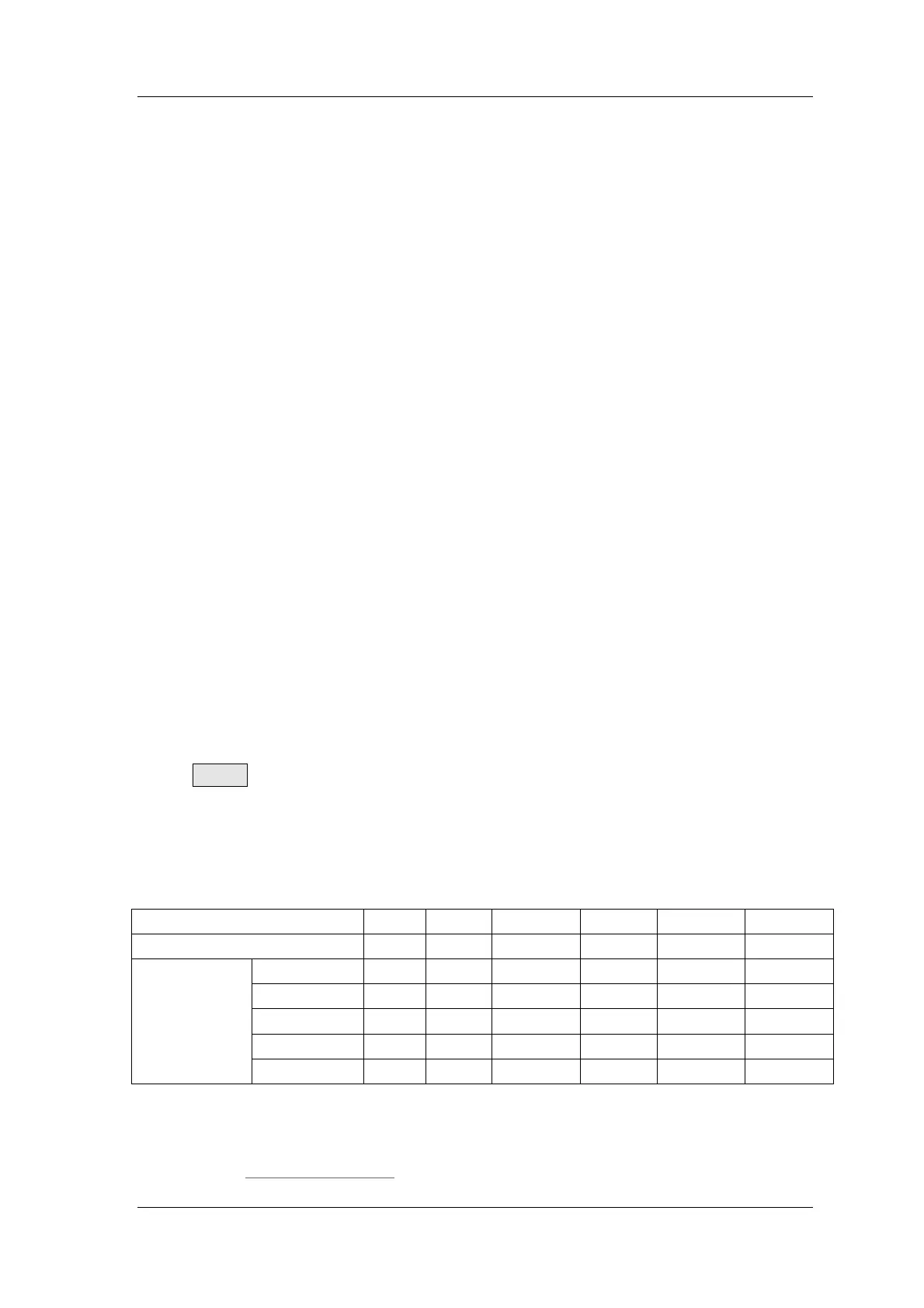
Waveforms
Sine Square
Rectangle Triangle
Sawtooth Arbitrary
Function Name
SINE SQUR
Rectangle TRGL Ramp Arb
Parameters
Frequency √ √ √ √ √ √
Amplitude √ √ √ √ √ √
Offset √ √ √ √ √ √
Phase √ √ √ √ √ √
Duty Cycle √
Note: Arbitrary waveforms can be edited and downloaded from PC software
provided by FeelElec. The relevant software and driver can be downloaded from
our website: www.feelelec.com .



 To Next Page