Note: If your computer only has a Type-C port, you can use a USB-A to Type-C cable to transmit the webcam
signal. Please note that the Type-C cable you choose needs to support data transmission. The signal is
recognized in Windows and MAC system as「FEELWORLD USB 3.0 Capture」.
「FEELWORLD USB 3.0 Capture」。
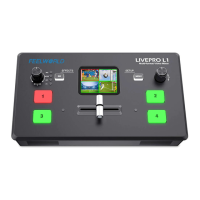
2.5 Connect USB3.0 as a Network Signal Source
You can use the L4’s USB CONTROL port to use the L4 as a webcam source, and you can
recognize the webcam signal from the L4 on live streaming platforms like Zoom, YouTube,
Facebook, Twitch, OBS, etc.
2.6 Connect Computer and L4
Software control: connect computer and L4 with CAT6 cable
Stream: connect L4’s USB CONTROL and L4’s USB 3.0 port with USB3.0 cable
(Note: the color of USB3.0 port is blue)
Minimum System Requirements for macOS (Note: the following system is an example, it
doesn’t mean only this system supported)
● macOS 11.0 Big Sur or later


 To Next Page