- 21 -
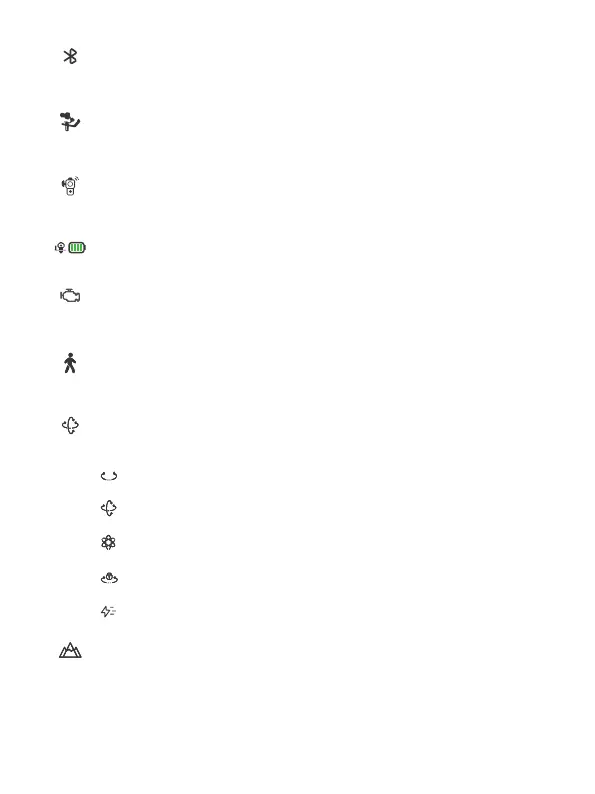
[3] Bluetooth connection
Icon appears after Bluetooth is connecting. And the icon won't be shown if
Bluetooth disconnect.
[4] Gimbal connection icon
The icon appears when the handle is connected with gimbal, the icon won't
be shown if the handle is detached.
[5] Motion sensing icon
The icon appears after enter motion sensing mode, the icon won't be
shown if gimbal is not in motion sensing mode.
[6] Gimbal battery
Show the current battery level of gimbal.
[7]Motor power
Use auto tune to adjust the motor power automatically, or adjust motor
power for each axis manually.
[8]Follow speed
Users can select dierent gimbal follow speed proles, or customize follow
speed.
[9]Follow mode
Select gimbal follow mode.
PF: Pan follow, only the pan axis follows the movement of user's
hand.
PTF: Pan and tilt follow, where both the pan and tilt axes follow the
movement of user's hand, but roll axis does not.
FPV: Pan, tilt and roll follow, where all 3 axes follow the movement
of user's hand.
Lock: All 3 axes do not follow the movement of user's hand, gimbal
keeps the direction of the camera xed.
FFW: Flash follow, where all 3 axes follow the movement of user's
hand in high follow speed.
[10]Scenario
Select gimbal usage scenario (timlapse, auto rotation, panorama, portrait
mode, sele mode, track video, etc.)














 To Next Page