- 24 -
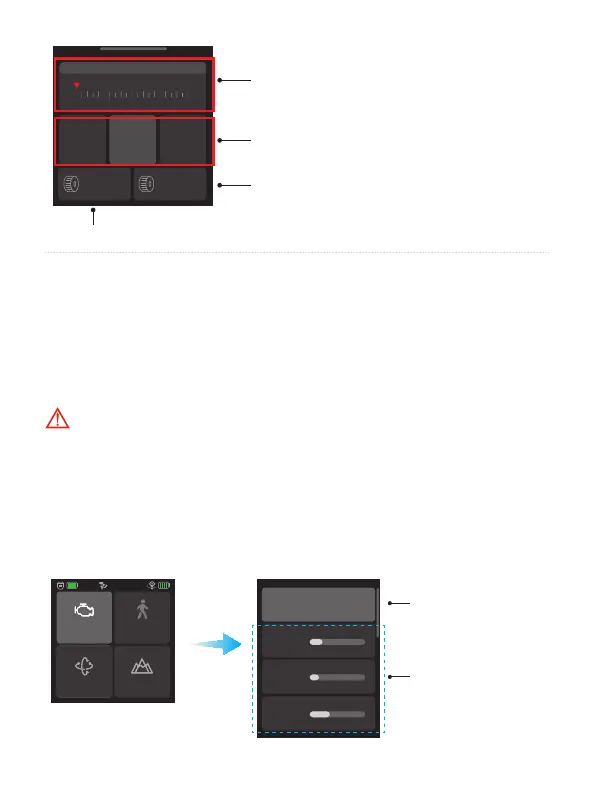
Focus motor
Pan Tilt Roll
Main knob
settings
Aux knob
settings
Main knob control panel
Aux knob control panel
Switch the control bject for main knob
Switch the control object for aux knob
*Main knob and aux knob will control the same object while the synchronous switch is
turning on. And the control object of aux knob will change synchronously if user switch the
control object of main knob now.
8.3 Function operation
8.3.1 Motor power settings
Please set motor power rst after powering on gimbal for the rst time or after
changing a new camera/lens.
Auto tune: Gimbal auto tune the motor power according to the load.
Adjust motor power manually: Adjust the motor power for each axis manually
according to the load.
Tips: If the gimbal is vibrating in high frequency, it means the motor power is too
strong. If the gimbal is shaking in low frequency and large amplitude, it means the
motor power is too weak.
Motor power
PTF
Follow speed
Scenario
Auto tune
Pan axis
Tilt axis
Roll axis
Auto tune the motor
power
(Recommend)
Adjust motor power
for each axis manually














 To Next Page