- 28 -
Panorama
Portrait mode
Selfie mode
Exit selfie mode
Motor power
PTF
Follow speed
Scenario
Disable sele: Swipe from left to right in home page, then select “Gimbal
settings”, enable the disable sele switch, then the sele mode will not be entered
if the trigger button is tapped three times.
8.3.9 Track video
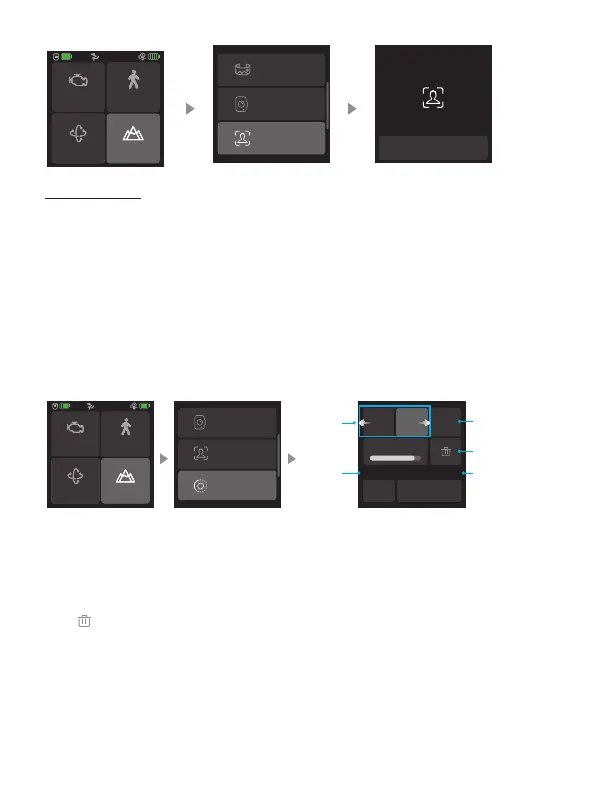
Select “Scenario” in home page, then select “Track video”, capture video with
up to 10 waypoints.
Portrait mode
Selfie mode
Track video
Start shooting
2 3
+
Smoothness
Preview
Horiz 0° Vert 0°
Delete waypoints
Vertical angle
Add waypoints
Waypoints
Horizon
angle
Motor power
PTF
Follow speed
Scenario
Use joystick or manually move camera to desired position, tap “+” icon to conrm
the waypoint, repeat to add another waypoint. Track video is designed to capture
video with up to 10 waypoints.
Select a waypoint number to check the position for this waypoint quickly, and
tap“ ”icon to delete it.
After setting up the smoothness, tap “Start shooting” to start shooting.














 To Next Page