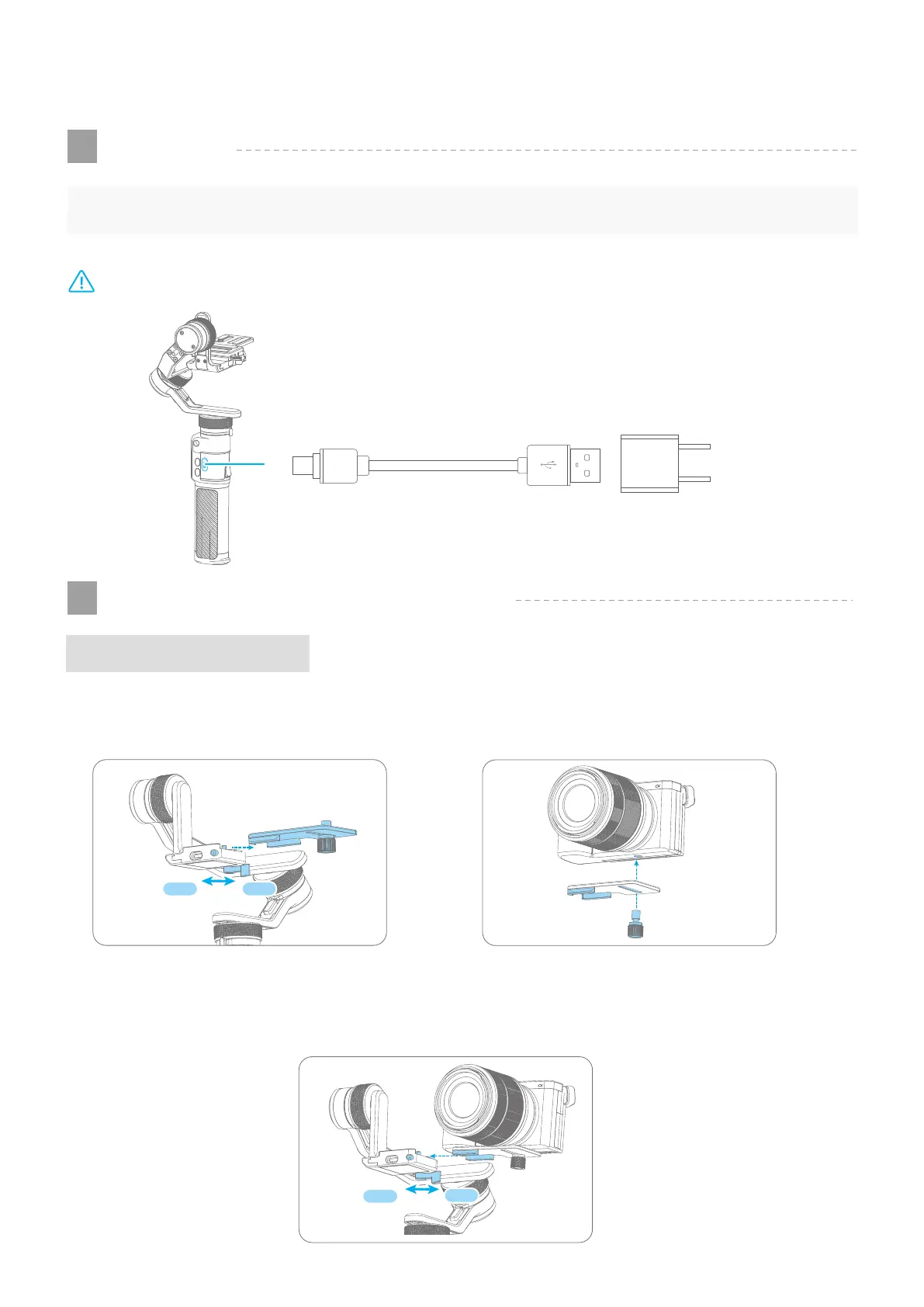
Camera Installation
Unlock the safety lock, press and hold the anti-drop column to take out quick release plate as
the figure 1 shows, tighten the thumb screw to fix the quick release plate on the bottom of the
camera as the figure 2 shows.
Press and hold the anti-drop column , insert the camera in the fixed plate , and lock the safety
lock as the figure 3 shows.
If the camera doesn't have the 1/4-20 inch screw hole, please put the camera on mount adapter, which
has 1/4-20 inch screw hole, and then mount it in follow the steps above.
2. Start to Use
Camera/SmartPhone Installation
2
Charging
1
(Equipped by user)
Output: 5V / 2A
Charging with Type C USB cable, as the figure below shows:
Type C port USB port
Type C USB
Cable
Please fully charge the battery before powering on the gimbal at the first time.
TIPS
03
www.feiyu-tech.cn
Figure 1
Figure 2
Figure 3
LockUnlock
Lock
Unlock
Note: DO NOT charge the gimbal via the Type C port on the fixed plate. Otherwise, the circuit board may
be burnt.



 To Next Page