Page 8
TriumphLX Operation
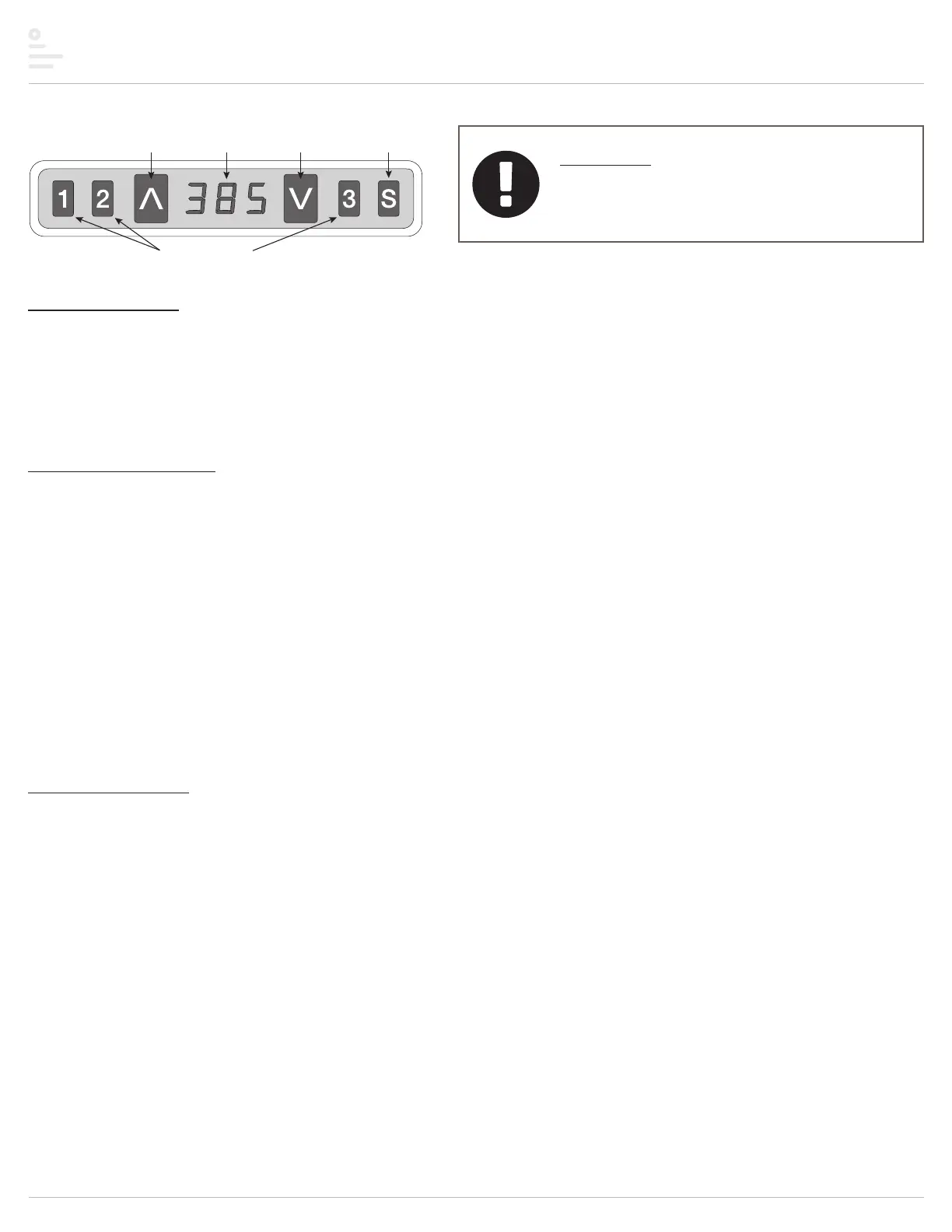
button
button
button
display
Important
• Before operating the table, the initialization procedure
must be completed. See Step 8 on page 6.
General operation
• Move the table up or down by pressing UP ▲ or DOWN ▼ until the worksurface reaches
the desired height.
• The table will continue to move up or down until you release the button or until the
maximum or minimum height is reached.
Memory stop positions
• Up to three memory stop positions can be used to save specific heights of the
worksurface. To set a specific position:
— Raise or lower the table to the position you want to save.
— The display on the digital keypad shows the worksurface height.
— Press and release the S button. Then press the desired memory button (1, 2 or 3)
within the next 3 seconds.
— Position 1, 2 or 3 is now saved.
• To move the worksurface to a memory stop position:
— Press and hold the desired memory button (1, 2 or 3).
— The worksurface will move to the saved position and then stop.
Lower stop position
• To set the lower stop position (the minimum height of the table):
— Raise or lower the table to the desired minimum height.
— Press and hold S, then press and hold 1. Continue to press both buttons for about 3
seconds.
— The letter “L” appears on the display. This means the minimum height of the table is
locked at its current position.
— Release both buttons.
• To erase the lower stop position:
— With the table at its lower stop position, press and hold S, then press and hold 2.
Continue to press both buttons for about 3 seconds.
— The letter “C” appears on the display, indicating the lower stop position has been
erased.
— Release both buttons.
Table movement stops when you release the UP
▲
or
DOWN
▼
button.
If you release the memory button before the saved
position is reached, table movement will stop.
If there is a memory stop position lower than the lower
stop position, the memory stop will be erased.


 To Next Page