ENGLISH
CAPABILITIES
IMPORTANT SAFETY INSTRUCTIONS — Please Read Before Using!
• Thesocket-outletmustbeinstalledneartheequipment
andbeeasilyaccessible.
• Topreventelectricalshock,doNOTuselaminatorclosetowater
anddoNOTspillwateronlaminator,electriccord,orwallsocket.
• Donotleaveelectriccordincontactwithawarmsurface.
• Donotleaveelectriccordhangingfromacupboardorshelf.
• Donotuselaminatorifelectriccordisdamaged.
•Donotlaminatemetalobjects.
• Onlyusepouchesspecicallydesignedforthelaminationsettingyouintendtouse.
• Alwayssupervisechildrenduringlaminatoroperation.
•Keeppetsawayfromlaminatorwhileinuse.
• Switchoffandunpluglaminatorwhennotinuse.
• Onlyopenthelaminatorasexplainedunder“Maintenance”.Donotopenor
attempttorepairinanyotherway,asthiscouldresultinelectricshockandwill
voidyourwarranty.ContactCustomerServiceifyouhavequestions.Pleasenote
thewarrantydoesnotapplyincasesofabuse,mishandlingorunauthorizedrepair.
• Pleasebecarefulofsharpedgesandcornersandresidualheatwhenopening
thelaminator.
2
Pouch Thickness 3-7 mil
Estimated Heat-Up Time 4 Minutes
Approximate Cool-Down Time 60 Minutes
Lamination Speed 18”/Minute
Maximum Width 12.5” mm
Voltage 120V
Frequency 60 Hz
Laminating capacity – 3-7 mil hot laminating pouches
Up to 12.5”
1000 Watt
Dimensions: 21
7
/8” x 9
5
/8” x 4
3
/4”
Max document thickness
1
/32”
IMPORTANT SAFETY INFORMATION
ThislaminatorisequippedwithanAutoshut-offfunction.Itwillturnthelaminatorinto
stand-bymode,ifithasnotbeenusedforover60minutes.Toswitchthelaminator
backon,simplypressthestand-bybuttonattheleftofthefrontoperatingpanel.
Duringlamination,thedirectionofthepouchcanbereversed,ifyouareunsureabout
theprogressofthelamination.Todoso,pressdownthereversekey.Thiswilleject
thepouchbackatthefrontentry.
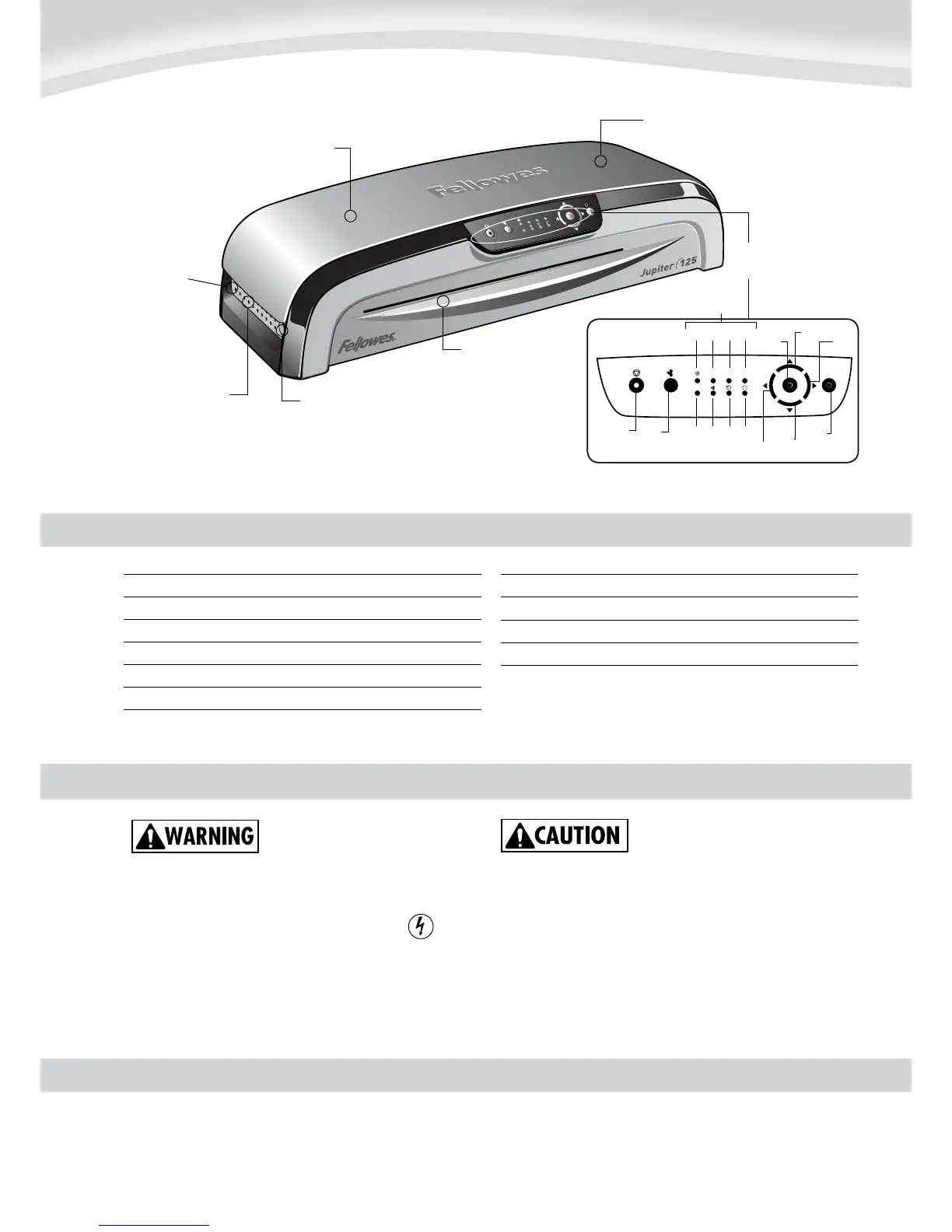
LED Interface Key
Stand By
Open
Left
Enter
Up
Right
Down
Reverse
LED Panel
cold 3 4 5
7 jam wait rev
Active Cooling System
Discrete carry
handles at side
Temperature controlled
release trigger for lid
Support Shelf on entry to
guide laminate path
HeatGuard Technology™ double-walled
insulation keeps heat inside
Opening lid to clean
laminating mechanism
LED Interface for
user guidance










 To Next Page