wwwwww
..
ffeennddeerr..ccoomm
✧
wwwwww
..mmrrggeeaarrhheeaadd..nneett
12
Front Panel Overview
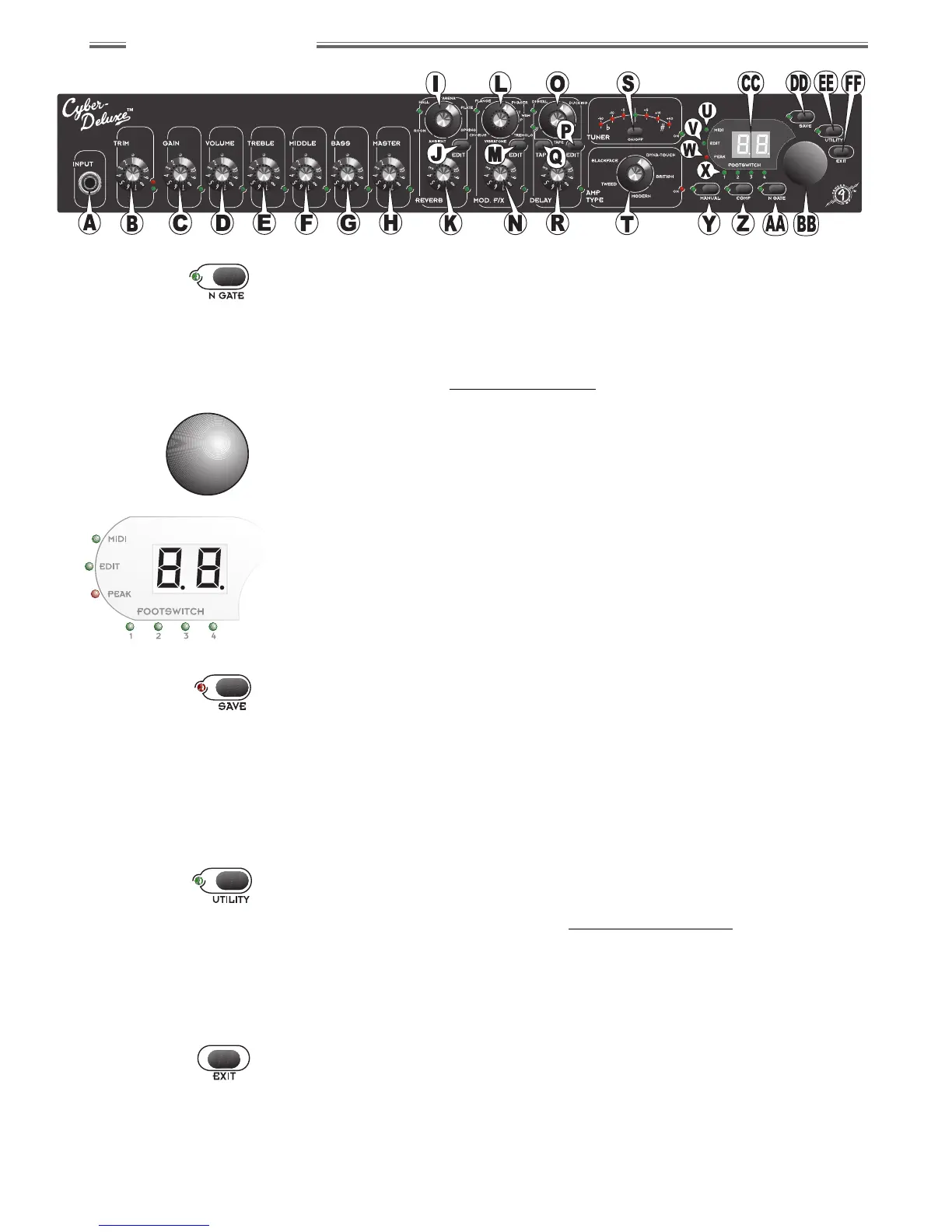
AA. NOISE GATE
Accesses Noise Gate settings for the current preset (or while in M
ANUAL
M
ODE
). Press once, then use the DATA WHEEL {BB} to select from 3 Noise
Gate types, or to turn the Noise Gate off. Press the button a second time
to adjust the depth from 1.0 to 9.9. The adjacent green LED will be ON any
time the Noise Gate is active. Press EXIT {FF} when selection/adjustment
is complete. See Noise Gate Settings on page 23.
BB. DATA WHEEL
• Selects presets when the Cyber–Deluxe™ amplifier is in P
RESET
M
ODE
• Sets values when editing Compressor, Noise Gate or effects parameters
• Set assignments for most Utility functions
CC. DISPLAY SCREEN
• Displays the current preset number in P
RESET
M
ODE
• Displays “— —” in M
ANUAL
M
ODE
• Displays the closest note to that being played while using the Tuner
• Displays the value of most knob settings as they are adjusted
• Displays the mnemonic code (abbreviation) for parameters and their
numeric values when an EDIT button {J, M or P} is pressed
DD. SAVE
Saves the current amplifier configuration to memory:
1) Press SAVE once and the display will flash a rewritable preset location.
2) Select any rewritable preset location (32–63) using the DATA WHEEL {BB}.
3) Press SAVE again and the preexisting contents of the displayed preset
location will be overwritten with the current amplifier configuration.
NOTE: If a different preset is selected before the current configuration is
saved, any active changes are lost.
EE. UTILITY
Accesses Utility settings for:
• MIDI/System management (see Utility Menu Functions on page 25)
• 4–button Footswitch—Preset Assignment (see page 25)
• Expression Pedal—Parameter Assignment (see page 26)
The adjacent green LED will be ON while navigating through the Utility
menu. Press EXIT {FF} when selections are complete.
FF. EXIT
Returns the Cyber-Deluxe™ amplifier to the most recent play mode (P
RESET
or M
ANUAL
) after using the Tuner and after editing effects, Compressor,
Noise Gate or Utility parameters. (EXIT will also return the amplifier to
P
RESET
M
ODE
from M
ANUAL
M
ODE
.)
% Use SAVE to COPY any of the 64
presets, with or without
modifications, to a rewritable
preset location (32–63).
% The red SAVE LED always flashes
in MANUAL MODE and after any
parameter is modified in PRESET
MODE as a reminder to SAVE.


 To Next Page
 Loading...