25
SONGS MODE
CREATING AND EDITING SONGS: FOOTSWITCH ASSIGNMENT
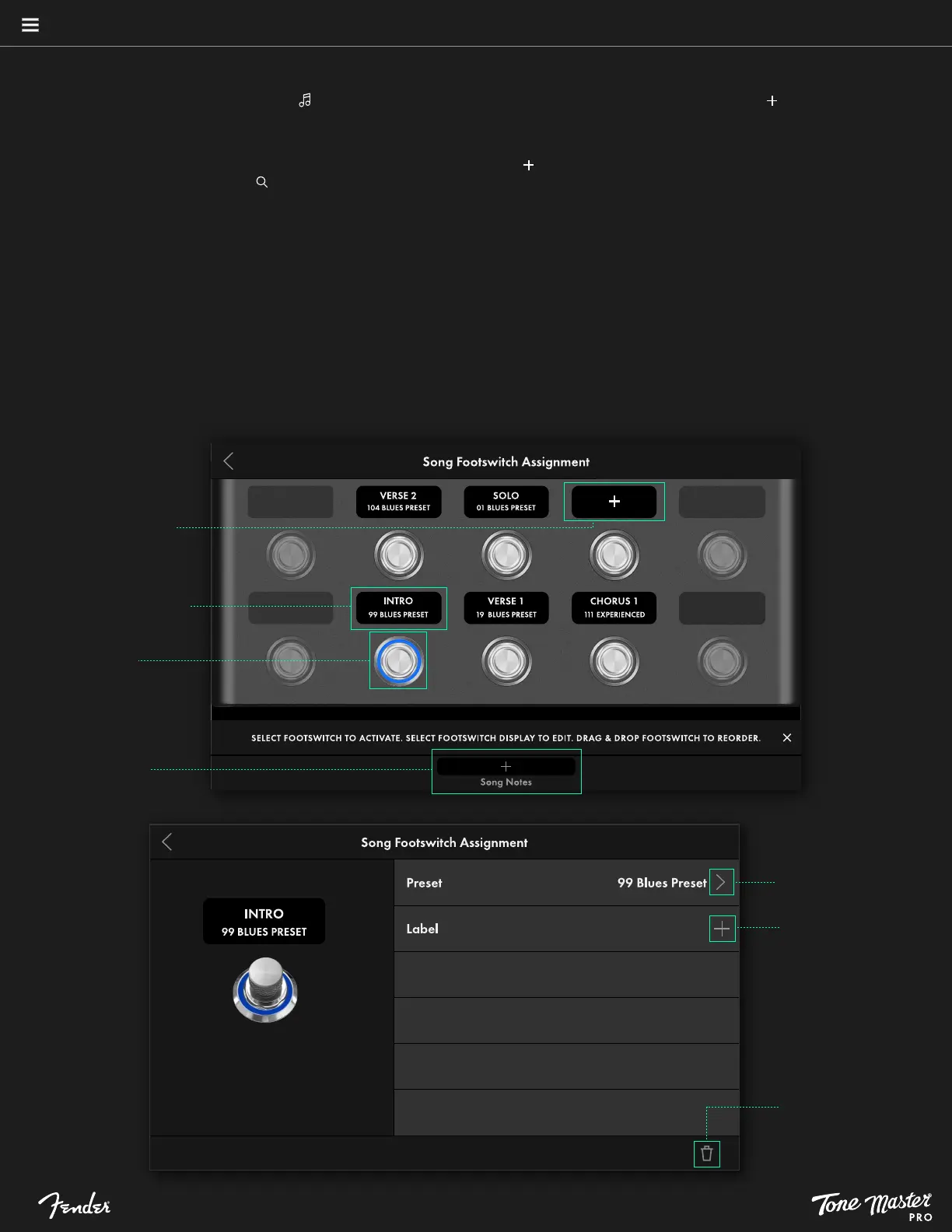
From the list view, touch the Songs symbol ( ) at left in the touchscreen to enter Songs mode. Then touch the plus symbol ( ) at upper right to
create a new Song; enter the song name using the pop-up keyboard and touch CONFIRM when done. In the Song Footswitch Assignment
screen shown, the touchscreen displays six assignable footswitches and their scribble strips.
To assign a preset to a footswitch, touch any scribble strip displaying a plus sign ( ) and select a preset from the Add Preset to Song screen
shown; touching the search symbol ( ) to search presets by a keyword entered using the pop-up keyboard can be helpful with this. Touch
CONFIRM when done. From the Song Footswitch Assignment screen shown, the user can then customize the assignment with the preset name,
pre-labeled song sections (intro, verse 1, chorus1, solo, verse 2, outro, etc.), and footswitch LED color. When done, touch the back arrow to
return to the main Footswitch Assignment screen.
To reorder preset footswitch assignments, drag and drop an assigned footswitch to a new location on the touchscreen. If the destination
footswitch already has an assignment, the user will be prompted to SWAP or REPLACE it. SWAP switches the locations of both presets;
REPLACE puts the preset in the new location and leaves the source footswitch empty with a plus symbol (+) in the label window. Select either
option by touching it.
Touch to create or
edit song notes
Touch footswitch
to load preset
Touch scribble strip
to edit existing assignment
Touch scribble strip with
plus symbol(+) to add
preset to song
Touch to change
assigned preset
Touch to add label
that will appear on
scribble strip
Touch trash can symbol
to delete assignment
SONG NOTES
The user can also add song notes to aid performance. These are short reminders for each song such as guitar choice, tuning, capo, etc. When
assigning presets to footswitches, add a note by touching + SONG NOTES at bottom center in the touchscreen, and use the pop-up keyboard to
enter a short descriptive note. Song Notes will appear below the song name when in Gig View for both Songs and Setlists modes.





 To Next Page