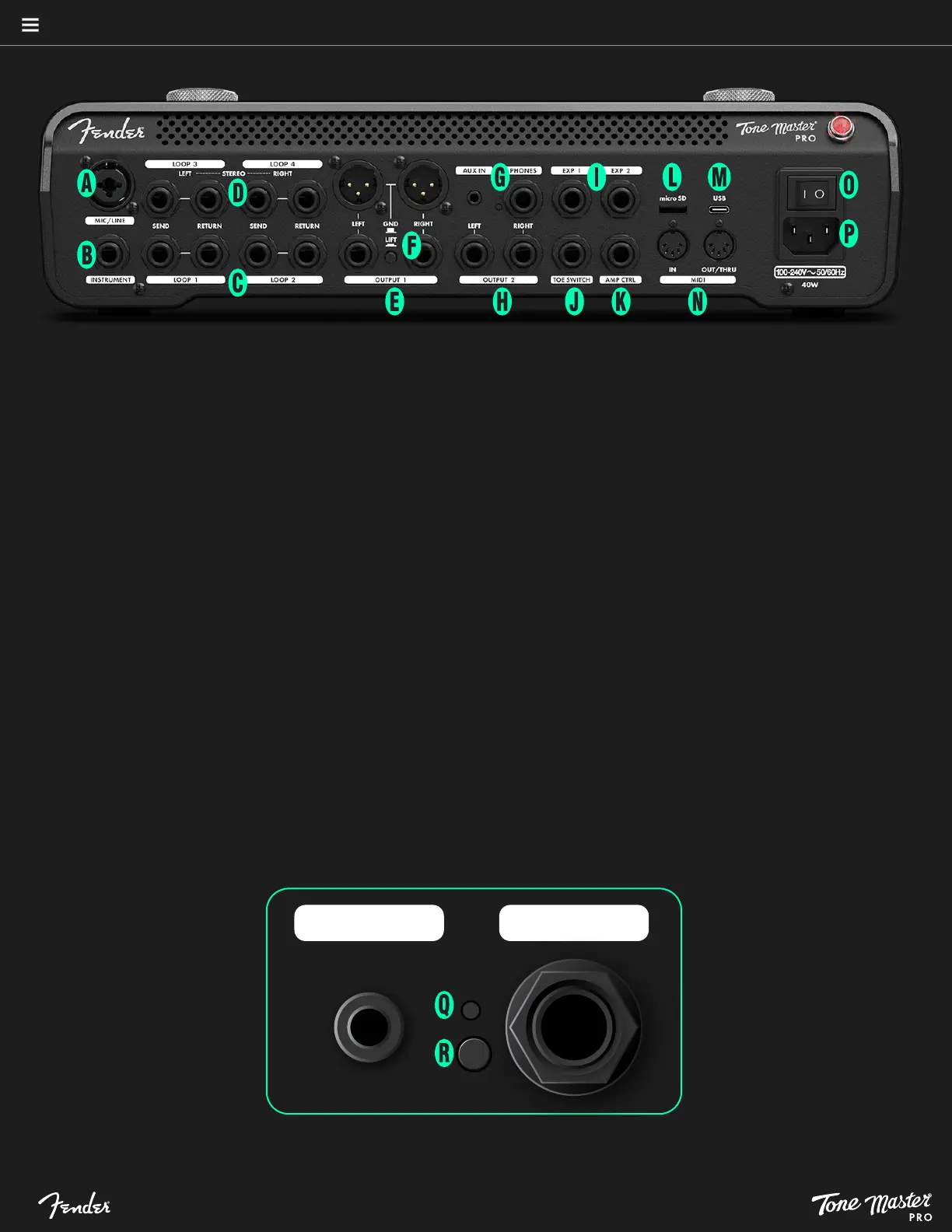
REAR PANEL
A. MIC/LINE INPUT: Combination XLR -1⁄4” TRS balanced
input for instrument or microphone.
B. INSTRUMENT INPUT: 1⁄4” input for guitar, bass or other
instrument.
C. EFFECTS LOOPS 1/2: Two analog pre-buffer send/return
loops for connecting external effects devices. Loop on/off
status can be saved with each preset.
D. EFFECTS LOOPS 3/4: One stereo or two mono send/re-
turn loops for connecting external effects devices. These
loops can be moved within the signal path. Loop on/off
status can be saved with each preset.
E. OUTPUT 1: Two balanced XLR outputs and two
balanced 1⁄4” line outputs for connecting to external
sound reinforcement and recording equipment.
F. GROUND LIFT: Pushbutton helps alleviate hum when
XLR outputs are connected to external sound reinforcement
and recording equipment.
G. AUX IN/PHONES: 1/8” stereo aux input for connecting
mobile devices and other external equipment; 1/4”
output for headphones.
H. OUTPUT 2: Dual assignable 1/4” stereo outputs for
connecting to external sound reinforcement and recording
equipment, independent of OUTPUT 1 (E).
4
I. EXP INPUTS: For connecting external expression
pedals to control effect parameters.
J. TOE SWITCH: 1⁄4” input for connecting to toe switch jack
on an expression pedal for on/off control of effects.
K. AMP CONTROL OUTPUT: 1⁄4” TRS jack for remote
control of up to two amplifier switching functions.
L. MICRO SD CARD SLOT: For future expansion of Tone
Master PRO functionality.
M. USB-C PORT: Bi-directional connection point for USB
audio recording, desktop editing and firmware updates.
N. MIDI I/O: Standard five-pin MIDI In and MIDI Out/Thru
ports, for interfacing with MIDI-compatible devices.
O. POWER: Turns Tone Master PRO on and off. Red power
jewel above switch indicates on/off status.
P. IEC POWER INPUT: Universal IEC input power. IEC cable
included.
Q. RESET: Pinhole button for factory reset (see closeup
below), which erases all presets and settings.
R. UPDATE: Button activates firmware update (see closeup below).
REAR PANEL
See pages 36-37 for more details on Tone Master PRO rear-panel features.
AUX IN PHONES






 To Next Page