34
GLOBAL SETTINGS
GLOBAL SETTINGS: OUTPUT MIXER
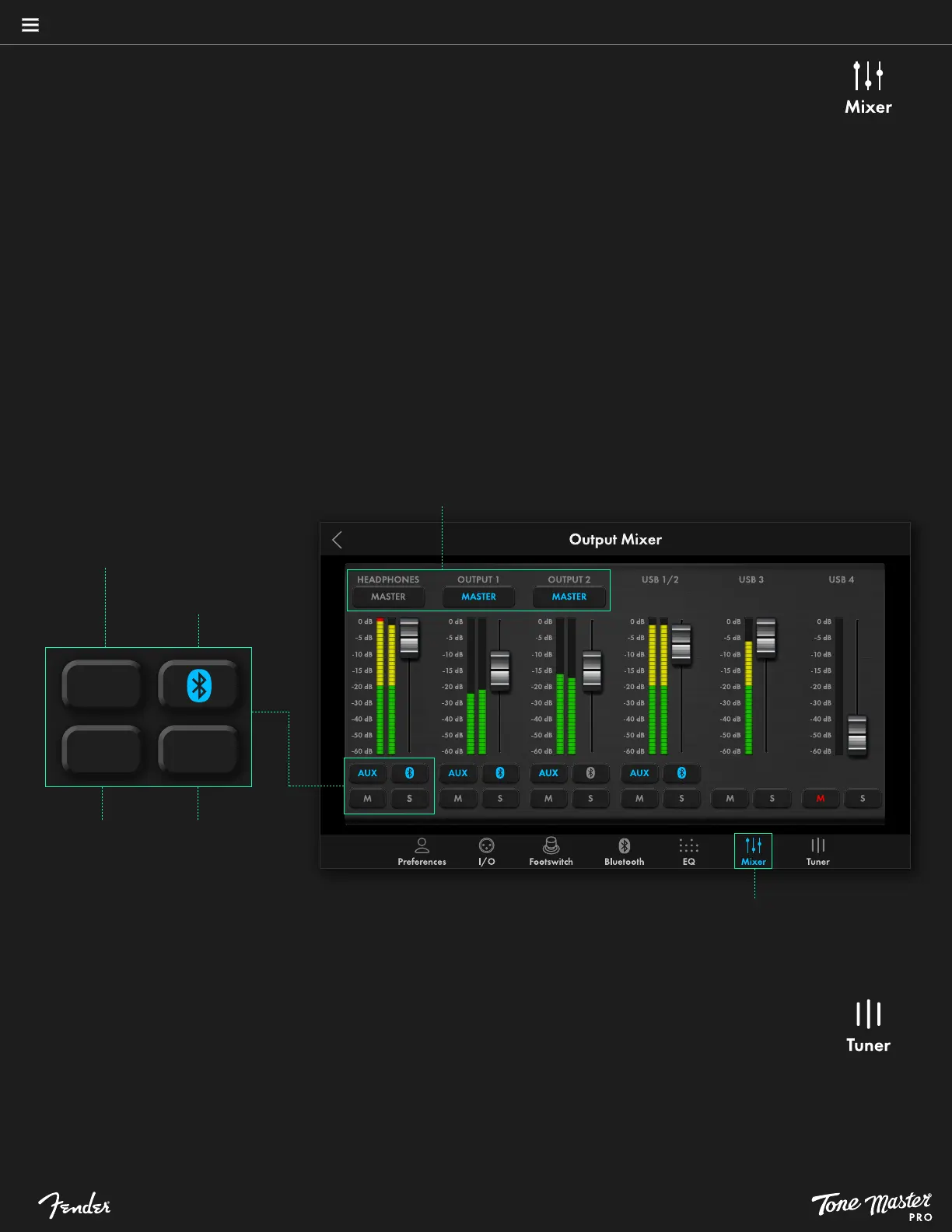
Touch Mixer at the bottom of the Global Settings menu to access the onboard mixer, which has six faders and several touch
controls for setting various output levels, including rear-panel OUTPUT 1, OUTPUT 2 and HEADPHONES. Features include:
• MASTER ASSIGN BUTTONS: Touch the MASTER buttons at the top of the HEADPHONES, OUTPUT 1 AND OUTPUT 2
channels to assign control of any or all of them to the master volume knob. When MASTER buttons are activated, their
corresponding faders operate in unison; when deactivated their corresponding faders operate independently.
• METERS: Six meters indicate signal level. Red LED bars at top indicate clipping with yellow LED bars from 0dBFS down to
-20dBFS and green LED bars from -20dBFS down. Keep the meters out of the red to avoid clipping.
• FADERS: Slide the six faders up and down using a finger to adjust output levels. Note that the faders for the HEADPHONES,
OUTPUT 1 and OUTPUT 2 channels operate in unison when their MASTER buttons are activated.
• AUX: Touch the button labeled AUX just below the meters for the HEADPHONES, OUTPUT 1, OUTPUT 2 and USB 1/2
channels to send incoming audio from the rear-panel AUX IN jack to a selected output.
• BLUETOOTH: Touch the button with the Bluetooth symbol just below the meters for the HEADPHONES, OUTPUT 1,
OUTPUT 2 and USB 1/2 channels to send incoming Bluetooth audio to a selected output.
• MUTE: Touch the button labeled M below each fader to mute a selected output.
• SOLO: Touch the button labeled S below each fader to hear the selected output on its own (solo) while muting all other
outputs. Touch additional solo buttons to add their output back into the mix.
Master Assign buttons
Access mixer by selecting it
from Global Settings menu
AUX
M
S
Touch to mute
channel
Touch to solo
channel
Touch to send Bluetooth
audio to selected output
Touch to send AUX IN
audio to selected output
GLOBAL SETTINGS: TUNER
Touch Tuner at the bottom of the Global Settings menu to manually access the onboard tuner, which can also be accessed by
pressing and holding the TAP/TUNER footswitch for two seconds (see page 30).





 To Next Page