fourindicatorswillbeconstant‐onafterchargingiscomplete.
3.Besuretoclosetheanti‐dustcoveroncechargingiscompleted.
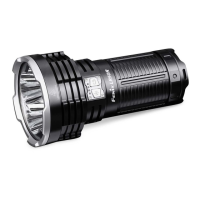
PowerBankFunction
1.Switchoffthe lightandplugtheUSBType‐Csocketofthe chargingcableintothe light,then
connecttheanotherUSB Type‐Csocketof thechargingcabletothe digitaldevicewithanUSB
Type‐Cport.
2.Singleclickeitheroftheswitchestobegindischarging,theindicatorswillrecedefromrightto
lefttodisplaythestatus.
3.Besuretoclosetheanti‐dustcoveroncechargingiscompleted.
Note:
1. OnlyEcooutputlevelisavailablewhencharginganddischarging.
2. TheUSBType‐Cportintheneckcombinescharginganddischargingfunction.
3. The light and the included charging cable support PD3.0/PD2.0, QC3.0/QC2.0fast charging
protocols,theexternaladapterwillbeauto‐detectedifitsupportsthementionedfast‐charging
protocols,ifitdoesthen4.0Achargingcurrentwillbeselected,or2.5Achargingcurrentwillbe
selected.
4.Rechargeastoredlighteveryfourmonthstomaintainoptimumperformanceofthebattery.
BatteryLevelIndication
Withthelightswitchedoff,singleclickeitherswitchtocheckthebatterystatus,whichwilllastfor
3seconds.
Fourbluelightson:100%‐80%
Threebluelightson:80%‐60%
Twobluelightson:60%‐40%
Onebluelighton:40%‐20%
Onebluelightflashes:20%‐0
Note:ThisonlyworkswiththeincludedFenixARB‐L52‐16000batterypack.


 To Next Page