Need help?
Do you have a question about the Fenix LR50R and is the answer not in the manual?
Details the function of the main and auxiliary switches for operation.
Instructions for turning the flashlight on and off.
How to switch between general and functional modes.
Procedure for cycling through different brightness levels.
How to lock and unlock the flashlight to prevent accidental activation.
Accessing instant turbo, strobe, and SOS modes.
How the flashlight remembers the last selected output.
Details time-limited downshift and overheat protection mechanisms.
Describes how the flashlight warns of low battery levels.
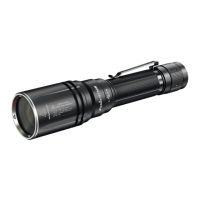
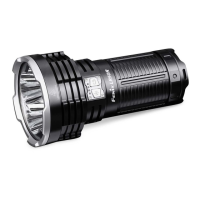
The Fenix LR50R is a high-intensity flashlight designed for powerful illumination and versatile use, featuring both general and functional modes to adapt to various lighting needs. Its robust design and intelligent features make it suitable for demanding environments and emergency situations.
The Fenix LR50R operates with a dual-switch system for intuitive control. The right switch serves as the main switch for turning the device on/off and selecting output levels in general mode. The left switch, or auxiliary switch, is used for on/off control and output selection in functional mode. To power the light on or off, either switch needs to be pressed and held for 0.5 seconds.
In general mode, users can cycle through various brightness levels: Eco, Low, Med, High I, High II, and Turbo, by single-clicking the main (right) switch. For quick access to functional mode, a single click of the auxiliary (left) switch will activate Turbo. When in functional mode, a single click of the main (right) switch will revert the light to the previously used output in general mode. Within functional mode, the auxiliary (left) switch allows cycling through Turbo, Strobe, and SOS.
The flashlight incorporates an intelligent memory circuit in general mode, which recalls the last selected output level when the device is turned on again. However, in functional mode, the light will always activate on Turbo for emergency readiness. It's important to note that this memory function is not available when using a 21700 battery.
For safety and convenience, the Fenix LR50R includes a lockout function. When the light is off and unlocked, simultaneously pressing both switches for 3 seconds will lock the device, indicated by two blinks on Eco mode. To unlock, the same action will activate the light on Eco. In a locked state, any switch click or press will result in two one-second blinks, confirming the locked status.
Instant access to emergency modes is also a key feature. With the light off, pressing and holding the auxiliary (left) switch for 0.5 seconds activates instant Turbo. Subsequent single clicks of the auxiliary switch will cycle through Strobe and then SOS.
The LR50R is equipped with an intelligent brightness downshifting sensor. If the light surface is held close to an object (approximately 60mm) for more than 1.5 seconds, the flashlight automatically reduces its output to Eco to prevent overheating. Once the light is moved away from the object for more than 0.8 seconds, it automatically reverts to the previously used output level. This sensor adapts to different materials and colors, though slight variations in sensing distance may occur.
Intelligent protection mechanisms are built into the device. A time-limited downshift feature ensures safety during prolonged high-output use. If Turbo mode is selected for over 20 seconds, the light will gradually reduce its output to 8000 lumens within 60 seconds. Similarly, if High II is selected for over 60 seconds, the output will downshift to 4000 lumens within 60 seconds. These functions are designed to prevent discomfort and danger from overheating.
An overheat protection system further safeguards the device. When operating in High I, High II, or Turbo modes for extended periods, the flashlight can accumulate significant heat. If the internal temperature reaches 60°C or higher, the light automatically reduces its output to lower the temperature. Once the temperature drops below 60°C, users can reselect the higher output modes.
A low-voltage warning system is also integrated. As the battery voltage drops below a preset level, the flashlight automatically downshifts to a lower brightness level until it reaches Eco output. In Eco mode, if the voltage continues to drop, the battery level indicator will blink, prompting the user to recharge or replace the battery.
The Fenix LR50R can function as a power bank. To use this feature, first switch off the light. Plug the USB Type-C socket of the charging cable into the flashlight, then connect the other USB Type-C socket to a digital device with a USB Type-C port. A single click of either switch initiates discharging, with indicators receding from right to left to show the status. After use, ensure the anti-dust cover is closed. Note that only Eco output is available during charging and discharging. The USB Type-C port supports PD3.0/PD2.0, QC3.0/QC2.0 fast-charging protocols, and can auto-detect compatible external adapters for optimal charging currents (4.0A or 2.5A).
Battery level indication provides quick status checks. With the light off, a single click of either switch will display the battery status for 3 seconds. Four blue lights indicate 100%-80% charge, three blue lights 80%-60%, two blue lights 60%-40%, one blue light 40%-20%, and one blinking blue light indicates 20%-0%. This feature is specific to the included Fenix ARB-L52-16000 battery pack.
Proper maintenance is crucial for the longevity and performance of the Fenix LR50R. Disassembling the sealed head is not recommended as it can damage the light and void the warranty. Fenix advises using high-quality batteries. If the flashlight will not be used for an extended period, the battery should be removed to prevent damage from electrolyte leakage.
To prevent accidental activation during storage or transportation, the light should be locked or the battery removed. Stored batteries should be recharged every four months to maintain optimal performance.
Over time, O-rings can wear out, affecting the water seal. Regular inspection and replacement with an approved spare O-ring are recommended to maintain water resistance.
Periodic cleaning of battery contacts is essential for consistent performance. Dirty contacts can cause flickering, intermittent illumination, or complete failure. If such issues occur, first check if the battery needs replacing. If not, clean the contact points, threads, and PCB board contacts with a cotton swab soaked in rubbing alcohol. If these steps do not resolve the issue, contact an authorized distributor.
 General
| Max Lumens | 12000 |
|---|---|
| Beam Distance | 950 meters |
| Water Resistance | IP68 |
| Impact Resistance | 1 meter |
| Charging Time | 4 hours |
| Battery Type | Rechargeable Li-ion battery pack |
| Runtime | Up to 58 hours on eco mode |
| Modes | Turbo, High, Medium, Low, Strobe, SOS |
| LED | Luminus SST70 |
| Charging | USB Type-C |
| Material | A6061-T6 aluminum |
| Color Temperature | Cool white |
| LED Type | Luminus SST70 |

 To Next Page