12
9
12
11
10
8
13
14
15
16
17
18
19
1234 56 7
REFERENCE GUIDE
FRONT, TOP & SIDES VIEW
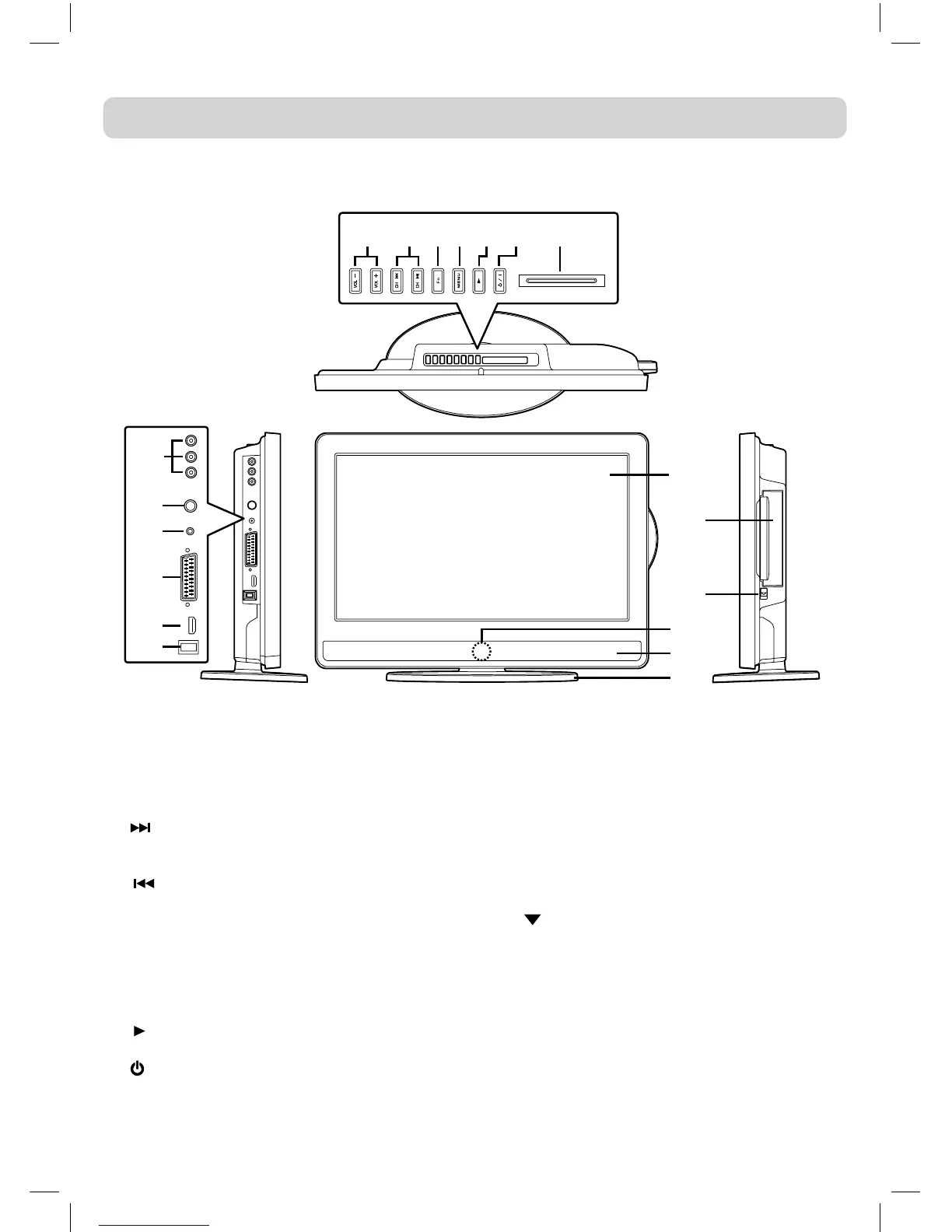
1) – VOLUME + controls
Adjustthevolumelevel.
2) CH buttons
Press to change the TV channels and highlight
selections(Up&Down)onthemenuscreen.
button
Presstoselectnexttitle,chapterortrackonadisc
andfastforwardplayback.
button
Presstoselectprevioustitles,chaptersortracks
onadiscandfastreverseplayback.
3) FUNCTION button
SelectDTV,ATV,AV1,AV2/SCART,YUV/SCART,
DVDorHDMI.
4) MENU button
Presstodisplaytheon-screenTVmenu.
5) PLAY button
Presstostartorresumeplaybackofadisc.
6) / I button
Turnstheunitonandoff.
7) COMMON INTERFACE slot
(ForoptionalConditionalAccessModule)
8) AUDIO IN jacks (Left/Right) / VIDEO IN jack
(AV IN 1)
9) TV Aerial - Coaxial TV antenna input
10) HEADPHONES jack
11) SCART jack (AV IN 2)
12) HDMI jack
13) Power Cord
14) Colour LCD Screen
15) Disc Door
Pushgentlytoclosethediscdoor.
16) PUSH OPEN knob
Pushdowntoopenthediscdoor.
17) Remote Sensor
Donotblockthissensorortheremotecontrolwill
notwork.
Standby Indicator
IndicateswhethertheunitisONorinSTANDBY
(OFF)mode.
Light On:TheunitisinSTANDBY.
Light Off: TheunitisturnedON.
18) Speakers
19) Removable stand


 To Next Page