28
PROGRAMMED MEMORY
1.PresstheMEMORYbuttontoenterprogrammode.
2.Press the
button to highlight theList.Pressthe or
buttontochoosethedesiredlesintotheprogramlist.Press
theENTER/OKbuttontoconrm.Repeatthesestepstoenter
morelesinthelist.
3.Pressthe
buttontoselect“PLAY”option.PresstheENTER/
OKbuttontostartplayingtheprogrammedlist.Orpressthe
buttontoselect“LIST”option.PresstheENTER/OKbutton
toshowtheprogrammedlist.
Ifyouwanttoedittheprogramlist,pressthe
or button
tohighlightaleto“Deleteit”orselectthe“DeleteAll”and
presstheENTER/OKbuttontodeletethelist.Pressthe
or
buttonstohighlight“Return”,presstheENTER/OKbuttonto
returntoProgramMode.
4.Press theYELLOW button toenterSORTFILE menu. Press
the
, , or buttonsto select theoptions andpress the
ENTER/OK button to confirm. Press the YELLOWbutton
againtoreturntoProgramMode.
Note:
•Youcanpressthe
PAUSEbuttontointerruptplayback,andpressthe PLAYbuttontoresume
playback.Pressthe
STOPbuttontostoptheplayback.PressMEMORYbuttontoexittheprogram
mode.
Program Mode
1920x1080 2010/9/1
List Play
A000001
000002
A000003
A000004
A000005
A000006
A000007
A000008
A
1
2
3
4
5
6
7
8
ROOT
A000001
000002
A000003
A000004
A000005
A000006
A000007
A000008
A
1
2
3
4
5
6
7
8
ROOT
SORT FILE:
Method:
Bytype
By name
By date
Ascending
Descending
Sequence:
Exit
PROGRAMMABLE PHOTO FILE PLAYBACK
CD/DVD PROGRAMMABLE PLAYBACK
PROGRAMMABLE MEMORY
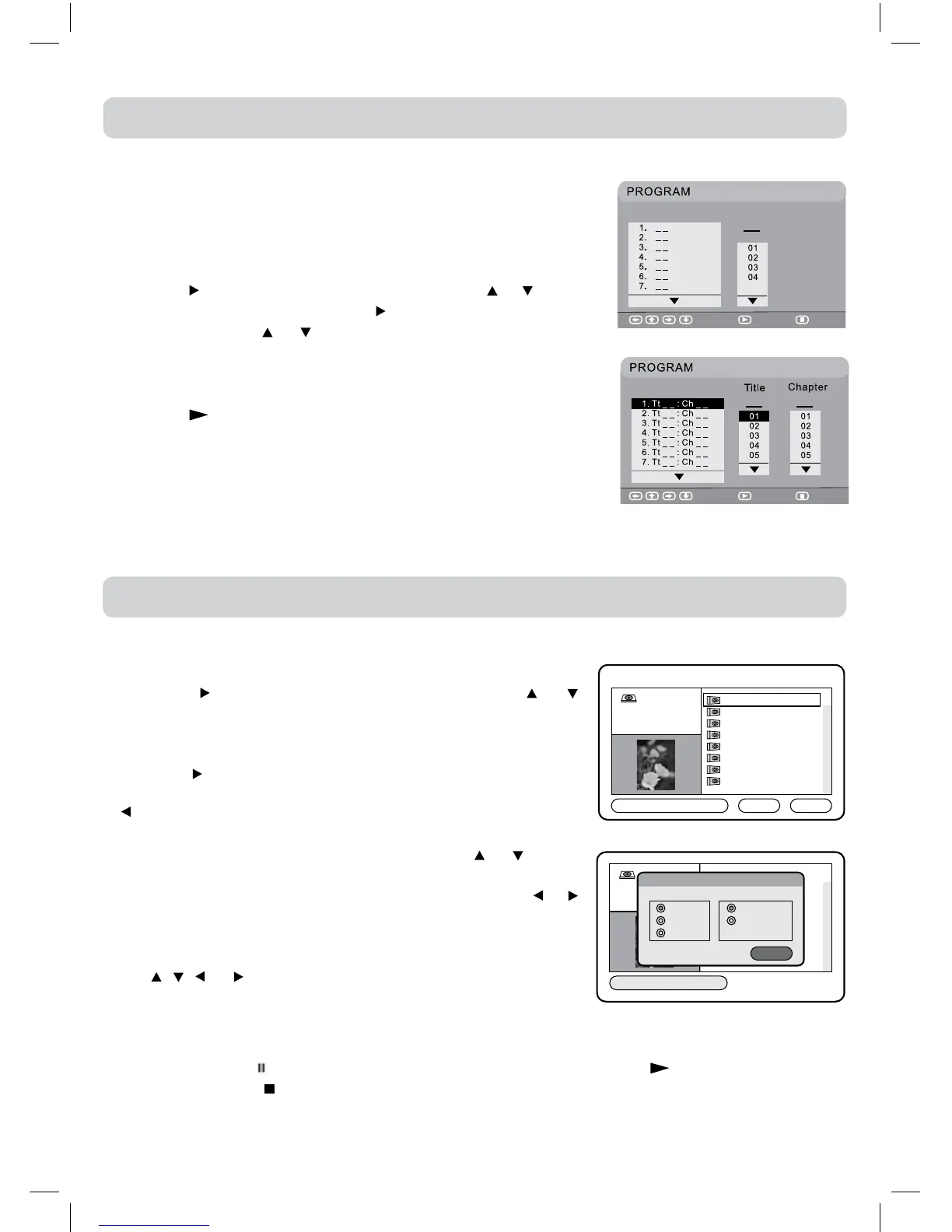
Thetwotypesofprogrammedplaybackprovidedbythisunitare
title/chapterforDVDandtrackforCD.
TRACK/TITLE/CHAPTER PROGRAMMED PLAYBACK
1.PresstheMEMORYbutton.Ascreenwillbeshownasright.
2.Pressthe
buttontohighlighttheTitle.Pressthe or buttonto
choosethedesiredtitle.Pressthe buttonagaintohighlightthe
Chapter.Pressthe or buttontochoosethedesiredChapter.
Press the ENTER/OK button to conrm. The highlight bar will
movetothenextitemautomatically.
3.Repeatstep2toadduptotwentytitlesandchapters.
4.Pressthe PLAYbuttontostarttheprogrammedplayback.
•TrackprogrammedplaybackforCDisliketitle/chapterprogramming
butjustentertracknumbers.
Select Play Clear
DVD
CD
Select Play Clear
Track


 To Next Page