19
ANALOGUE TV / DTV SETUP
LOCK MENU
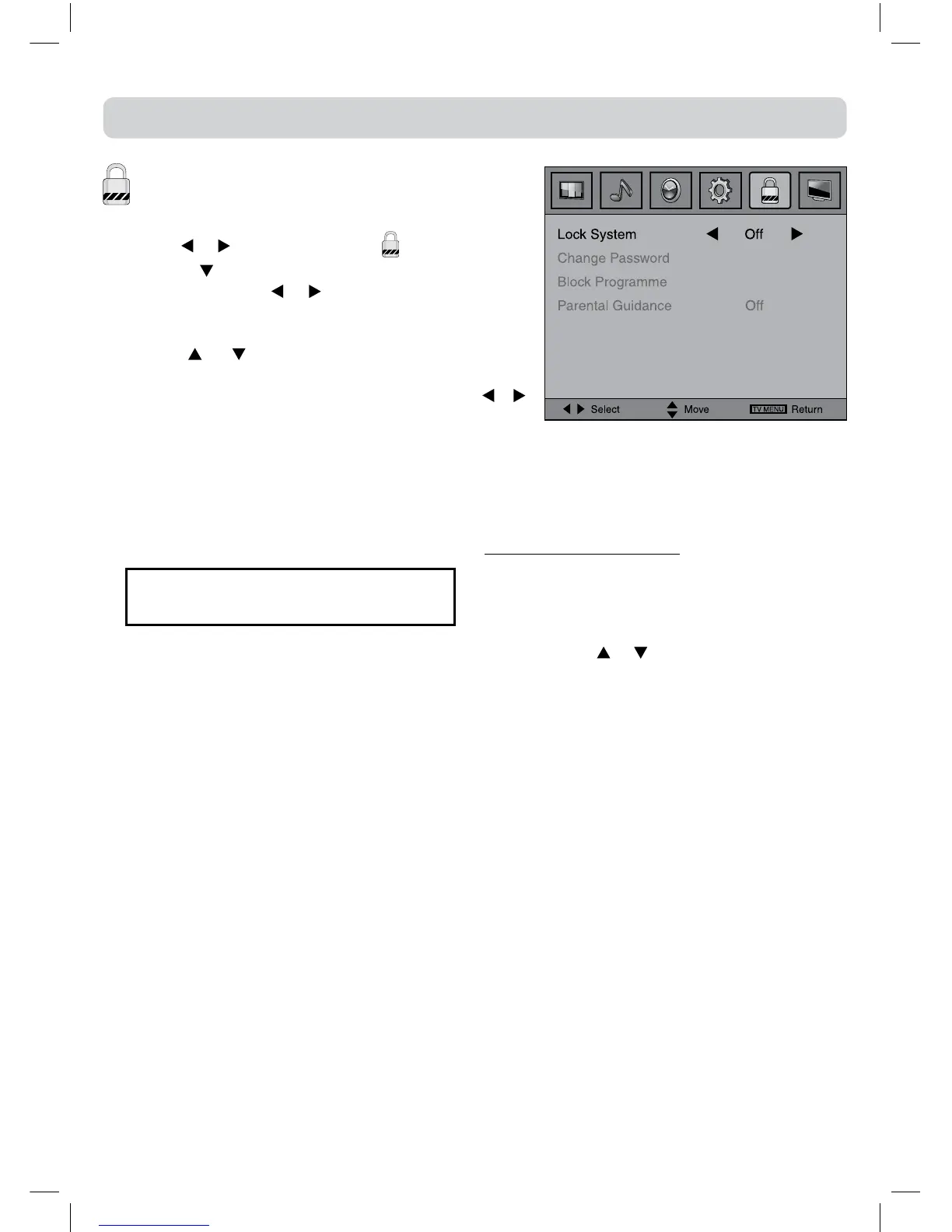
1.PresstheTV MENUbutton.
2.Usethe
or buttontoselectthe .
3.Press the
buttonto highlight Lock System then
pressENTER/OKor or toenter,enterpasswordto
proceed.
(The default password is 0000.)
4.Usethe or buttontoselecttheoptions(Lock
System, Change Password, Block Programme,
Parental Guidance),presstheENTER/OKor /
buttontoadjust.
5.Press the TV MENU button to return to previous
menu.
6.Toexitthesetupmenuandreturntothenormalscreen,presstheEXITbutton.
• LockSystem:Selecttolockorunlocktheprogrammes.
• ChangePassword:Ifyouchangethepassword,rememberyourpassword.
• BlockProgramme:EntertheBlockProgrammemenu,pressthe
or buttontoselectachannel,
presstheGREENbuttontoLockorUnlockthechannel.
• ParentalGuidance:Selectacensorshipleveltocensorandblocktheprogrammes.
Note:
ThissystemwillonlyworkifthecorrectinformationistransmittedbytheTVchannel.
If you forget the password, enter " 8888 "
to unlock parental control.


 To Next Page