18
ANALOGUE TV/ DTV SETUP
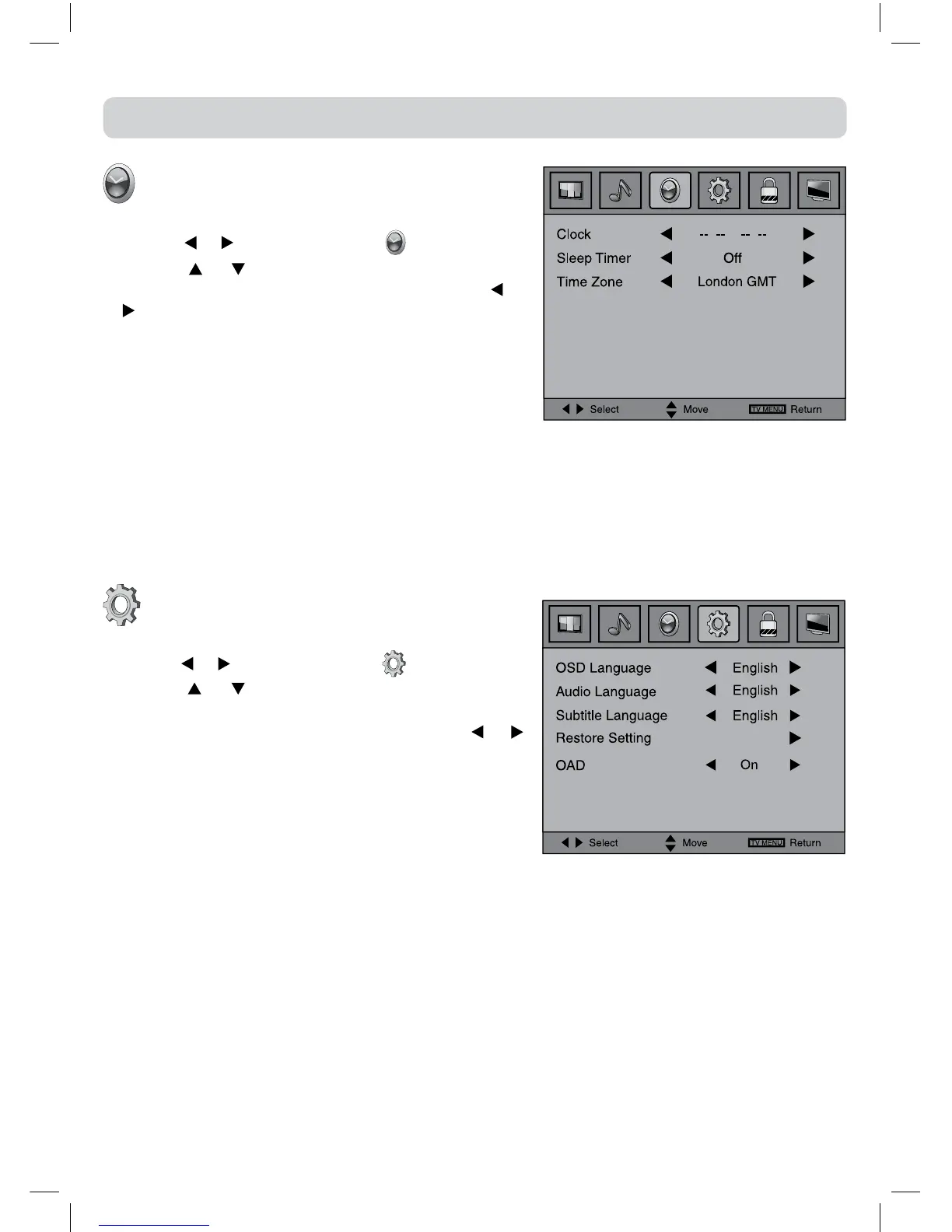
TIME MENU
1.PresstheTV MENUbutton.
2.Usethe
or buttontoselectthe .
3.Use the
or button toselect the options (Clock,
Sleep Timer, Time Zone),adjustthemusingthe or
button.
4.PresstheTV MENUbuttontoreturntopreviousmenu.
5.To exit the setup menu and return to the normal
screen,presstheEXIT button.
• Clock:Theclockissetautomaticallywhenreceiving
adigitalsignal.
• Sleep Timer : Select the time to turn the unit to
Standbymodeautomatically:Off->5min--->90min->120min.
• TimeZone:Selectyourtimezone.
SETUP MENU
1.PresstheTV MENUbutton.
2.Usethe
or buttontoselectthe .
3.Usethe
or buttontoselecttheoptions(OSD
Language, Audio Language, Subtitle Language,
Restore Setting, OAD),adjustthemusingthe
or
button.
4.Pressthe TV MENU buttonto return to previous
menu.
5.Toexitthesetupmenuandreturntothe normal
screen,presstheEXITbutton.
• OSDLanguage:SelectyourpreferredOnScreenDisplaylanguage.
• AudioLanguage:Selectyourpreferredaudiolanguage.(Availablefordigitalchannelsifmultiple
audiolanguagesarebroadcasted.)
• SubtitleLanguage:Selectyourpreferredsubtitlelanguageorturnoffsubtitle.(Availablefordigital
channelsifmultiplesubtitlelanguagesarebroadcasted.)
• RestoreSetting:PresstheENTER/OKbuttontorestorethesystemsettingstothefactorydefault.
• OAD (Over Air Download) :Selecttoenable/disableOAD(OverAirDownload)feature.This
shouldnormallybeSettoONtoallowtheTVtobeautomaticallyupdgradedifthisisneededfrom
timetotime.


 To Next Page