4.5.3
User parameter settings:
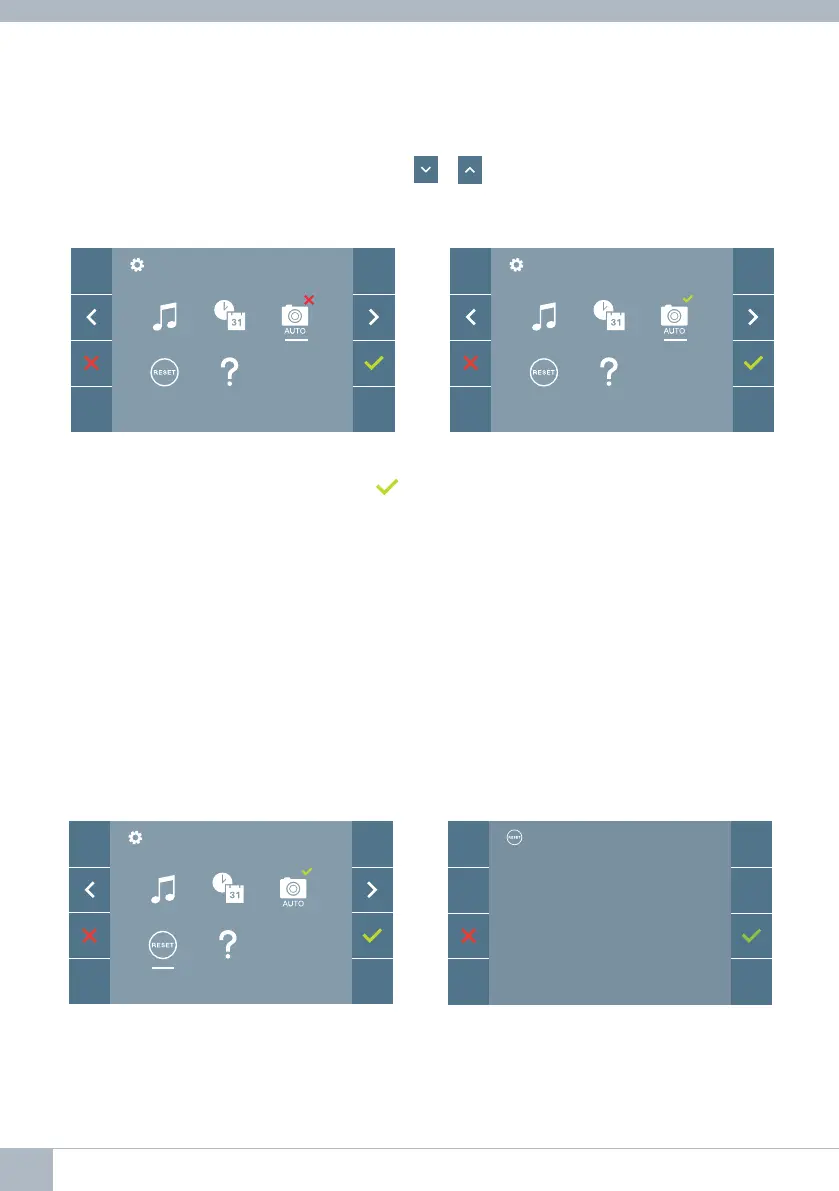
ENABLE/DISABLE IMAGE CAPTURE
4.5.4 User parameter settings: USER RESET
Notes:
- You are not permitted to validate an incorrect date and time, and the closest date
and time will be suggested.
- Holding down the navigation icons - will cause the numbers to change
more quickly.
With this option, you can enable or disable the automatic capture of images. Select the
image capture icon and press confi rm
to activate or deactivate it.
The monitor can take an automatic picture within 3 seconds of receiving a call from an
outdoor panel. According to the European Union legislation about data protection ((EU)
2016/679), the capture of images may be restricted. This feature is deactivated by default
in all monitors, although can be activated at your own responsibility.
Furthermore, the legislation may force to place a sign next to door stations, indicating
that monitors can capture images. You can download it at https://www.fermax.com/intl/
en/corporate/utilities.html.
With this option you can reset all settings to factory default values, keeping the address
already programmed into the monitor. Selecting and confi rming the option.
If you want to perform a reset, confi rm
the option.
RESET?
20 DUOX VEO MONITOR









 To Next Page