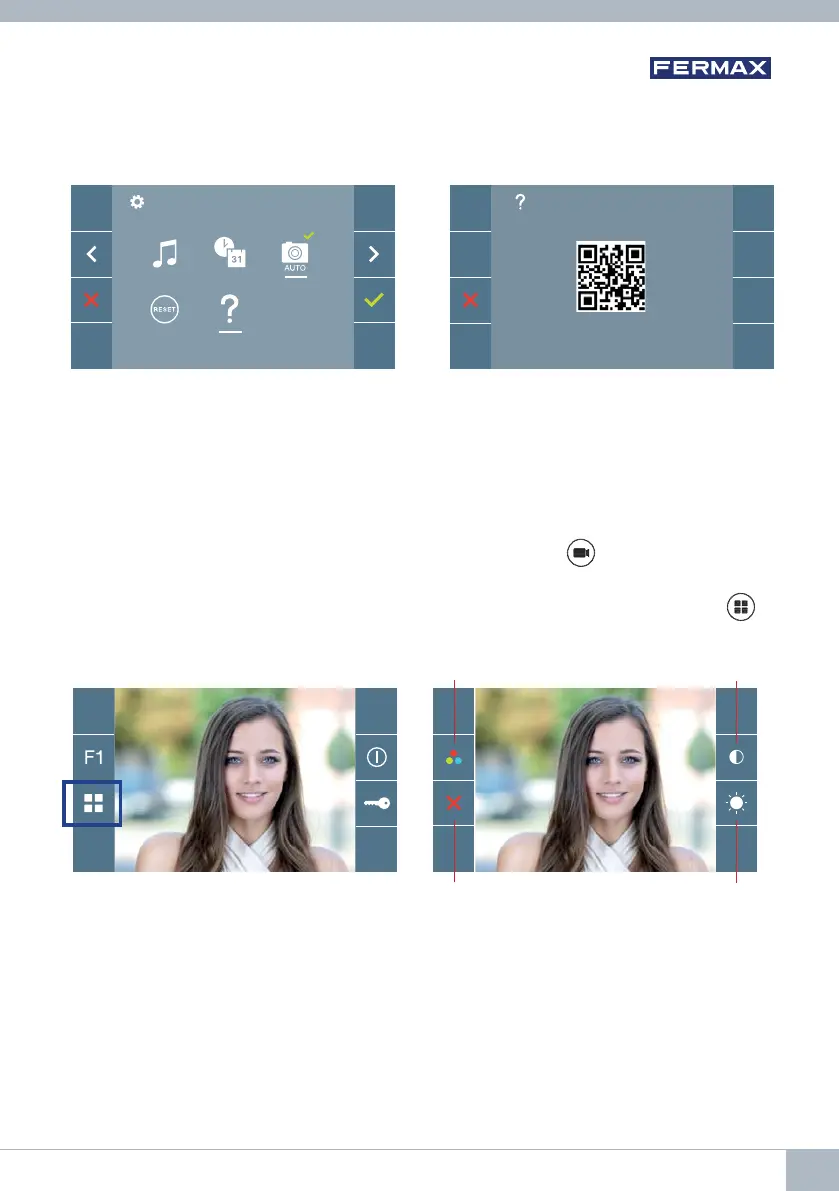
The monitor allows you to adjust the brightness, contrast and colour while a call is incoming
(communication not established) or when auto-on is in progress (camera). See Chapter
Operation: Auto-on.
While the video image is on the screen, you may press the button briefl y (Menu)
to
display a shortcut menu allowing adjustments to the brightness, contrast, and colour of
the image.
1. Select the contrast, brightness and colour with the corresponding buttons.
The audio can also be activated from these screens (establish communication).
4.5.5 User parameter settings: HELP
The screen will display a QR code that allows access to a promotional link that explains
in detail the digital DUOX system that Fermax has created.
5. SETTINGS: VIDEO AND AUDIO
5.1 SETTINGS: VIDEO SETTINGS: BRIGHTNESS - CONTRAST - COLOUR
Colour
Cancel
Contrast
Brightness
DUOX VEO MONITOR 21









 To Next Page