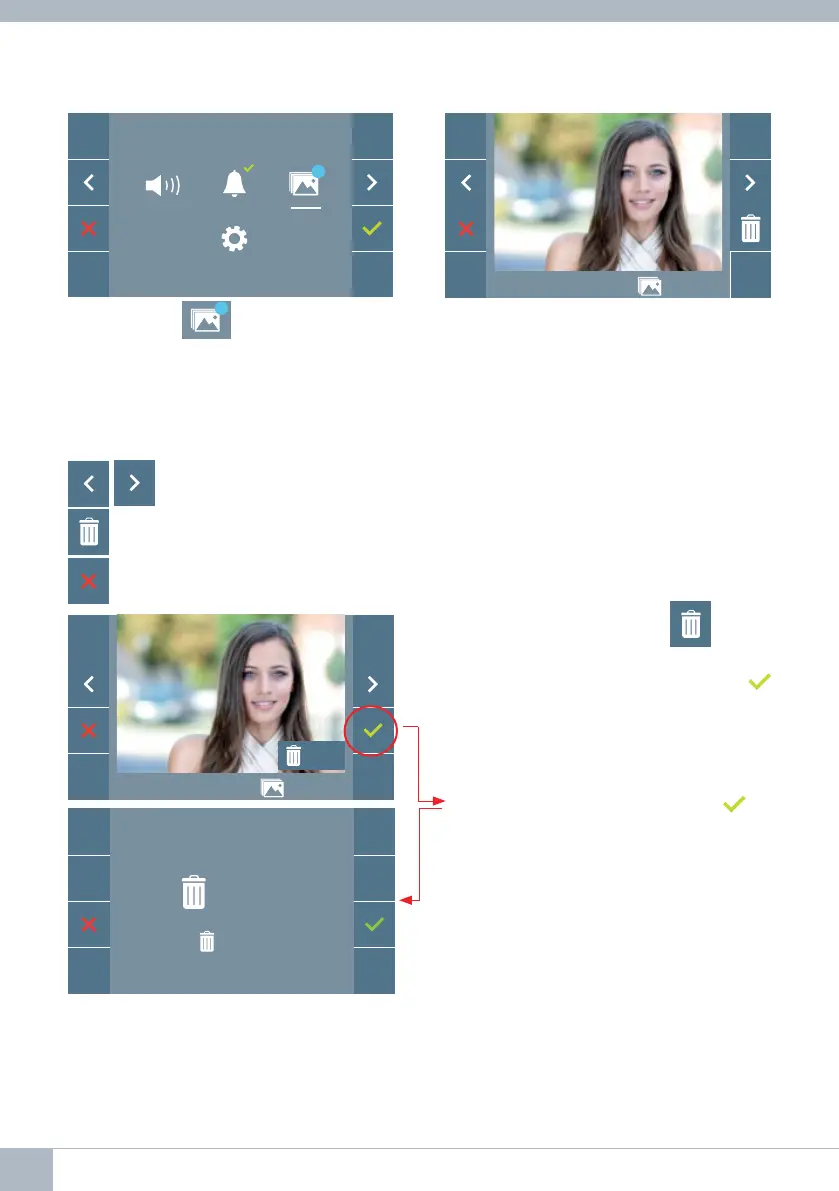
Select the icon
99
to display the various
photos taken.
The most recent image will be displayed
with the date, time and the photo number.
F2
99
10/04/2019 09:28 130 / 149
10/04/2019 09:28 130 / 149
OK?
A contextual menu will appear:
: To select/view the photos stored.
: To clear images.
: To cancel and go to the previous screen.
If you press the Erase option
you will
be taken to the delete confi rmation screen,
and by pressing the confi rmation icon
the selected picture will be deleted. The
user can navigate through the saved pho-
tos, even when the confi rmation window is
active.
Note: If you press the confi rm icon
for
5 seconds, all images can be deleted upon
confi rmation.
OK ?
1...149
28 DUOX VEO MONITOR










 To Next Page