Pag 21
Kit Halo & iLoftKit Halo & iLoft
Kit Halo & iLoftKit Halo & iLoft
Kit Halo & iLoft
Kit Halo & iLoftKit Halo & iLoft
Kit Halo & iLoftKit Halo & iLoft
Kit Halo & iLoft
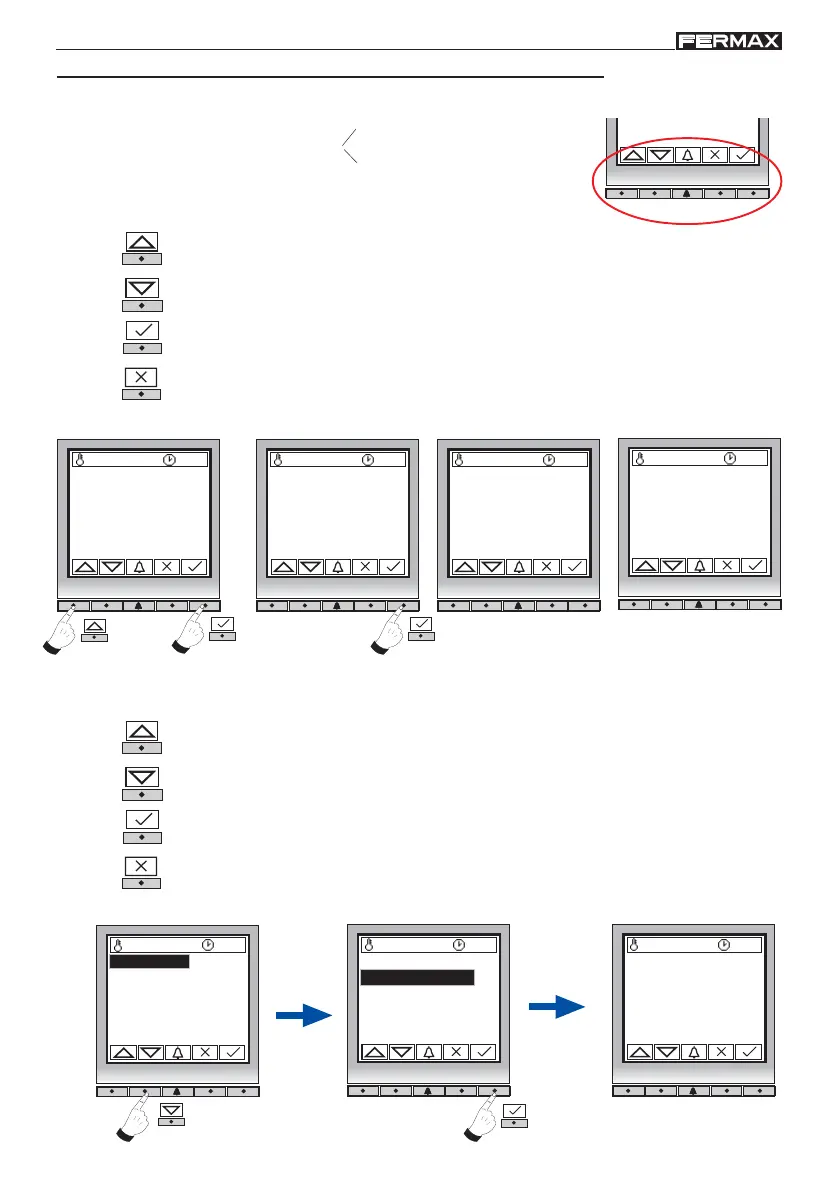
The functionality may be for
Data Introduction
Options Menu Selection
- Data Introduction:
Upward Arrow key: To enter digits/symbols, shown in ascending order: 1, 2, 3, 4 ...
etc.
Downward Arrow key: To enter digits/symbols, shown in descending order: #, *, 9, 8
... etc.
Confirmation key: Press after entering each digit/symbol.
Cancel key or go back to the previous digit/symbol.
Example: We enter the administrator (installer) code -> 24797
Upward Arrow key: To move up through the menu.
Downward Arrow key: To move down through the menu.
Confirmation: Press after selecting the desired menu.
Cancel key or return to previous menu.
- Options Menu Selection:
27 ºC 10:54
27 ºC 10:54
2.1 Clock
2.2 Language
2.3 Panel Nr
2.4 Panel Type
2.5 Exit button
2.6 Backlight
Example: Select Configuration menu.
Programming menu
27 ºC 10:54
Master mode
1.Users
2.Configuration
3.Codes
4.Timing
5.Message
6.Utilities
27 ºC 10:54
Programmer code:
2 4 _ _ _
. . . .
27 ºC 10:54
Programmer code:
2 4 7 9 7
1.Users
2.Configuration
3.Codes
4.Timing
5.Message
6.Utilities
1.Users
2.Configuration
3.Codes
4.Timing
5.Message
6.Utilities
Key functions














 To Next Page