13
Loft Compact VDSLoft Compact VDS
Loft Compact VDSLoft Compact VDS
Loft Compact VDS
Loft Compact VDSLoft Compact VDS
Loft Compact VDSLoft Compact VDS
Loft Compact VDS
Hundreds: Press the button
Tens: Press the button
Units: Press the button
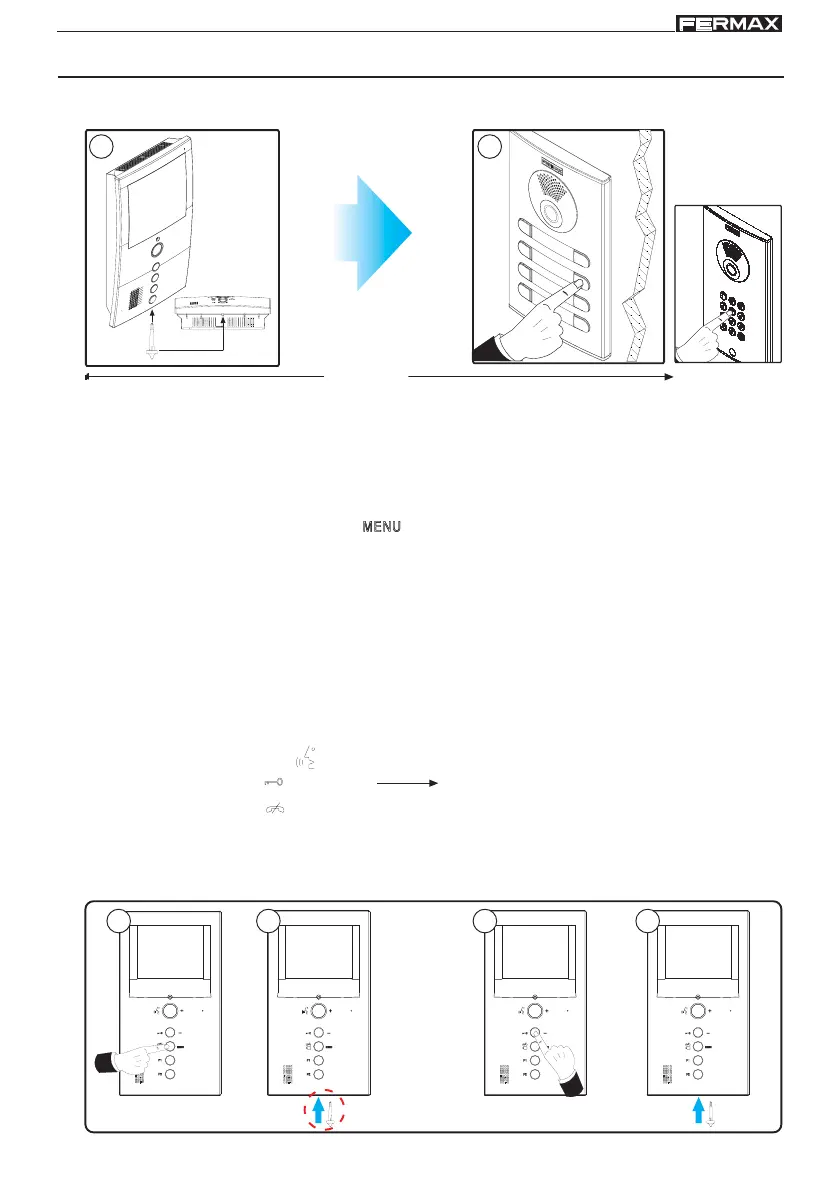
1º. With the monitor connected, press the programming button. A confirmation tone is heard.
2º. Press the house call button. Another confirmation tone is heard.
* The monitor will not work unless it has been programmed.
MONITOR PROGRAMMING
Option 1: From Panel + Monitor
Option 2: From the Monitor
1. Enter configuration mode: Press the button for 5 seconds. The LED blinks once per second
and a confirmation tone is heard.
2. Set the monitor in programming mode: With the monitor connected, press the programming button
for 1 second.
At this point, the call number currently programmed is indicated by means of high-pitched tones. First,
the Hundreds, then Tens, and finally the Units.
To separate each unit, the LED comes on and a lower tone is heard.
3. Program the call number: Every time the button corresponding to hundreds, tens or units is
pressed, the figure increases by one.
4. Exit programming: Press the programming button or wait for 30 seconds without pressing any buttons.
When you exit prgramming mode, the number indicated is stored. If it is correct (between 1 and
199), a confirmation tone is heard. If it is not correct, an error tone is heard.
If 9 is reached and the button is pressed
again, an error tone is heard. The next
button pressed starts off from number1.
< 2 min
i
Current no:12
0
moc
1
beep
moc
2
beep
beep
moc
1 2
1 2 3 4
(5 sec.)









 To Next Page