9
user’s manual
HYPSOS by Ferrum
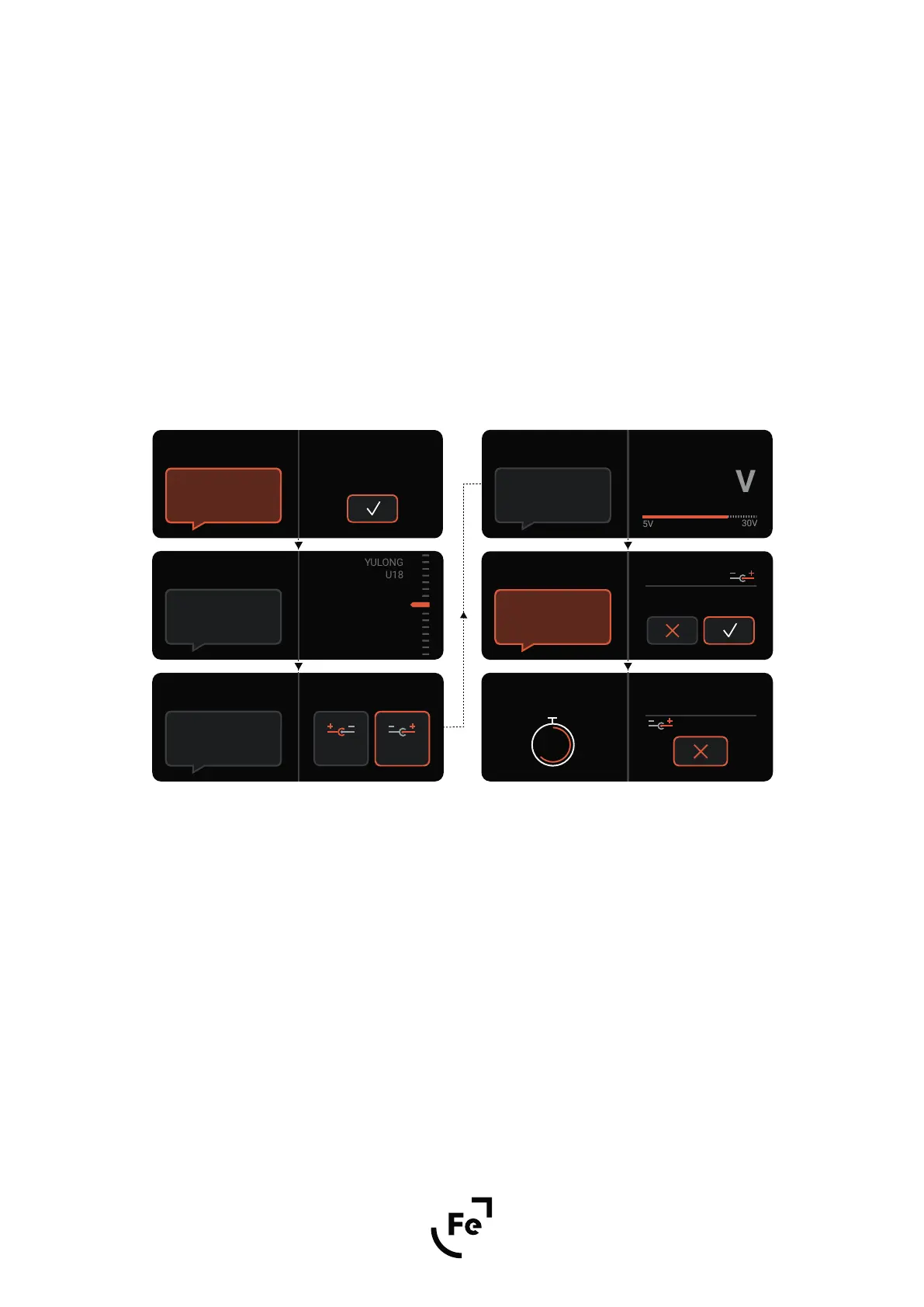
If the device you want to power is not in the list, select "Manual configuration" and confirm by pressing the dial.
The first window allows you to select the appropriate polarity for your device. You can choose between two
options: the middle pin of the power plug is the positive pole or the middle pin of the power plug is the negative
pole.
After selecting the appropriate polarity, confirm your choice by pressing the dial.
In the next window, select the voltage appropriate for powering your device. You can choose between 5V and
30V. Confirm your choice of voltage by pressing the dial.
Above parameters should be set according to the recommendations of the manufacturer of the device you
want to power! Ferrum refuses every liability for damage to equipment due to an incorrect connected DC
output voltage.
If you see your device in the list, select it and confirm by pressing the dial. HYPSOS will show you a summary of
the preset and ask you to approve the settings. It is a good idea to check if the voltage and polarity that
HYPSOS proposes are correct for the device you want to power.
Once the settings have been approved, a timer will appear on the screen counting down the time to apply the
voltage to the HYPSOS output - you still have 9 seconds to change the settings if necessary. To stop the count-
down and return to the settings, press the knob.
After 9 seconds, the previously set voltage is applied to the DC HYPSOS output.
Done!
Note: The list of available devices can be updated by updating the firmware. Let us know if you want us to add
a device that is not on the list.
Manual configuration
Thank you for
choosing Ferrum!
Welcome!
Press knob to
start the configuration
If you do not find
your device on the list,
please choose manual
configuration.
Choose the Device
Manual
Configuration
Set polarity accordingly
to the device’s
specification.
Set Polarity
Center
Positive
Center
Negative
Set voltage accordingly
to the device’s
specification.
Set Voltage
18.0 V
Attention: Wrong
voltage level and
polarity may destroy
your device!
Apply Parameters
18.0 V
Polarity
Voltage
Powering Up in:
6
18.0 V
Custom
device


 To Next Page