4.4. Connecting the HYPSOS
4.5. Turning on your HYPSOS for the first time
8
user’s manual
HYPSOS by Ferrum
The first time you start the HYPSOS, it needs to be configured to properly power other devices.
After start-up press the knob and HYPSOS will display a list of devices, which have already configured presets.
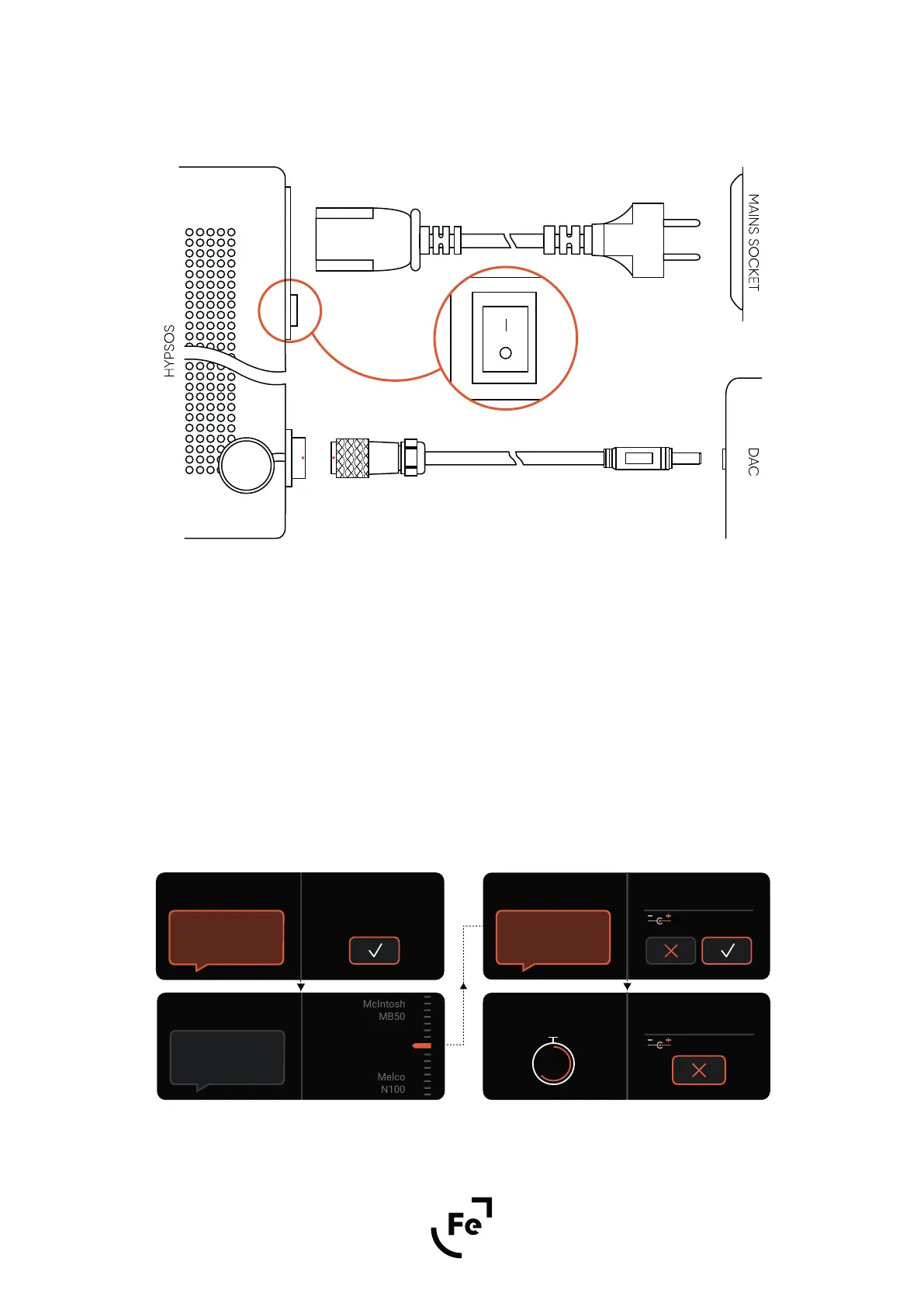
DC output location and connecting DC and AC mains cable.
Make sure that all cables are correctly connected to the HYPSOS and powered device (Fig. 4). Then use the
main switch to start the HYPSOS (Fig.2D) .
DC
AC
SWITCH
Selecting a device from the list
Figure 4.
Thank you for
choosing Ferrum!
Welcome!
Press knob to
start the configuration
Attention: Please
ensure that the proper
device is selected!
Submit Selection
12.0 V
McIntosh
MS500
Powering Up in:
6
12.0 V
McIntosh
MS500
If you do not find
your device on the list,
please choose manual
configuration.
Choose the Device
McIntosh
MS500


 To Next Page