Festo — CPX(-M)-FB33/34/35/43/44/45 — 2022-05f
4.2.4 Control elements
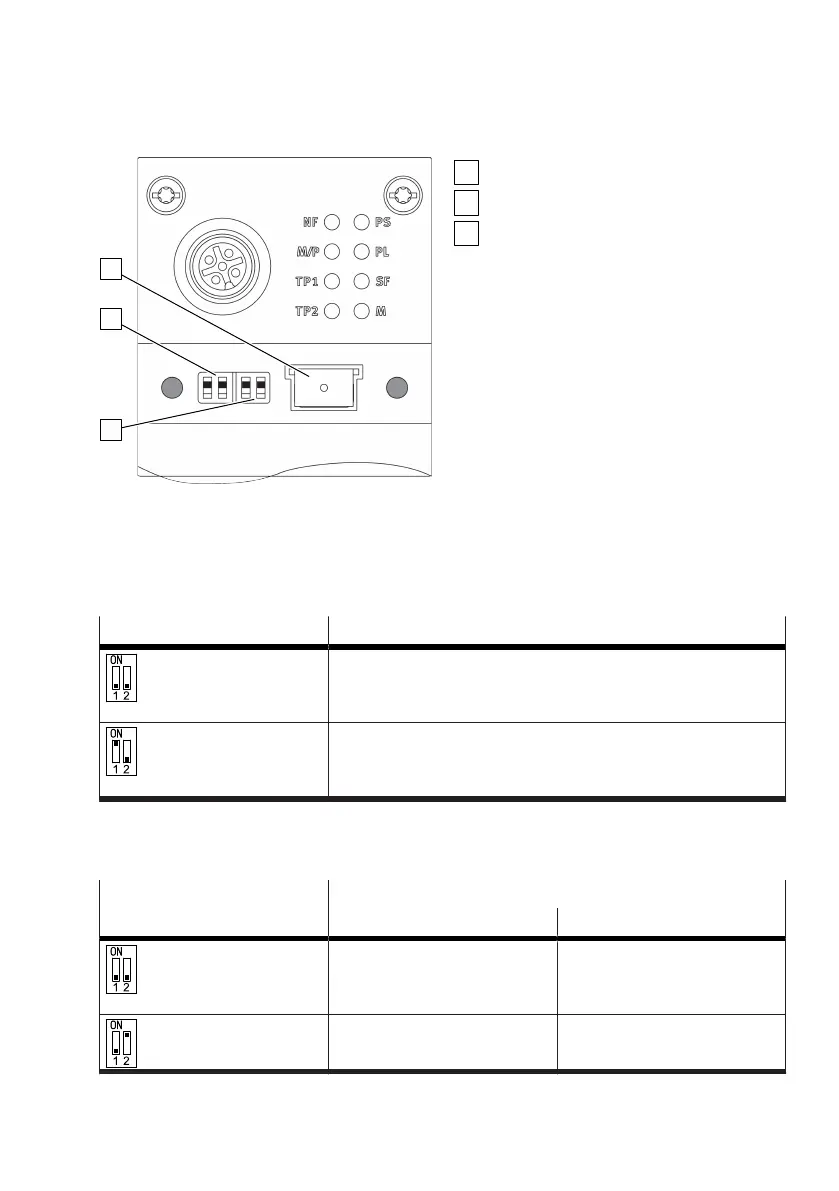
Fig. 2: Control elements for PROFINET
Memory card
DIL switch: operating mode
DIL switch: diagnostics mode
DIL switches
A bus node must be operated as a master in the CPX terminal. The "Remote I/O" operating mode must
be set on this bus node. The "Remote Controller " operating mode must be set on all other bus nodes.
The [2] DIL switch is used to set the operating mode :
DIL switch [2] Description
Factory setting:
1: OFF
2: OFF
Remote I/O operating mode
All functions of the CPX terminal are controlled by the PROFINET
IO controller.
1: ON
2: OFF
Remote controller operating mode
A CPX-CEC-xx takes over the I/O open-loop control. Requirement:
CPX Terminal with CEC.
Tab. 5: Setting the operating mode
The diagnostics mode or the data field size is set with the [3] DIL switch depending on the operating
mode:
DIL switch [3] Description
Remote I/O Remote controller
Factory setting:
1: OFF
2: OFF
Diagnostics switched off. Data field size:
8 bytes I/8 bytes O
1: OFF
2: ON
Status bits switched on. Data field size:
16 bytes I/16 bytes O



 To Next Page