EasyManua.ls Logo

Festo Span Series - User Manual

Festo Span Series
6 pages
Print Icon
To Next Page IconTo Next Page
Loading...
Pressure sensor SPAN
Festo AG & Co. KG
Postfach
73726 Esslingen
Germany
+49 711 347-0
www.festo.com
Operating instructions 8049275
1607
[8049280]
Original: de
Pressure sensor SPAN English..........................................
1 Product description
The operating instructions describe the entire function range. The function range is
limited, depending on the product variant.
Note
You can find detailed specifications for the product, the device description file
(IODD) with a description of the IO-Link parameters and the declaration of con
formity at: è www.festo.com/sp.
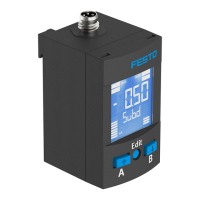
1.1 Overview
1
2
3
456
1 Display
2 Electrical connection
3 Pneumatic connection
4 B-key
5 Edit button
6 A-key
Fig. 1 Representation of other variants can deviate from this
1.2 Characteristics
Characteristic Value Description
Type SPAN Pressure sensor
Pressure
measuring range
-B2, -B11, -P025, -P05, -P1, -P2,
-P6, -P10, -P12, -P16, -V025,
-V05, -V1
è Technical data
Supply port R Relative pressure
Pneumatic port -G18, -R18, N18, -M5,
-Q4,
Thread Gx, Rx, NPTx, M5
Push-in connector 4 mm
Thread type
M
F
None
Male thread
Female thread
Electrical
output 1
-PNLK
-PN
Switching output PNP / NPN / IO-Link
PNP / NPN
Electrical
output 2
-PNVBA
-PN
PNP / NPN / 0…10 V / 1…5 V / 4…20 mA
PNP / NPN
Electrical
connection
-L1 Plug connector, design L1
Certificate
+T
Without
With inspection report
Fig. 2
2 Safety
Intended use
The pressure sensor SPAN is intended for monitoring pressure of compressed air
and inert gases in the piping.
General safety information
Only use the product in its original status, without any unauthorised modifications.
Only use the product if it is in an excellent technical status.
The product is intended for use in industrial environments. Measures may need
to be implemented in residential areas for radio interference suppression.
Take into consideration the ambient conditions at the location of use.
Operate the product only with compressed air of the specified air quality class
(è Technical data).
Observe the specifications on the rating plate.
Comply with all applicable national and international regulations.
Disposal
Observe the local specifications for environmentally friendly disposal.
3 Function and application
The sensor converts pneumatic pressure values (relative pressure) into electrical
signals, which can be used for control or regulating functions. Measurements are
carried out using a piezoresistive sensor element with a following electronic evalu
ation unit. Interfacing to the higher-level system is provided by 1 or 2 switching
outputs, an optional analogue output and an optional IO-Link interface.
The switching outputs can be configured for monitoring of a threshold value,
a pressure range or a differential pressure. The outputs can be set as PNP or NPN
and normally open (NO) or normally closed (NC). Via the IO-Link interface, process
values can be read out and parameters changed and transmitted to additional
devices.
3.1 Operating statuses
Operating status Function
RUN mode Basic status after the operating voltage is switched on
Display of the current measured value
SHOW mode Display of the current settings
EDIT mode Setting or modification of parameters
TEACH mode Acceptance of the current measured value to determine switching
points
Fig. 3
3.2 Switching functions
Threshold value comparator for monitoring of a pressure threshold
Function NO (normally open) NC (normally closed)
Switching function:
1 switching point (SP)
TEACH mode:
2 teach-in points (TP1, TP2)
SP = ½ (TP1+TP2)
TP1 TP2
HY
1
0
Out
p
SP
TP1 TP2
SP
HY
1
0
Out
p
Fig. 4
Window comparator for monitoring of a pressure range
Function NO (normally open) NC (normally closed)
Switching function:
2 Switching points
(SP.Lo, SP.Hi)
TEACH mode
1)
:
2 teach-in points (TP1, TP2)
TP1 = SP.Lo, TP2 = SP.Hi
HY HY
TP1=SP.Lo TP2=SP.Hi
1
0
Out
p
HY HY
TP1=SP.Lo TP2=SP.Hi
1
0
Out
p
1) SP.Lo = smaller pressure/vacuum value, SP.Hi = larger pressure/vacuum value, dependent on the
Teach sequence
Fig. 5
Auto difference monitoring d_|¯|_
This funciton permits monitoring of a pressure value for constancy.
If the applied pressure is constant in the range between [SP.Lo] and [SP.Hi], the refer
ence pressure PRef is automatically determined. The result is a switching operation at
the output. The signal change signals the start of pressure monitoring.
If the pressure remains in the monitoring range [d.SP] around PRef, the pressure is
stable. When the monitoring range is left (e.g. caused by a leakage in the system),
the output switches back.
Question and Answer IconNeed help?

Do you have a question about the Festo Span Series and is the answer not in the manual?

Summary

Product description

Overview

Provides a visual overview of the pressure sensor SPAN and its components.

Characteristics

Details the technical characteristics and specifications of the pressure sensor variants.

Safety

Intended use

Specifies the intended application of the pressure sensor for monitoring compressed air and inert gases.

General safety information

Outlines crucial safety guidelines for the proper and safe operation of the product.

Disposal

Advises on the environmentally friendly disposal of the product.

Function and application

Operating statuses

Describes the different operating statuses of the sensor, such as RUN, SHOW, and EDIT modes.

Switching functions

Explains the different switching functions like threshold value and window comparators.

Auto difference monitoring

Details the auto difference monitoring function for pressure constancy.

Installation

Mechanical and pneumatic

Covers mechanical mounting considerations and pneumatic connections for the sensor.

Electrical

Provides essential information and warnings regarding the electrical connection of the sensor.

Commissioning

LCD display

Explains the components and information displayed on the sensor's LCD screen.

Switch on sensor (RUN mode)

Describes the initial steps to switch on the sensor and enter the RUN mode.

Displaying parameters (SHOW mode)

Details how to view sensor parameters using the SHOW mode and A/B keys.

Enter the security code (EDIT mode)

Guides on how to enter the security code to unlock parameter settings.

Configuring switching output (EDIT mode)

Explains the process for configuring the switching outputs for OutA and OutB.

Change device settings (EDIT mode)

Outlines how to modify device settings like filter and unit via the EDIT mode.

Set analogue output (EDIT mode)

Describes the procedure for setting the parameters of the analogue output.

Replicating parameters (EDIT mode)

Details how to copy parameters from a master sensor to a device sensor.

Menu structure

Presents a visual overview of the sensor's menu structure and navigation.

Zero point synchronisation (zero adjust)

Explains how to perform zero point synchronization for accurate pressure readings.

Teach switching points (TEACH mode)

Describes the process of teaching switching points for output configuration.

Operation

Caution

Warns about potential property damage due to high temperatures during operation.

Restoring factory settings

Provides instructions on how to reset the sensor's parameters to factory default settings.

Maintenance and care

General maintenance

Outlines the basic steps for maintaining and caring for the sensor.

Disassembly

General disassembly

Details the procedure for safely disconnecting and removing the sensor.

Fault clearance

Malfunctions and remedies

Lists common malfunctions and provides corresponding troubleshooting steps and remedies.

Accessories

Product catalogue

Directs users to the Festo website for a catalogue of compatible accessories.

Technical data

General specifications

Lists general specifications like approval certificates, materials, and operating medium.

Pressure measuring ranges

Provides specific pressure measuring ranges for different sensor variants.

IO-Link specifications

Details the IO-Link protocol version, profiles, and communication parameters.

Summary

Product description

Overview

Provides a visual overview of the pressure sensor SPAN and its components.

Characteristics

Details the technical characteristics and specifications of the pressure sensor variants.

Safety

Intended use

Specifies the intended application of the pressure sensor for monitoring compressed air and inert gases.

General safety information

Outlines crucial safety guidelines for the proper and safe operation of the product.

Disposal

Advises on the environmentally friendly disposal of the product.

Function and application

Operating statuses

Describes the different operating statuses of the sensor, such as RUN, SHOW, and EDIT modes.

Switching functions

Explains the different switching functions like threshold value and window comparators.

Auto difference monitoring

Details the auto difference monitoring function for pressure constancy.

Installation

Mechanical and pneumatic

Covers mechanical mounting considerations and pneumatic connections for the sensor.

Electrical

Provides essential information and warnings regarding the electrical connection of the sensor.

Commissioning

LCD display

Explains the components and information displayed on the sensor's LCD screen.

Switch on sensor (RUN mode)

Describes the initial steps to switch on the sensor and enter the RUN mode.

Displaying parameters (SHOW mode)

Details how to view sensor parameters using the SHOW mode and A/B keys.

Enter the security code (EDIT mode)

Guides on how to enter the security code to unlock parameter settings.

Configuring switching output (EDIT mode)

Explains the process for configuring the switching outputs for OutA and OutB.

Change device settings (EDIT mode)

Outlines how to modify device settings like filter and unit via the EDIT mode.

Set analogue output (EDIT mode)

Describes the procedure for setting the parameters of the analogue output.

Replicating parameters (EDIT mode)

Details how to copy parameters from a master sensor to a device sensor.

Menu structure

Presents a visual overview of the sensor's menu structure and navigation.

Zero point synchronisation (zero adjust)

Explains how to perform zero point synchronization for accurate pressure readings.

Teach switching points (TEACH mode)

Describes the process of teaching switching points for output configuration.

Operation

Caution

Warns about potential property damage due to high temperatures during operation.

Restoring factory settings

Provides instructions on how to reset the sensor's parameters to factory default settings.

Maintenance and care

General maintenance

Outlines the basic steps for maintaining and caring for the sensor.

Disassembly

General disassembly

Details the procedure for safely disconnecting and removing the sensor.

Fault clearance

Malfunctions and remedies

Lists common malfunctions and provides corresponding troubleshooting steps and remedies.

Accessories

Product catalogue

Directs users to the Festo website for a catalogue of compatible accessories.

Technical data

General specifications

Lists general specifications like approval certificates, materials, and operating medium.

Pressure measuring ranges

Provides specific pressure measuring ranges for different sensor variants.

IO-Link specifications

Details the IO-Link protocol version, profiles, and communication parameters.

Festo Span Series Specifications

General IconGeneral
Material sealsNBR
Mounting typeInline
Operating mediumCompressed air
Ambient temperature-20 ... 60 °C
Medium temperature-20 ... 60 °C

Related product manuals