19
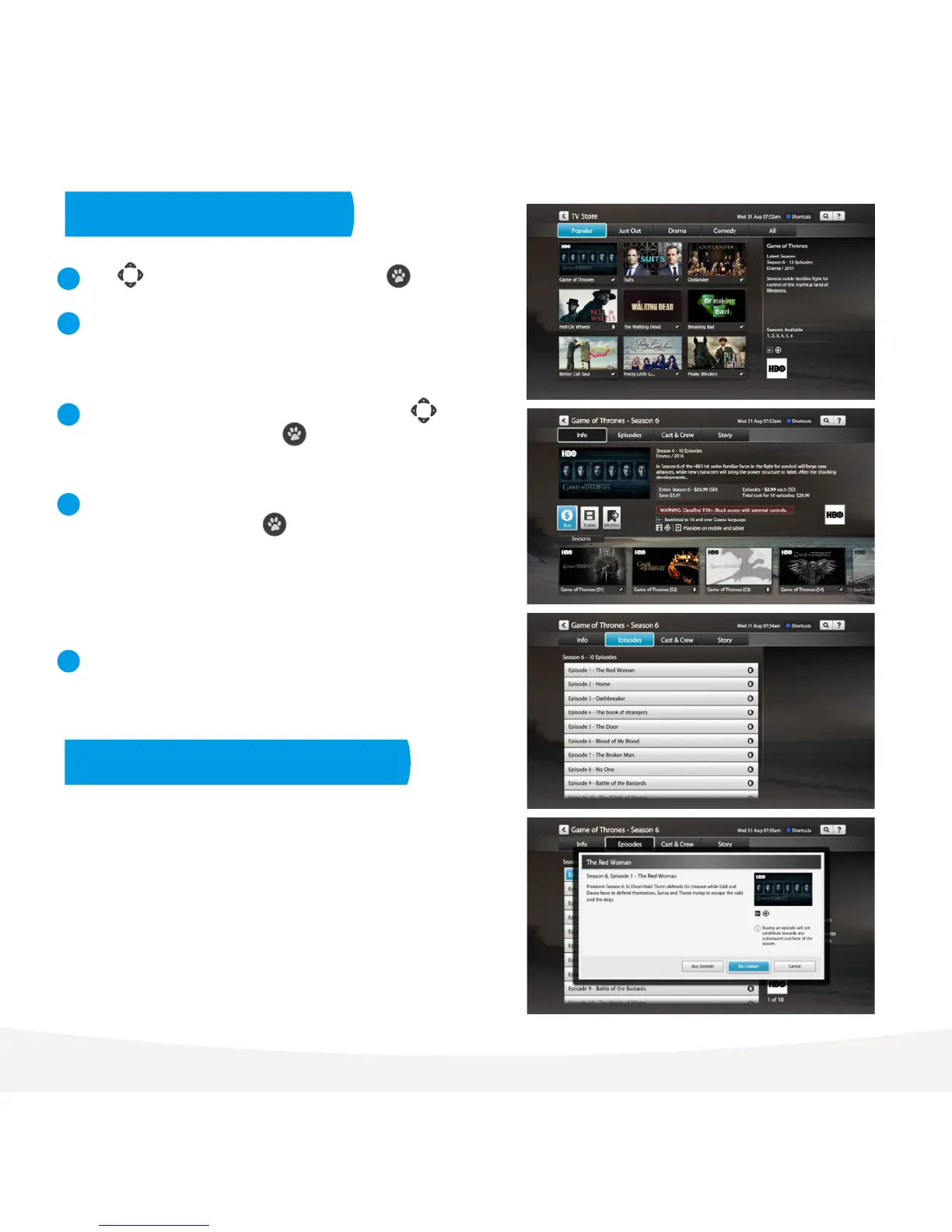
Use to select show from TV Store and press .
TV episodes cost $3.49 for HD and $2.99 for SD. The price will
vary on occasion when specific sales might be on.
Season prices will vary depending on how many episodes are
in the season, but you do save money buying the whole season
rather than the individual episodes.
Episode purchases don’t count towards a Season purchase, so if
you think you want to watch the whole season it’s better to buy
it all at once.
From the Season details screen, you can select to watch
the full screen trailer (if available), buy the season or add
the show to your Wishlist in My Stuff > TV Shows.
To buy an episode rather than the whole season, use
to highlight Episodes and press . Choose the episode
you’d like to purchase.
To buy an episode or season, you’ll be asked to enter
your Parental PIN and press . You can choose to rent
the SD or HD format if available. Once you confirm the
purchase the amount will come off your credit card for
Fetch TV retail customers or will be added to your next
month’s bill for customers with one of our partner ISPs.
If your purchase is successful the first available episode will
download ready to play.
1
2
3
4
5
Buy TV Episodes or Seasons
Cost to buy TV episodes and seasons



 To Next Page