30
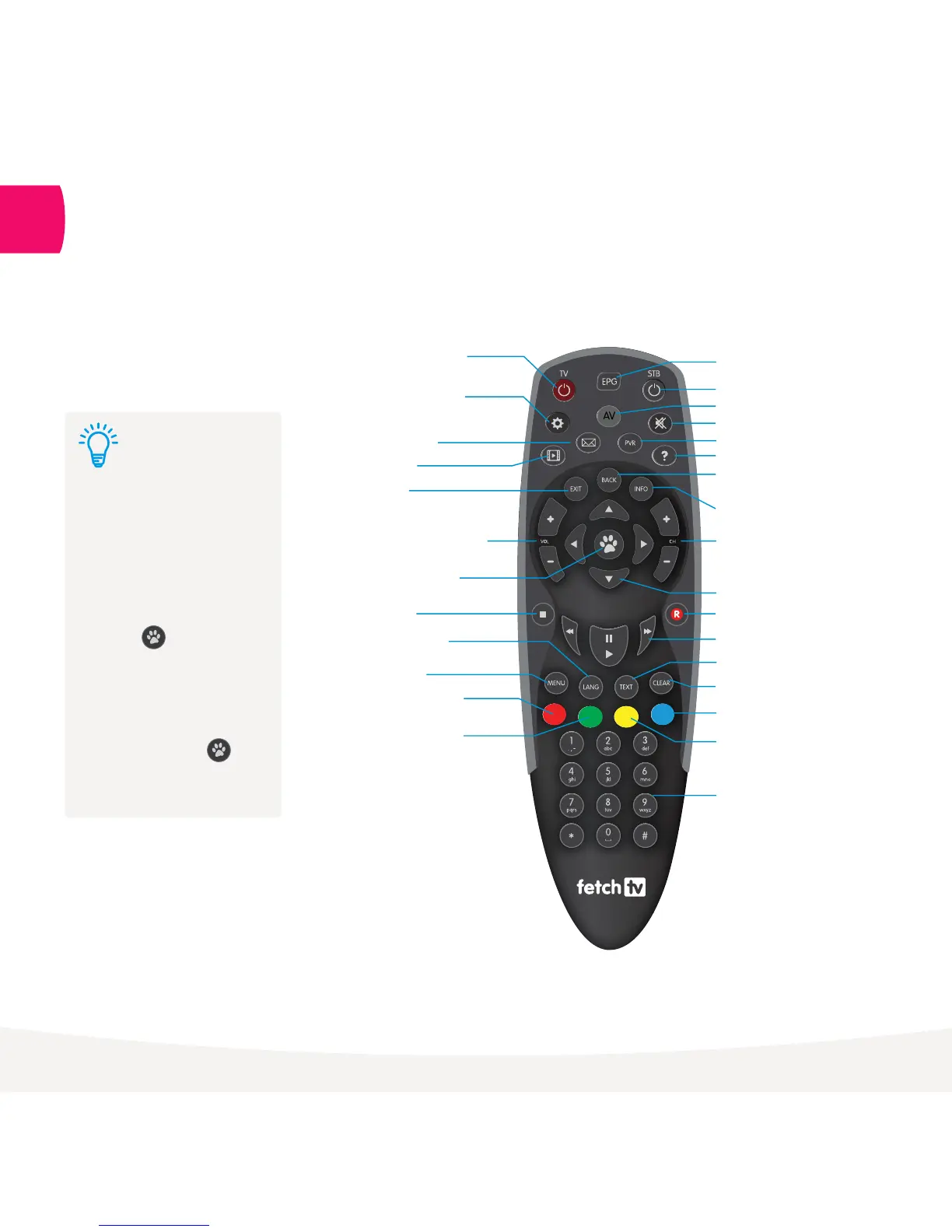
The Remote Control
13
To set up universal remote
see “Fetch TV Remote 2”
user guide.
To set Fetch TV remote to
control the volume on your
TV, press and VOL+
simultaneously and wait for
LED to blink twice.
To set Fetch TV remote to
control the volume on your
Fetch TV Box, press and
VOL- simultaneously and
wait for LED to blink twice.
Tip:
The remote control brings Fetch TV
to life. It has all the functions you
need for quick and easy viewing.
Dedicated TV
Power Key
Simple Set
for TV Set up
Message
Movie
Exit
Exit from screen
Volume Up/Down
Enter/Select
Stop
Language
Choose Audio Language
Menu
Set Reminders
Function Key
Add/Remove channels
to My Channels, Search
Function Key
Electronic Program Guide
Standby
Dedicated TV/AV Key
Mute
Access onscreen help
Personal Video Recorder
Back
Takes you up a level
Channels Up/Down
Directional Arrow Keys
Rwd, Pause/Play, FF
Text Subtitle On/Off
Clear
Switch between My Channels and
All Channels mode
Number Keypad
Record
Information Bar
Function Key
Function Key



 To Next Page