Go to fetco.com for the latest version of all information 6 P141 REV:002 revised 1/2016 ©December 2015
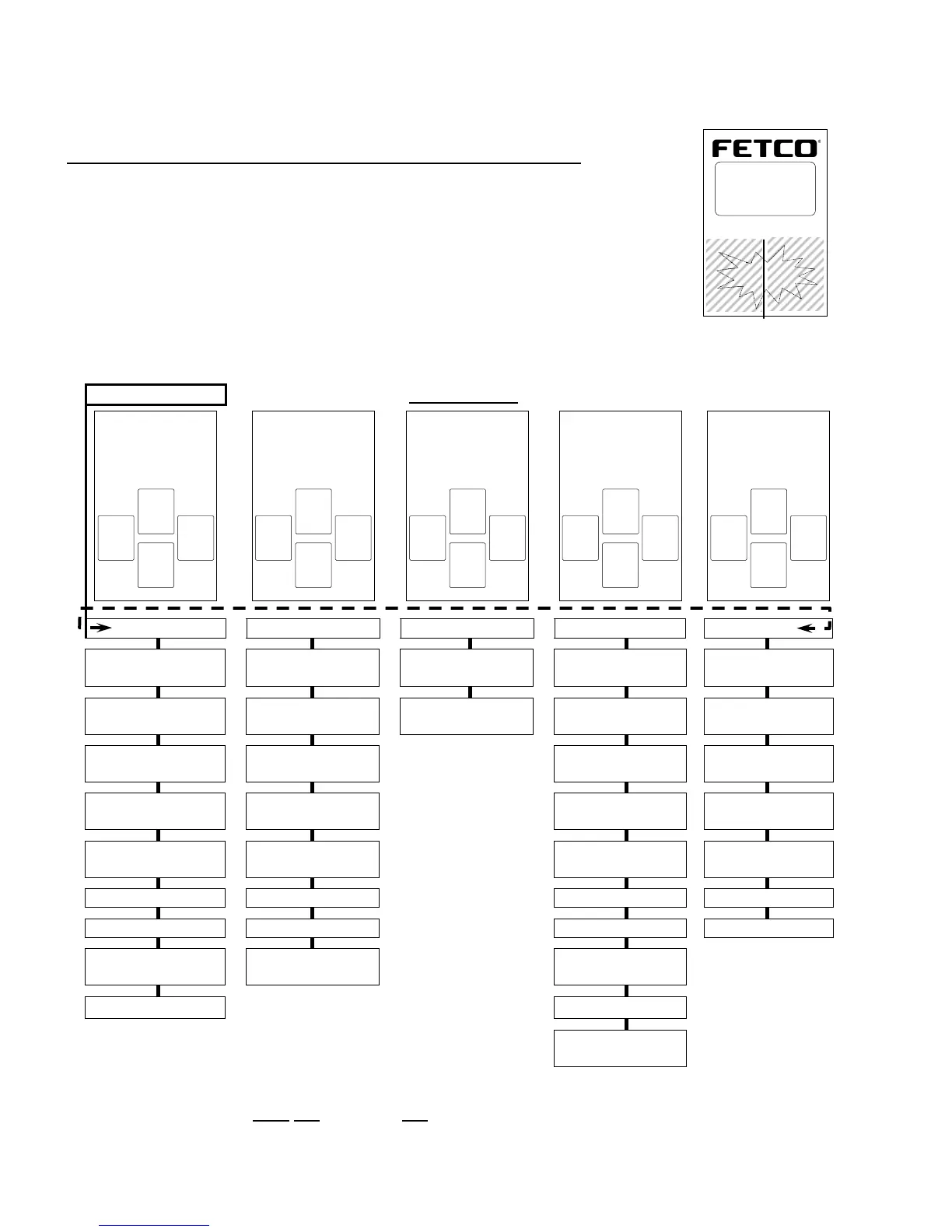
Service Menu: Access and XTS menu tree
Menu adjustment and name selection, control parameter settings, programming, error codes, counters and reset
features are accessed by activating touch screens.
General Service Menu
PROGRAM, GENERAL, INPUTS, OUTPUTS, and OTHER Service Menu.
-Enter Service Menu by accessing the power switch on back of the panel
ÆSwitch power “OFF”with power switch located on rear of brewer
-After at least ten seconds: Turn power switch “ON”
-Quickly touch and hold the XTS screen to enter the programming screens as shownÆ.
-When entering The SERVICE MENU: the first screen is “PROGRAM”
-Use right and left arrow icons to scroll through the five main SERVICE menus.
-The DOWN icon will open the FEATURE icon below.
-Scroll through the Menu Item with the arrows, edit any if needed
-When finished editing press the up arrow to go back through the menu items to save changes and exit
-A Menu Tree is below to show the main categories of the five SERVICE menus
XTS Main Menu
Menu tree-XTS
Å
Æ
Å
Æ
Å
Æ
Å
Æ
PROGRAM
GENERAL
INPUTS
OUTPUTS
OTHER
Batch 1 Right*
(Or) Batch 1 Left*
Tank Temp
Display
Inputs
Show
Summary
Error Codes
Batch 2 Right†
Or Batch 2 Left†
Brew at Temp
Calib Touch
Screen
Left Valve
Copy Program
Batch 3 Right†
Or Batch 3 Left†
Units of
Measure.
L.Bypass Valve
Upload LOGO
Batch 4 Right†
Or Batch 4 Left†
ECO Mode
Right Valve
Reset to
Factory
Batch 1 Right*
(Dual side brewer)
LOGO
Timeout
R.Bypass Valve
Counters
Batch 2 Right†
Brew B. Sensor
Fill Valve
Firmware
Batch 3 Right†
Use Flojet®
L.B.Basket Lock
DEMO Mode
Batch 4 Right†
LLC Sensitivity
R.B.Basket
Lock
Batch Copy
Heater
Screen
*Single side brewer only shows the four RIGHT menus—dual brewers show LEFT and then RIGHT
Batch 1—Right and Left are permanent-may not be deleted and are completely programmable
†Batch 2-4—Right
and Batch2-4—Left may be individually selected-or-entirely deleted
X
X
T
T
S
S
™
™
E
E
X
X
T
T
R
R
A
A
C
C
T
T
O
O
R
R
T
T
O
O
U
U
C
C
H
H
S
S
C
C
R
R
E
E
E
E
N
N
CBS_2100XTS
■ Ready
Heating
Filling
Touch
screen
to unlock
<PROGRAM>
<Batch 1 Left>
«
▼
EXIT
»
<GENERAL>
<Tank Temp>
«
▼
EXIT
»
< INPUTS >
<Display Inputs>
«
▼
EXIT
»
< OUTPUTS >
<Show Summary>
«
▼
EXIT
»
< OTHER >
<Error Codes>
«
▼
EXIT
»


 To Next Page