7
2. Bluetooth
M11 supports virtually all Bluetooth formats including the high-resoulution
ones for your ultimate listening pleasure, including: 24bit aptX-HD (also
backwards compatible with aptX), LDAC and HWA. M11 can also be a Bluetooth
transmitter or a Bluetooth receiver.
Using M11 as a Bluetooth transmitter
To use the M11 with new Bluetooth devices (e.g. Bluetooth earphones, speakers,
remote controls), the M11 must first be paired with the device as follows:
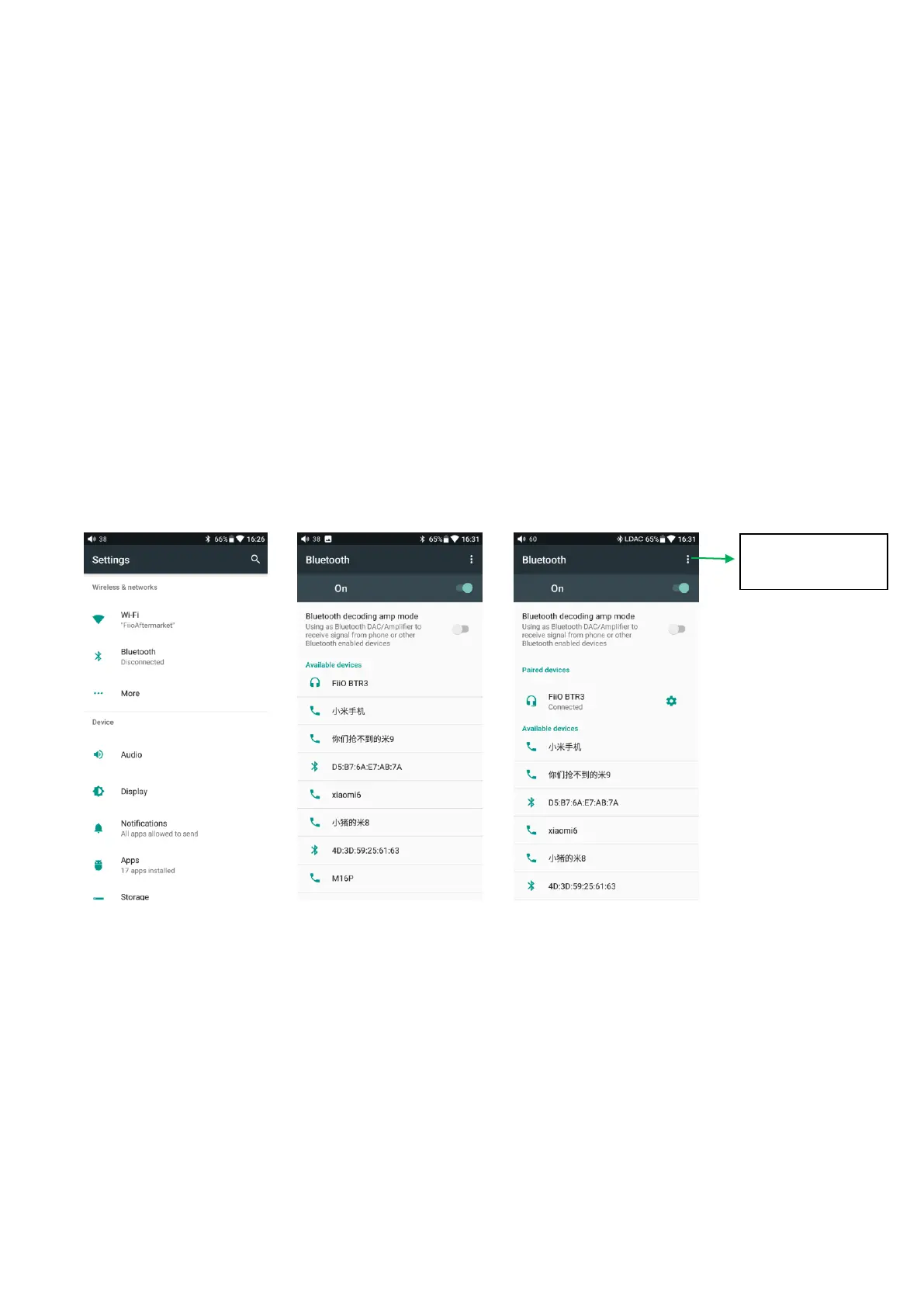
1) Tap the Bluetooth in setting as shown in the picture below;
2) If Bluetooth on the M11 is off, turn it on by flicking the switch on the upper right to
the “ON” position on the right;
3) Tap “SEARCH FOR DEVICES” at the bottom of the screen to have the M11
search for and display nearby Bluetooth devices;
4) Tap the name of your Bluetooth device to pair with it. Successfully paired devices
will appear under the “PAIRED DEVICES” list:
Before you connecting to Bluetooth, you can select the Bluetooth audio code which
you want to use as follows:
1) Enter the Settings-Audio settings interface
2) Click on the Wireless Play, select the one you want to use, then disconnect the
current connection and connect with your Bluetooth device again.
Refresh to search
Bluetooth



 To Next Page