16 17
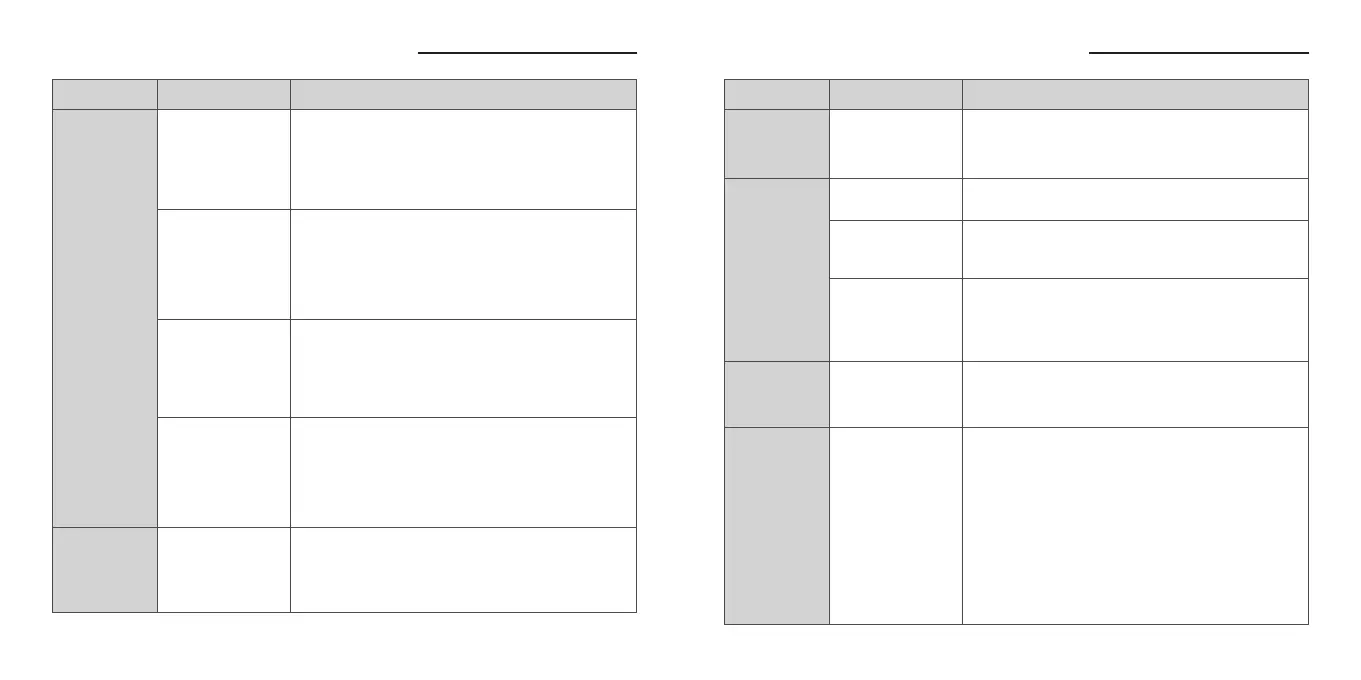
Troubleshooting: When You Think, “Is It Broken?”
Troubleshooting: When You Think, “Is It Broken?”
Metal contacts on
earbud are not
touching the pins
on the charging case
Earbuds
cannot be
charged
Problem
Charging case
battery level is low
(LED indicator does
not light up while
opening or closing
the case)
Normally, if the earbuds are returned to an adequately
charged case, the earbuds will automatically turn OFF and
start being charged. If the charging does not start, the
battery power level of the charging case might be too low.
Please try again after charging the charging case. Please
refer to “Power / Charging” on P.3 regarding the method for
charging.
The lid of the charging
case is not properly
closed
Normally, if the earbuds are returned to an adequately
charged case, the earbuds will automatically turn OFF and
start charging. If the lid of the charging case is closed and
re-opened, the earbuds will turn ON and keep consuming
power and lead to longer charging time. Please make sure
the lid is properly closed while charging.
Please ensure that the metal contacts are touching the
pins on the charging case. In addition, if the golden
terminal on the earbud or the charging case is dirty with
sebum, etc., it may not be able to be charged. Dirt is
hardly visible to the naked eye, so please wipe it off gently
with a dry cotton swab.
The touch control
panel has become
soiled or wet
In case the touch control panel has become soiled or wet,
the touch control panel may not function properly, and it
may not be possible to operate the earbuds. Please wipe
the touch control panel section with a soft, dry cloth to
remove stains or moisture.
Using ear tips other
than an accessory
Normally, if the earbuds are returned to an adequately
charged case, the earbuds will automatically turn OFF and
start being charged. However, if ear tips other than provided
are used, there are cases in which they may interfere with the
charging case and cause the earbuds could not be charged.
Please check to see whether the earbuds start charging (LED
lights up in Red) by using original ear tips.
Touch control
is not
functioning
Problem RemedyCause
Connected to
a previously
connected device
Earbuds are not
in the pairing mode
Earbuds
cannot be
detected /
paired
While playing
music, sound
(connection) is
interrupted
Please try performing the pairing operation again after having
deleted the pairing information from the previously paired device.
Unstable connection
caused by interference
from external factor
Bluetooth and Ultra Low Latency communicates using the
2.4GHz band. This band is used by other wireless standards
such as Wi-Fi, etc., and so there is a possibility of receiving
interference. Moreover, this 2.4GHz band does not penetrate
liquids. There is impact from humidity and rain, and the
human body also contains liquid, so there are individual
differences in connectivity. Furthermore,it depends on the
specifications of smartphones and other devices. For that
reason, switching OFF unused Wi-Fi / Bluetooth settings on
surrounding devices, etc. is a countermeasure. While
outside, there is a possibility that moving a smartphone from
inside a bag to a breast pocket, etc. or otherwise reducing
the distance between devices may improve the connection
status.
In some cases, performing a reset operation may fix the
problem. Please refer to “Factory Reset” on P.10.
The output of the USB
adapter being used
for charging is low
In case it takes
time to charge
When using a USB port on a PC or similar device, the output
may be low, resulting in longer charging times than the rated
value. Therefore, when charging this product, please use a
USB charger capable of supplying 0.5A (500mA) or more.
Noise cancelling
is not effective
enough
Inappropriate
ear tips size
If the the size of ear tips are not proper, noise cancellation will
not adequately work. Please try various sizes other than the
standard M size and use the most appropriate size. For more
information, please check "Ear Tips" on P.12.
Problem RemedyCause
Ultra low latency
USB-C transceiver is
connected
When ultra low latency USB-C transceiver is connected to s
device, the earbuds will prioritize ultra low latency wireless
connection. If you would like to switch to Bluetooth connection,
please remove the ultra low latency USB-C transceiver from the
device.


 To Next Page
 Loading...