choose "Light Sensor Mode", the image will be turned to black and white at
night in order to keep clear. To set light sensor mode, appoint a lux stantard
of switching D/N here. Current lux value is provided for reference. Under
"Times Mode" according to given time. You can also control it by choosing
"Color" or "B/W" .
h. DNR: Adjust this option to reduce the noise.
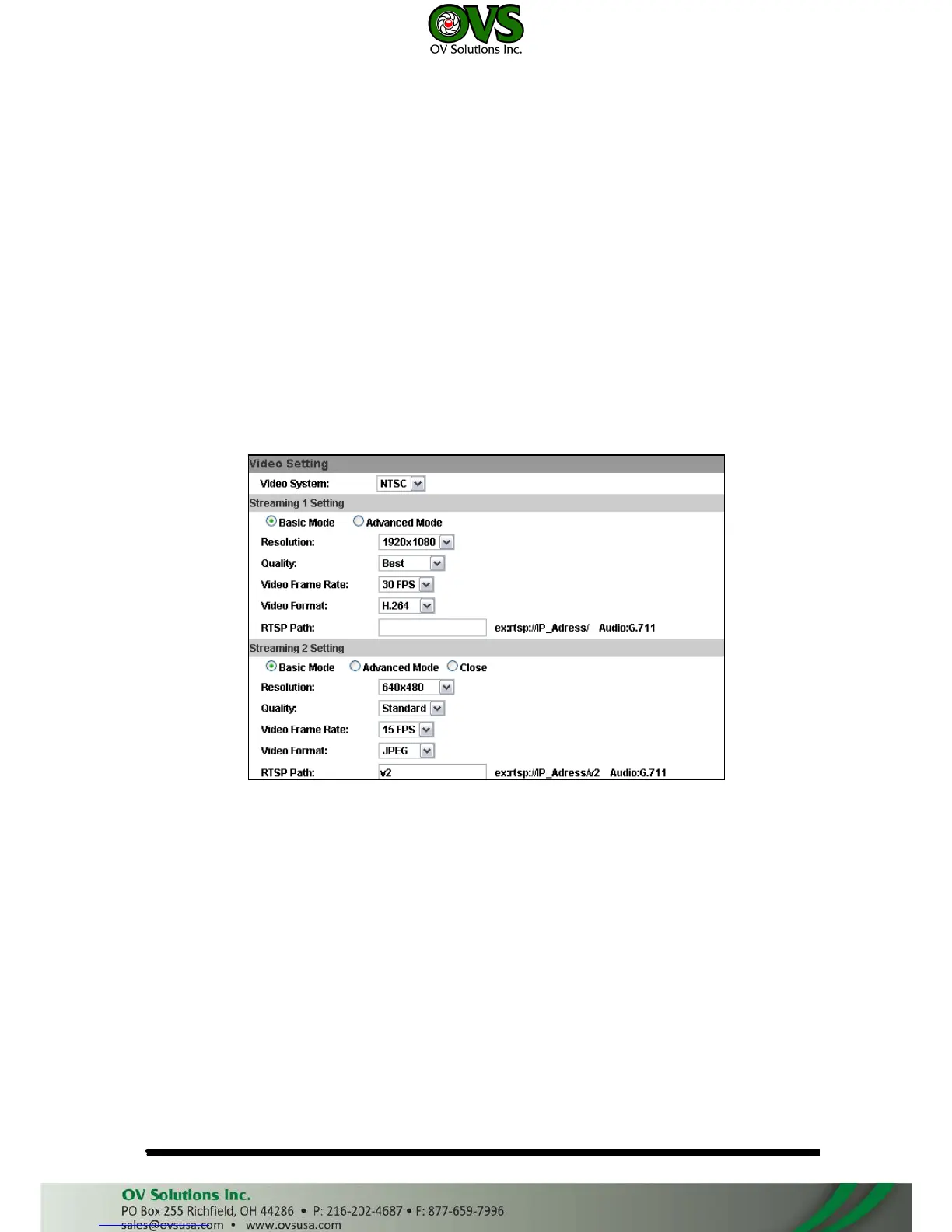
2. Video Setting
User may select 2 streaming output simultaneously:
Streaming 1 Setting: Basic mode and Advanced mode
Streaming 2 Setting: Basic mode, Advanced mode, and 3GPP mode
a. Basic Mode of Streaming 1 and Streaming 2:
(i)
(ii)
Resolution:
There are 5 resolutions can be chosen:
1920x1080, 1280x720, ,640x480, 320x240, 176x144
Quality:
There are 5 levels to choose:
Best/ High/ Standard/ Medium/ Low
The higher the quality is, the bigger the file size is. It might affect
Internet transmitting speed if the file gets too large.
(iii) Video Frame Rate: The video refreshing rate per second. In Streaming
1 you can choose up to 30 FPS, while in Streaming 2 only up to 15
FPS.
(iv) Video Format: H.264, MPEG4, or M-JPEG
(v) RTSP Path: Set the RTSP output connecting route



 To Next Page