39
CONTENTS
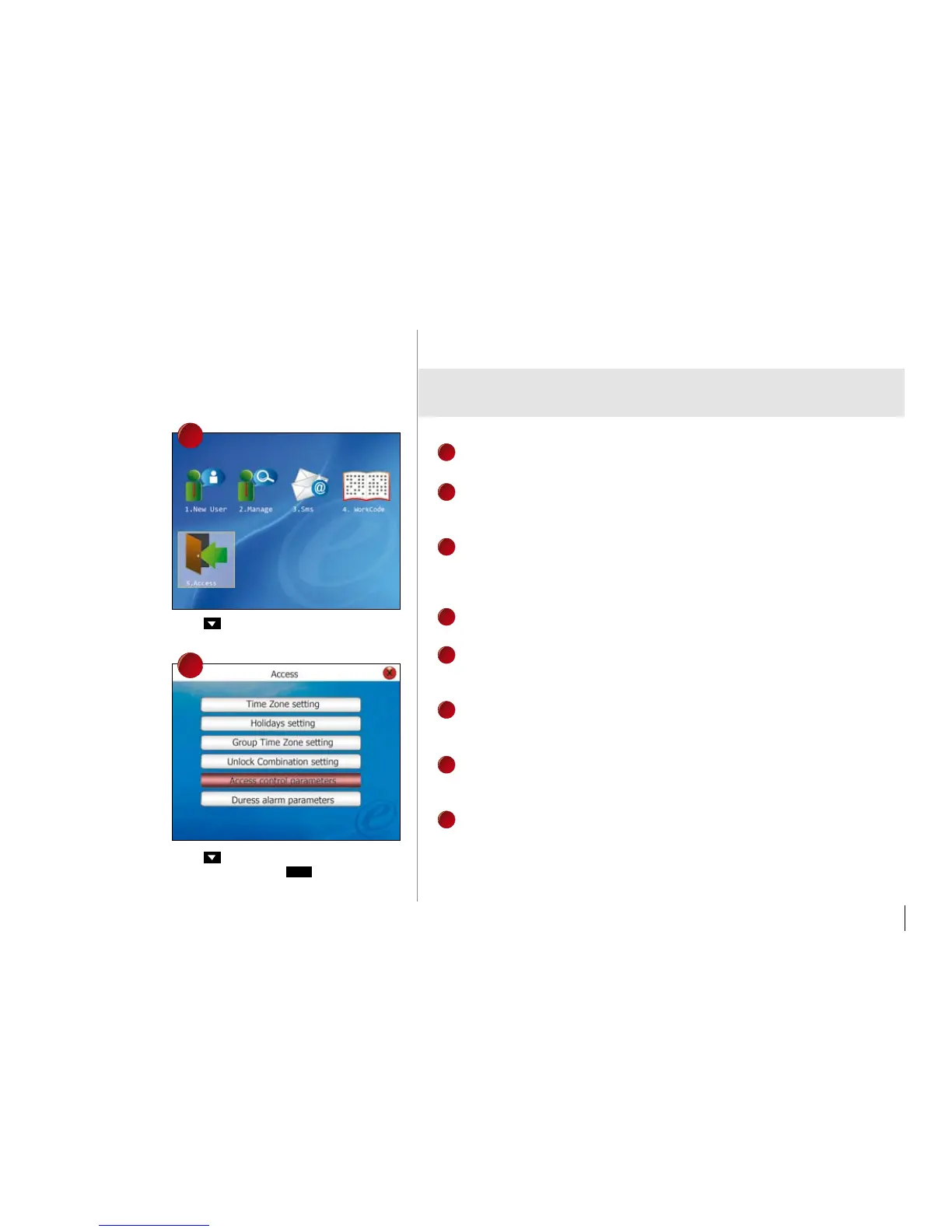
Press once choose for Access.
Press 4 times to choose Access Control
Parameters and press
Ok
.
Options available and their functions
1
LOCk (1-10S)
To adjust the unlocking time after verification.
2
To delay door sensor from triggering alarm system when door is not closing. This
function only works when a door sensor is attached to the reader.
3
DSEN mODE
To choose the type of door sensor attached to the reader. There are NO (nor-
mally opened) and NC (normally closed) available. Choose NONE if no door
sensor is attached.
4
aLaRm DELay (1-99S)
To delay the reader from triggering alarm system.
5
aLaRm COUNT (1-9 TImES)
To adjust the maximum verification failures of users. When the maximum is
reached, reader will trigger alarm system.
6
CLOSE Tz
Door is always locked during the predefined time period, so users cannot gain
access after verification.
7
OpEN Tz
Door is always unlocked during the predefined time period, so users do not need
to verify their identities but can gain access.
8
vaLID HOLIDayS
Choose Valid to enable the holiday settings. Choose Invalid to disable the holi-
day settings
.
3
4



 To Next Page