- 13 -
• Functions of the menu system are described in the
following sections.
Volume Setting
• Press V+ button to increase the volume. Press V-
button to decrease the volume. A volume level scale
(slider) will be displayed on the screen.
Programme Selection (Previous or Next
Programme)
• Press P- button to select the previous programme.
• Press P+ button to select the next programme.
Programme Selection (Direct Access)
• Press the numeric buttons on the remote control to
select programmes between 0 and 9. The TV will
switch to the selected programme.
First Time Installation
IMPORTANT: Ensure that the aerial is connected
and a Common Interface module is not inserted
before switching on the TV for the first time
installation.
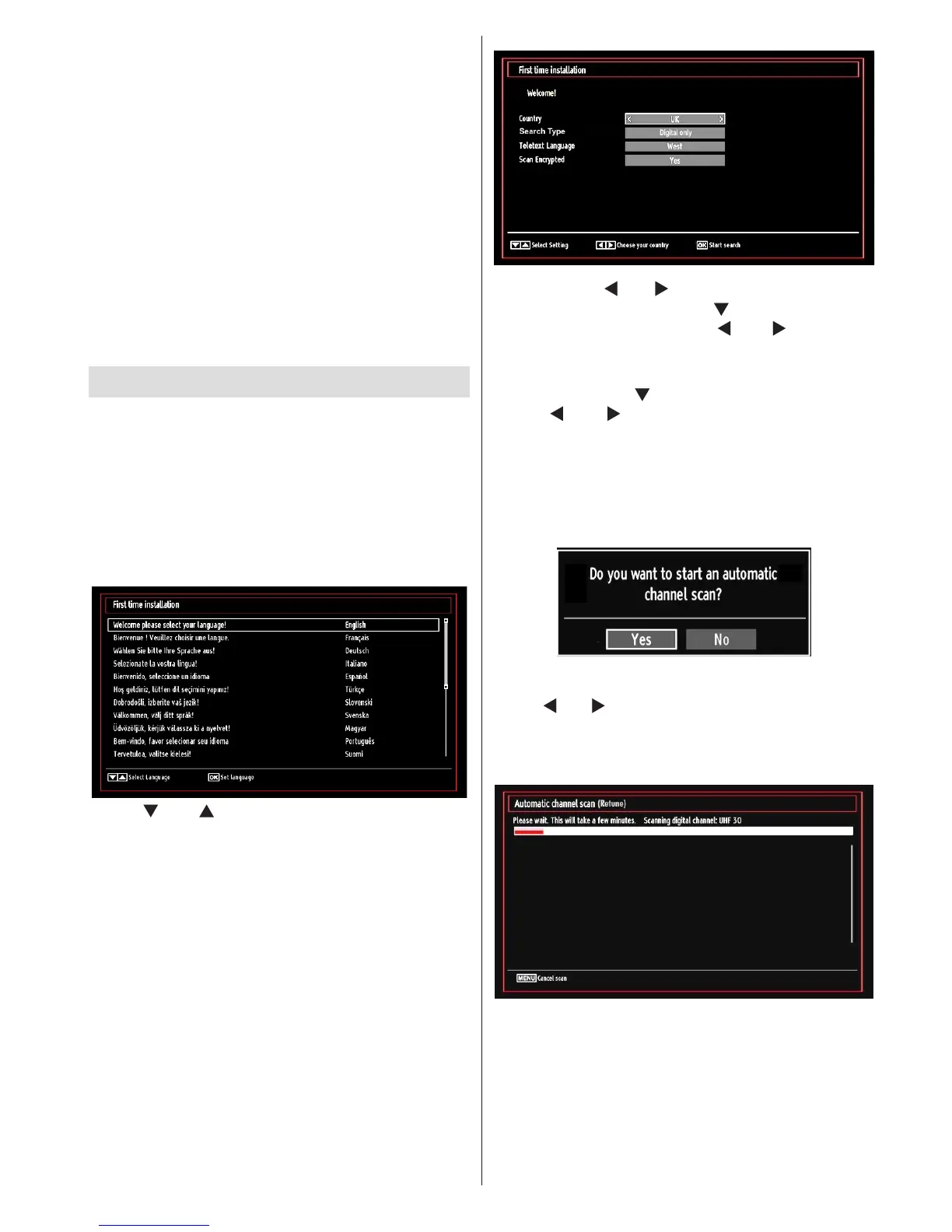
• When the TV is operated for the rst time, the
installation wizard will guide you through the
process. First, the language selection screen will
be displayed:
• Use “ ” or “ ” buttons to select your language
and press OK button to set the selected language
and continue.
• After selecting the language, “Welcome!” screen will
be displayed, requiring you to set Country, Search
Type, Teletext Language and Scan Encrypted
options.
• By pressing “ ” or “ ” button, select the country
you want to set and press “ ” button to highlight
Search Type option. Use “ ” or “ ” to set the
desired search type. Available search types are
digital only, analog TV only and full.
• When set, press “ ” to select Teletext Language.
Use “ ” or “ ” to select the desired Teletext
Language.
•
• Press OK button on the remote control to continue
and the following message will be displayed on the
screen:
To select the “Yes” or “No” option, highlight the item by
using “ ” or “ ” buttons and press OK button.
Afterwards the following OSD will be displayed on
the screen and the TV will search for both digital and
analogue TV broadcasts.
Note: You can press “MENU” button to cancel.
End of the search process, “Choose Region” osd will
be displayed on the screen (if any multiple region
variants are detected).Please select country and
region choice then press OK to continue.











 To Next Page