- 16 -
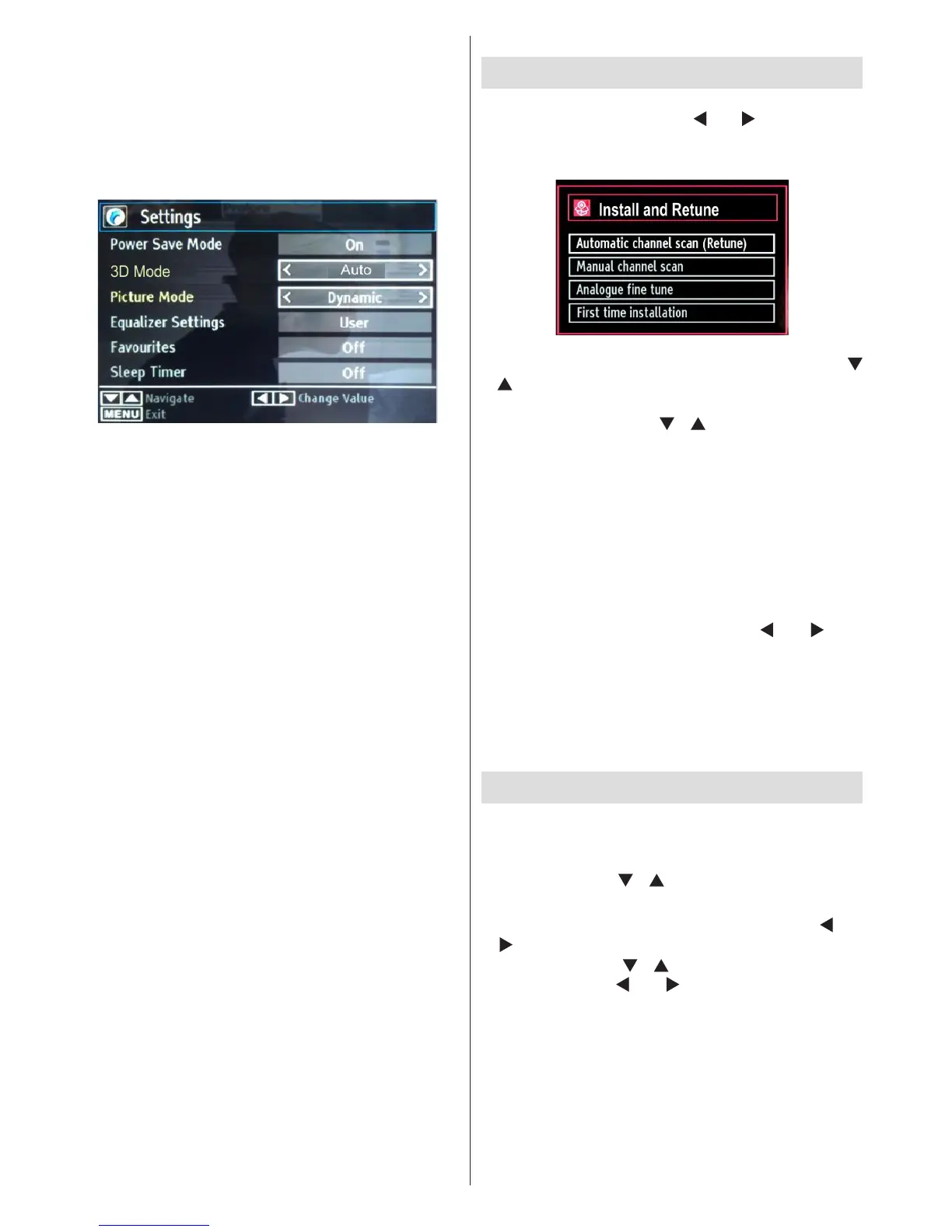
Quick Menu
Quick Settings menu allows you to access some
options quickly. This menu includes Power Save
Mode, 3D Mode, Picture Mode, Equalizer Settings,
Favourites and Sleep Timer options. Press Q.MENU
button on the remote control to view quick menu.
See the following chapters for the details of the listed
features.
Installation
Press MENU button on the remote control and
select Installation by using “ ” or “ ” button. Press
OK button and the following menu screen will be
displayed.
Select Automatic Channel Scan (Retune) by using “
”/“ ” button and press OK button. Automatic Channel
Scan (Retune) options will be displayed. You can
select options by using “ ”/“ ” and OK buttons.
Auto Channel Scan (Retune) Menu
Operation
Analogue: Searches and stores analogue stations.
Digital & Analogue: Searches and stores both
analogue and aerial DVB stations.
• Whenever you select an automatic search type and
press OK button, a conrmation screen will appear
on the screen. To start installation process, select
Yes, to cancel select No by using .“ ” or “ ” and
OK button.
• After the auto channel scan type is set and selected
and conrmed, the installation process will start and
the progress bar will move along. Press “MENU”
button to cancel process. Located channels are not
stored if the process is cancelled.
Manual Tuning
HINT: This feature can be used for direct broadcast
entry.
• Select Manual Channel Scan from the Installation
menu by using “ ”/“ ” and OK buttons. Manual
Scan options screen will be displayed.
• Select the desired Search Type using “ ” or
“ ” button. Manual search options will change
accordingly. Use “ ”/“ ” button to highlight an item
and then press “ ” or “ ” button to set an option.
You can press “MENU” button to cancel.




 To Next Page