No. 2015-0007
Date Released: December 2, 2015
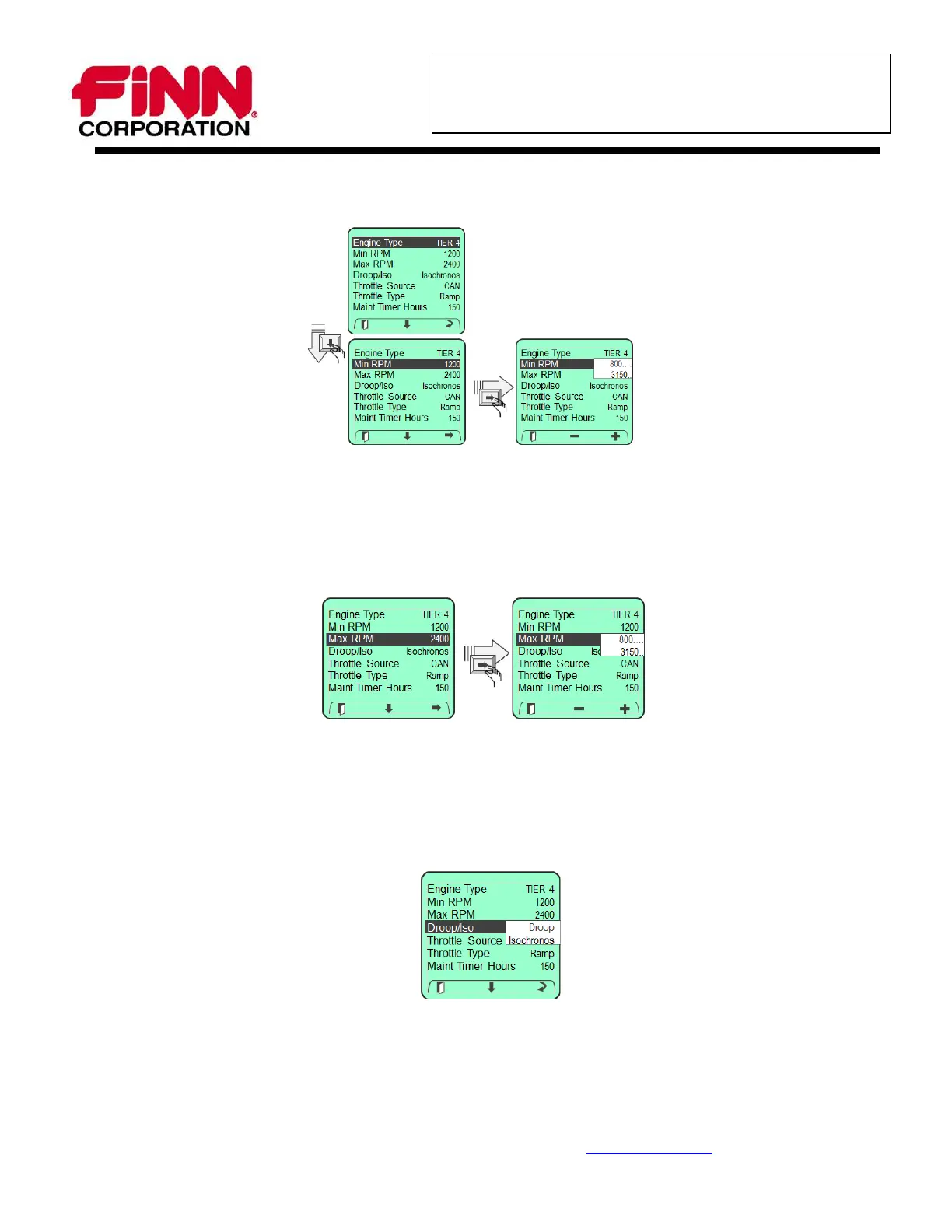
7. Scroll down with the down arrow key to “Min RPM” and press the right arrow to enter.
8. Using the “-“ or “+” Soft Keys, adjust the setting to 1000 rpm.
9. Press the left “Exit” Soft Key to return to the Engine Settings Menu.
10. Scroll down with the down arrow key to “Max RPM” and press the right arrow to enter.
11. Using the “-“ or “+” Soft Keys, adjust the setting to 2800 rpm.
12. Press the left “Exit” Soft Key to return to the Engine Settings Menu.
13. Scroll down with the down arrow key to “Droop/Iso” and press the right arrow to enter.
14. Using the right “Change” Soft Key, cycle the setting to Isochronos.
15. Press the left “Exit” Soft Key to return to the Engine Settings Menu.
9281 LeSaint Drive Fairfield, Ohio 45014-5457 U.S.A.
(513) 874-2818 800-543-7166 Fax (513) 874-2914 www.finncorp.com
Page 5 of 6




 To Next Page