Product Description
MS-9050UD Series PN 52413:D 12/15/08 35
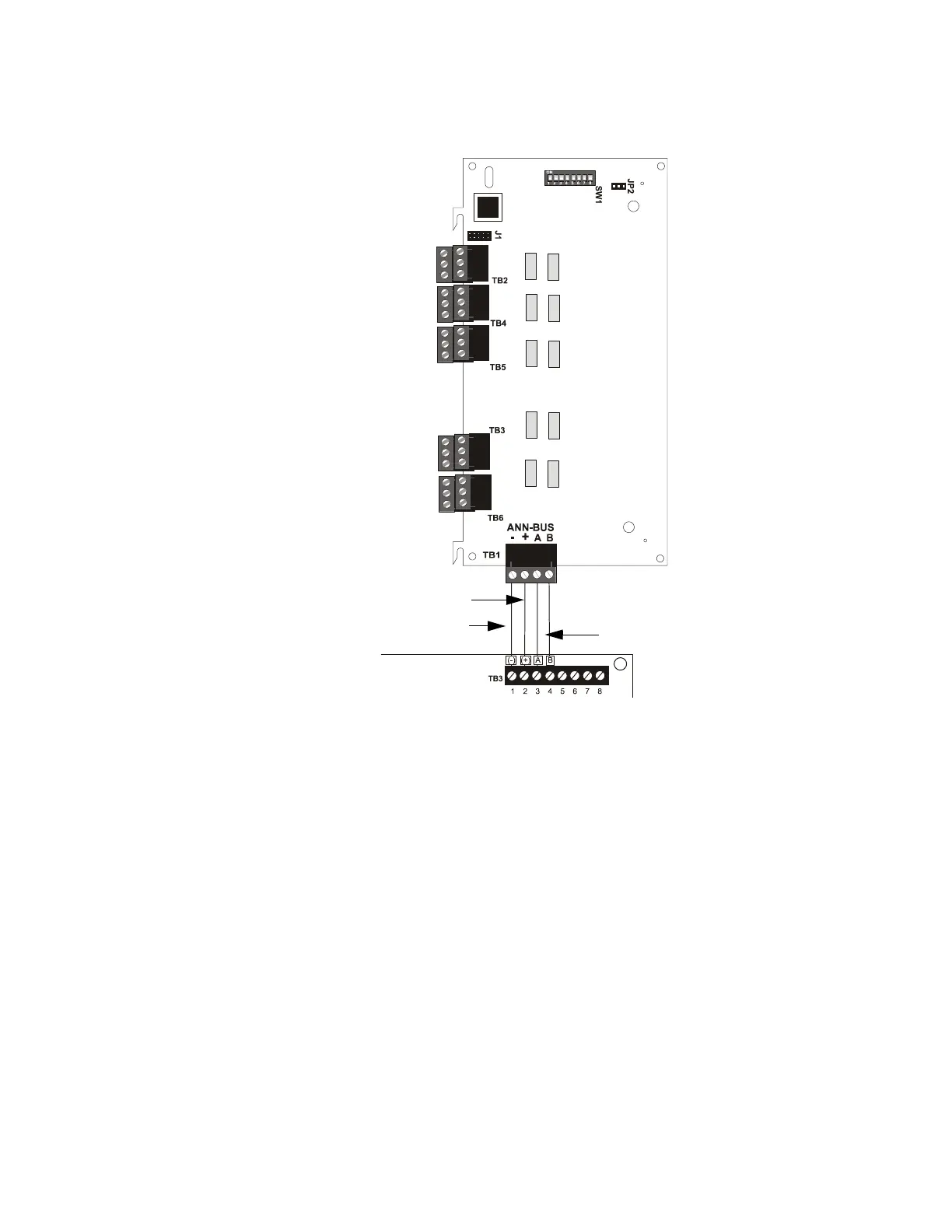
1.9.7.4 ANN-RLY Connection to FACP
Figure 1.7 illustrates the ANN-RLY board showing locations of screw terminals for connection
to the FACP and the DIP switches for selecting the ANN-BUS ID number.
1.10 Getting Started
The following is a brief summary of the minimal steps involved in bringing an
MS-9050UD on-line:
• Install Backbox and Main Circuit Board (refer to "Mounting Backbox" on page 39)
• Address and Install Intelligent Devices (refer to the SLC Wiring Manual)
• Enter Autoprogramming (refer to "Autoprogram" on page 56)
• Resolve Programming Conflicts
• Go to Point Program to Enter Specific Data (refer to "Point Program" on page 57). Use the
right and left arrow keys to navigate between devices.
Figure 1.7 ANN-RLY Connection to FACP
FACP
ANN-RLY
ANN-BUS
+24 VDC
-24 VDC
ANN-BUS and power wiring are
supervised and power-limited














 To Next Page